
fbaolhbfbmniffcokakochjjeccpcpkh
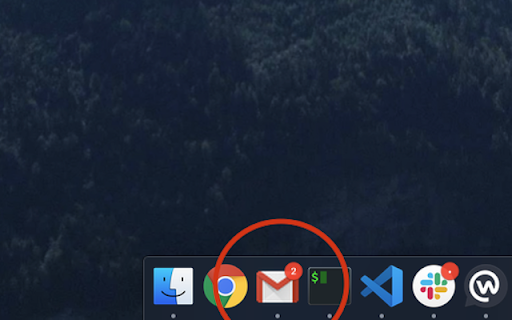
Show badge notifications in the taskbar when using Gmail as an app 1. Install the extension 2. Add Gmail as an app. You can do so by following this guide: https://support.google.com/chrome_webstore/answer/3060053?hl=en - make sure to select the option "open as a window". 3. Open the newly installed app.

Badge Notifications for Gmail PWA
Show badge notifications in the dock/shelf when using Gmail as an app (PWA). PWA badge notifications are supported on Windows, macOS and ChromeOS:

Multi-Email/App Taskbar/Dock PWA Unread Badge
Disclaimer: The developer of this extension in no way claims to be affiliated with Google**/Gmail**/Microsoft**/Outlook**. I acknowledge that I do not own their respective trademarks. This extension was developed for personal use and shared for others to use, if they wish to. This extension adds an unread count badge to the taskbar/dock icon of a PWA* Gmail**/Outlook** app. The app supports multiple Gmail**/Outlook** PWA accounts. Multiple account badges only work when each PWA is installed using a unique Google** Chrome browser profile that is setup with the unique Google** Account that you wish to access Gmail**/Outlook** emails with. Please note: this extension does not work, as intended/expected, with multiple Gmail**/Outlook** accounts within the same Google** Chrome browser profile, if each PWA is installed using the same Chrome Profile, it will show the unread count of each account on the same PWA taskbar icon by cycling through each account dependant on when you opened the PWA account on your device. So, please ensure you install multiple instances in separate Chrome Profiles. (Windows) How to install a PWA in Google** Chrome: 1. Navigate to the Gmail**/Outlook** URL, i.e. go to your Gmail**/Outlook** Inbox. 2. Click on the Google** Chrome browser settings button, ⋮ . 3. Click on menu option, "More tools". 4. Click on sub-menu option, "Create shortcut..." 5. Name the shortcut, e.g. GMail**/Outlook**. 6. (NB!) Ensure that you check/tick the checkbox labelled, "Open as window". 7. Once the new GMail**/Outlook** window opens, remember to pin the PWA to your taskbar to ensure that the extension adds the unread count to the pinned icon on the taskbar. 8. In Windows** 10 and 11, ensure that the Taskbar setting, "Show badges on taskbar buttons", is toggled on (i.e. enabled) to allow the unread count badge to be shown on the Windows** Taskbar. Once you have successfully made use of the extension, could you please rate it, and if you have any feedback, it will be appreciated too. This will give me an indication on whether or not I should enhance this extension further. I hope that this small extension helps you in some way, enjoy. *PWA, Progressive Web Application. **The trademarks mentioned are owned by their respective owners and Ocfinity and/or this extension are not affiliated with these companies. Updates: 2025-03-01 (0.2.6.6) - Added URL match for *://outlook.cloud.microsoft/*. Enable or disable the URL match** supported list using the extension details Site Access list. The new URL has not been tested - added on request only. 2023-01-24 (0.2.6.5) - Added support for Slack** PWA. Enable or disable the Slack** support using the extension options. 2022-12-30 (0.2.4) - Merged the extensions that were created for Gmail** and Outlook** into a single extension with the ability to enable or disabled each through the extension's options. Please ensure that the apps are enabled in the options if you are experiencing issues with this extension displaying the unread counts on the taskbar/dock respective icons. Bug Fixes: 2023-01-24 (0.2.6.5) - Addressed issue with saving extension options. 2023-01-09 (0.2.5) - Fixed the storage of the extension options settings that prevented the unread count remaining after a single count update was done.

Gmail Notifications
Gmail Notifications: Simple notifier for gmail. Check gmail inbox and get instant alerts in any tab—no switching. 🌟 Stay on top of your inbox like a pro with Gmail Notifications – the easiest and fastest way to keep track of your messages without leaving your current tab. No more endless switching or wondering how do I check my email – now you can check my email instantly, right from your browser. 📬 With our smart notifier for gmail, you’ll always know when something important lands in your inbox. View the last 10 unread messages directly in your toolbar, see who sent them, read the subject lines, and open them in Gmail with one click. This badge checker for gmail makes your workflow smoother than ever. 🔔 Get real-time gmail desktop notifications that keep you informed no matter what you’re doing. Whether you’re working, gaming, studying, or relaxing, you’ll get a clear notification gmail the moment a message arrives. No more searching how to get notifications from gmail – our extension does it for you. 1️⃣ Live unread counter in your browser toolbar 2️⃣ Instant preview of the last 10 unread emails 3️⃣ Quick one-click access to your Gmail inbox 4️⃣ Customizable gmail notification sound for each alert 5️⃣ Minimalist, clutter-free design for full focus ⏳ Need to concentrate? Activate Do Not Disturb mode to temporarily pause notifications from gmail. When you’re ready, switch it back on and your gmail notif will flow in without missing a beat. 📢 If you regularly check my gmail or quickly check gmail inbox while working, this tool will save you time and keep you productive. Email notifications appear instantly so you can decide whether to act now or later. 🔊 Turn on gmail email sound notification to make sure you hear every new message. Our clean, professional email notification sounds mean your notification of gmail stands out without being distracting. ⚙️ Customize notifications for maximum productivity: ➤Turn notification sounds on or off ➤Turn on visual notification animation ➤Set up do not disturb mode ➤ Fine-tune notification email settings for any workflow 📥 Setup is instant: install and turn on gmail desktop notifications immediately. Your notif gmail will run quietly in the background, always ready. 💡 Key reasons to use Our Extension daily: • Reliable email notifications in real time • Instant message previews through the gmail notifier icon • Control over how you see notifications gmail • Fast access to Gmail from anywhere in Chrome • Adjustable notifications on gmail for any schedule 1. Saves time – no repetitive inbox checking 2. Keeps you focused – notifications on gmail are subtle yet effective 3. Boosts efficiency – quick notification email access means faster replies 💬 Whether you manage clients, handle urgent projects, or just keep in touch with friends, you can rely on notification gmail to keep your communication flowing. 🎯 You’ll never miss a critical update again. The unread email notification icon updates live, showing exactly how many messages are waiting. One click takes you straight to Gmail so you can act immediately. 🚀 This extension is more than a gmail notification tool – it’s your personal assistant for email management. From work emergencies to personal invites, you’ll always know when something arrives. 📈 At a glance, you get: • gmail notif for each new email • Both visual and sound email notifications • A quick Do Not Disturb toggle for quiet time • Instant visual notification of gmail without delay • Clear gmail email sound notification for important messages 🌐 Ideal for anyone who often wonders how to check my email or needs a quick way to check my gmail during the day. Whether you prefer visual alerts, sound alerts, or both, you can adapt it to your style. 📂 Business users benefit from faster response times, while casual users enjoy effortless check gmail inbox access without cluttering their screen. The combination of email notification sounds and desktop alerts makes communication seamless. ⚡ Even in a busy workspace, you can keep notifications from gmail under control. Just enable Do Not Disturb during meetings or deep work sessions, and bring alerts back instantly when you’re ready. 🛠 With our extension, you have total control: • Adjust notifications gmail frequency • Decide how your notification email appears • Enable or disable unread email notification icon visibility • Configure email notification to match your schedule 💼 Start today and see how much easier email can be. Install Gmail Notifications, turn on desktop notifications gmail, set your preferences, and enjoy a smarter, faster, cleaner way to manage your messages. Your gmail notifier will become an essential part of your workflow.

Gmail Checker - Multi Account Gmail Notifier
Get notifications for multiple Gmail accounts, and read or delete email without opening Gmail This extension provides quick access to your email inbox, saving time on opening messages or switching profiles. Receive instant alerts with a notification sound for new emails, ensuring you never miss important correspondence. It supports reminders for all connected accounts, seamless profile switching, and viewing emails across profiles. Manage messages effortlessly—read, mark as read, delete, archive, or move to trash—without visiting the website. Features: ➢ Effortless account support and profile switching. ➢ Immediate alerts with sound for new emails. ➢ Background notifications even when the browser is closed. ➢ Full email management directly from the extension. Tips: No manual setup—automatically syncs with accounts logged into your email service on the web. Developed by independent creators and not affiliated with the official service provider.
