
hangbmidafgeohijjheoocjjpdbpaaeh

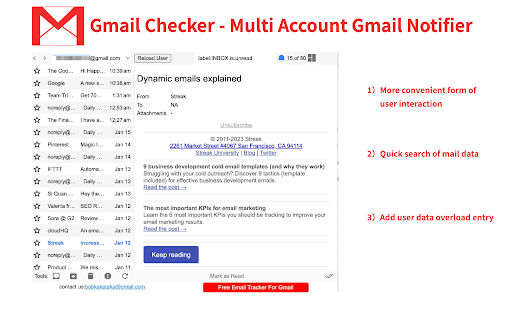
Get notifications for multiple Gmail accounts, and read or delete email without opening Gmail This extension provides quick access to your email inbox, saving time on opening messages or switching profiles. Receive instant alerts with a notification sound for new emails, ensuring you never miss important correspondence. It supports reminders for all connected accounts, seamless profile switching, and viewing emails across profiles. Manage messages effortlessly—read, mark as read, delete, archive, or move to trash—without visiting the website. Features: ➢ Effortless account support and profile switching. ➢ Immediate alerts with sound for new emails. ➢ Background notifications even when the browser is closed. ➢ Full email management directly from the extension. Tips: No manual setup—automatically syncs with accounts logged into your email service on the web. Developed by independent creators and not affiliated with the official service provider.

Email Tracker by Mailtrack®
Free, unlimited email tracker for Gmail, trusted by millions. Accurate, reliable, GDPR-compliant, and Google-audited. ➤The Most Accurate and Reliable Email Tracker Mailtrack eliminates false self-opens and accurately tracks individual opens in group emails, so you know exactly who is engaging with your messages. ➤Avoid Your Emails Landing in the Spam Folder Mailtrack sends emails directly from your personal Gmail account, using Gmail's trusted infrastructure. No external servers, no red flags—minimizing the risk of your emails being marked as spam. ➤Individually Track Recipients in Group Emails In group emails, traditional email trackers only tell you if an email was opened, but not by whom. Mailtrack tracks each recipient individually helping you follow up more effectively based on their engagement. ➤Receive Real-Time Follow-Up Alerts Automatically Get Open Spike Alerts for multiple opens and Revival Alerts for old emails reopened, so you can identify strong interest and re-engage at the right moment. You'll also receive No-Reply Alerts if an email goes unanswered for 24–48 hours. ➤Privacy First. We Never Access or Sell Personal Data Mailtrack never stores your emails. We do not sell, rent, or share your emails, browsing information, or personal data. Your information is fully protected, and we comply with GDPR. ➤Secure and Legal with Encrypted Protection We undergo annual Google audits, are ISO (Information Security Management) certified, and recognized as a Google Cloud Partner. Our system employs 256-bit Advanced Encryption Standard (AES-256) for top-tier security. Key Features that make Mailtrack the Best Email Tracker for Gmail ✔️Individual tracking in group emails: Know who opened your emails when sent to multiple recipients. ✔️Full email tracking history: See exactly when and how many times your emails have been opened. ✔️Real-time email open tracking and notifications ✔️Follow-up alerts: Get notified if your email isn’t opened or replied to within 24–72 hours. ✔️Link click tracking ✔️False open avoidance: Emails sent to yourself aren’t tracked. ✔️Fully integrated Gmail email tracker: Mailtrack works directly within your Gmail, allowing you to keep your email habits unchanged Follow up at the perfect moment with Mailtrack’s real-time email tracker—know instantly when a prospect opens your email! How to track your email with Mailtrack 1. Install the Mailtrack email tracker extension. 2. Send an email as usual. 3. Go to your Sent folder and check if your email has been opened: one check mark means unread, two check marks mean read. Simple! Is Mailtrack safe and legal? Yes. Mailtrack is completely safe. Mailtrack’s email tracker is fully compliant with GDPR, the European Union’s rigorous regulations for safeguarding privacy. In addition, Mailtrack securely encrypts all of your data. ✅GDPR Compliant ✅Audited by Google ✅ISO (Information Security Management) Certified ✅256-bit Advanced Encryption Standard (AES-256) Unlock powerful advanced email tracking features to strengthen client relationships and close more deals! 🏅Integrate with Salesforce™, your CRM, or 4,000+ other apps through Zapier 🏅Excellent reviews: 4.4 stars from over 11,000 reviews 🏅Featured in Forbes, Mashable, Inc, Lifehacker, and more Plans and Pricing: https://mailsuite.com/en/pricing Privacy Policy: https://mailsuite.com/en/privacy-and-security-center ---------------------------------------------------- PRIVACY, SAFETY AND AUDIT Mailsuite® processes personal data in accordance with European Regulation (EU) 2016/679 of the European Parliament and of the Council of 27 April 2016. Mailsuite®’s Privacy Policy and Terms of Use comply fully with GDPR, which is the strictest privacy and security law in the world.

Checker Plus for Gmail™
Get notifications, read, listen to or delete emails without opening Gmail and easily manage multiple accounts. 🛠️ Trusted developer with a suite of highly rated extensions 🚀 Lightning-fast email previews, alerts, and smart tools 🔔 Push notifications and background alerts 🧠 Voice notifications — hear your emails read aloud (perfect for multitasking or accessibility) 🧩 Works with multiple Gmail & Google Workspace accounts 🔄 Real-time sync across inboxes, labels, and custom filters 🆕 Tons of options, features, and regular updates ✨ Option to quickly reply & compose emails with AI using prompts in any language 🆘 Access to an extensive FAQ and fast, personal tech support 🧱 Now supports the Chrome side panel 🧑🍳 Your suggestions help shape new features 🎁 Extra features unlocked with any contribution 📥 Read, archive, mark as read, or delete — right from the popup 🔇 Add your own notification sounds or voices

Notifier for Gmail™
Multiple label and account notifier for Google Mail (Gmail™) Gmail™ Notifier is an open-source project that notifies you about incoming emails from all your Google Mail accounts and labels. Features: 1. No requirement to enter your credentials. 2. Multiple account support 3. Multiple label support 4. Low bandwidth usage by using RSS technology 5. Mark as read, report spam, trash or archive messages right from browser's toolbar 6. Dark theme support Source Code: Source code of the extension is available on Github: https://github.com/inbasic/ignotifier To report bugs and track them submit them: https://github.com/inbasic/ignotifier/issues?state=open FAQs: Addon's homepage has a FAQ section. Some of the QAs are listed here: Check this page for more instructions: https://webextension.org/listing/gmail-notifier.html ----------------------------------------------------------------------------- Please don't use reviews as a support forum. If you are experiencing problems with the add-on, send a support request: https://github.com/inbasic/ignotifier/issues?state=open -----------------------------------------------------------------------------

Gmail Notifications
Gmail Notifications: Simple notifier for gmail. Check gmail inbox and get instant alerts in any tab—no switching. 🌟 Stay on top of your inbox like a pro with Gmail Notifications – the easiest and fastest way to keep track of your messages without leaving your current tab. No more endless switching or wondering how do I check my email – now you can check my email instantly, right from your browser. 📬 With our smart notifier for gmail, you’ll always know when something important lands in your inbox. View the last 10 unread messages directly in your toolbar, see who sent them, read the subject lines, and open them in Gmail with one click. This badge checker for gmail makes your workflow smoother than ever. 🔔 Get real-time gmail desktop notifications that keep you informed no matter what you’re doing. Whether you’re working, gaming, studying, or relaxing, you’ll get a clear notification gmail the moment a message arrives. No more searching how to get notifications from gmail – our extension does it for you. 1️⃣ Live unread counter in your browser toolbar 2️⃣ Instant preview of the last 10 unread emails 3️⃣ Quick one-click access to your Gmail inbox 4️⃣ Customizable gmail notification sound for each alert 5️⃣ Minimalist, clutter-free design for full focus ⏳ Need to concentrate? Activate Do Not Disturb mode to temporarily pause notifications from gmail. When you’re ready, switch it back on and your gmail notif will flow in without missing a beat. 📢 If you regularly check my gmail or quickly check gmail inbox while working, this tool will save you time and keep you productive. Email notifications appear instantly so you can decide whether to act now or later. 🔊 Turn on gmail email sound notification to make sure you hear every new message. Our clean, professional email notification sounds mean your notification of gmail stands out without being distracting. ⚙️ Customize notifications for maximum productivity: ➤Turn notification sounds on or off ➤Turn on visual notification animation ➤Set up do not disturb mode ➤ Fine-tune notification email settings for any workflow 📥 Setup is instant: install and turn on gmail desktop notifications immediately. Your notif gmail will run quietly in the background, always ready. 💡 Key reasons to use Our Extension daily: • Reliable email notifications in real time • Instant message previews through the gmail notifier icon • Control over how you see notifications gmail • Fast access to Gmail from anywhere in Chrome • Adjustable notifications on gmail for any schedule 1. Saves time – no repetitive inbox checking 2. Keeps you focused – notifications on gmail are subtle yet effective 3. Boosts efficiency – quick notification email access means faster replies 💬 Whether you manage clients, handle urgent projects, or just keep in touch with friends, you can rely on notification gmail to keep your communication flowing. 🎯 You’ll never miss a critical update again. The unread email notification icon updates live, showing exactly how many messages are waiting. One click takes you straight to Gmail so you can act immediately. 🚀 This extension is more than a gmail notification tool – it’s your personal assistant for email management. From work emergencies to personal invites, you’ll always know when something arrives. 📈 At a glance, you get: • gmail notif for each new email • Both visual and sound email notifications • A quick Do Not Disturb toggle for quiet time • Instant visual notification of gmail without delay • Clear gmail email sound notification for important messages 🌐 Ideal for anyone who often wonders how to check my email or needs a quick way to check my gmail during the day. Whether you prefer visual alerts, sound alerts, or both, you can adapt it to your style. 📂 Business users benefit from faster response times, while casual users enjoy effortless check gmail inbox access without cluttering their screen. The combination of email notification sounds and desktop alerts makes communication seamless. ⚡ Even in a busy workspace, you can keep notifications from gmail under control. Just enable Do Not Disturb during meetings or deep work sessions, and bring alerts back instantly when you’re ready. 🛠 With our extension, you have total control: • Adjust notifications gmail frequency • Decide how your notification email appears • Enable or disable unread email notification icon visibility • Configure email notification to match your schedule 💼 Start today and see how much easier email can be. Install Gmail Notifications, turn on desktop notifications gmail, set your preferences, and enjoy a smarter, faster, cleaner way to manage your messages. Your gmail notifier will become an essential part of your workflow.
