
nkhmnjgpidaifbdmenkelmcciampkggc
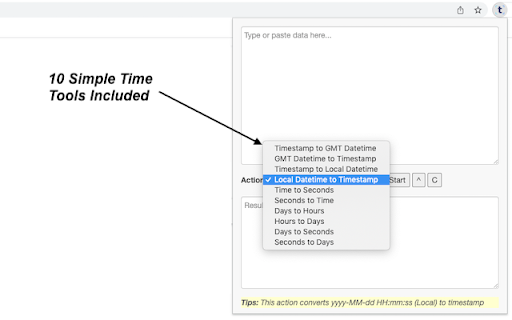
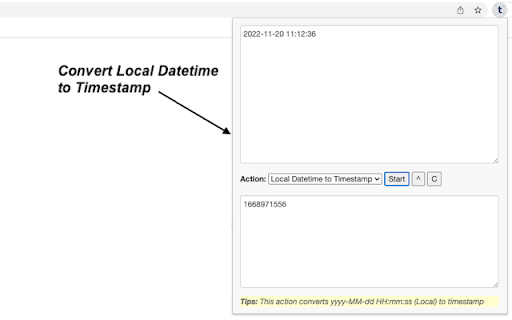
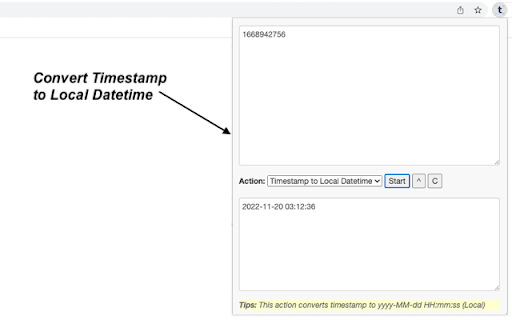
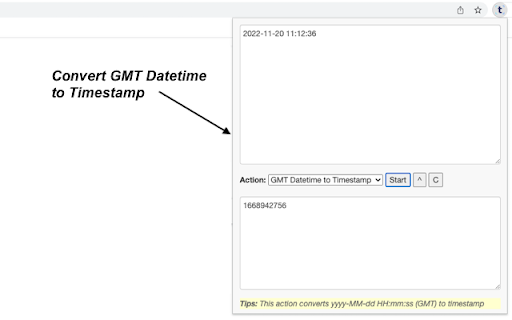
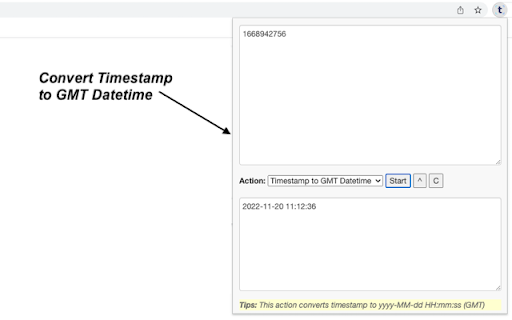
Sometimes you need to finish simple time manipulation tasks like converting timestamp to local/GMT date & time. This extension can help you get them done easily. Just paste what you want to process, and click on start button, then wait for the result to come out. It is fast and effective! 10 tools are available for now and more tools will be added to the extension in a regular basis. - Timestamp to GMT Datetime: converts timestamp to yyyy-MM-dd HH:mm:ss (GMT) - GMT Datetime to Timestamp: converts yyyy-MM-dd HH:mm:ss (GMT) to timestamp - Timestamp to Local Datetime: converts timestamp to yyyy-MM-dd HH:mm:ss (Local) - Local Datetime to Timestamp: converts yyyy-MM-dd HH:mm:ss (Local) to timestamp - Time to Seconds: converts clock time in HH:mm:ss format to seconds - Seconds to Time: converts seconds to clock time in HH:mm:ss format - Days to Hours: finds how many hours are in the given days - Hours to Days: finds how many days are in the given hours - Days to Seconds: finds how many seconds are in the given days - Seconds to Days: finds how many days are in the given seconds CHANGELOG ========== Version 0.1.1 - 2023-04-06 - Refine plugin title and description

AppZen Inbox
Generative AI that reads and organizes AP emails and writes detailed responses for you Take touchless AP processing to the next level with AI that handles all your vendor emails and account change requests, generates thorough replies to supplier inquiries, and processes invoices all the way to ‘okay-to-pay,’ freeing up your time for high-value tasks. Save time with email and invoice processing handled for you Email is the way you communicate with your vendors. Automating your entire invoice processing workflow right from your inbox saves you hours of time processing invoices and reading, categorizing, and responding to emails. Put generative AI to work for your AP team AppZen’s generative AI handles the overwhelming task of crafting data-driven, individualized responses so you don’t have to. No more hunting down data for replies to bank change requests, payment updates, and more. Maintain a small, powerful finance team Slash processing time from hours to minutes without increasing the AP team headcount. AppZen Inbox bridges the gap between your email and your existing ERP and P2P systems like SAP, Oracle, Workday, Coupa, Ariba, Netsuite, and more. By installing this extension, you agree to our terms of service and privacy policy. [https://www.appzen.com/terms-of-service] [https://www.appzen.com/privacy-policy]

Clevermail
Race through your emails with Clevermail – Your AI-powered Gmail assistant. Clevermail is an innovative AI-powered email assistant that seamlessly integrates with Gmail via a Chrome extension. It enhances your email experience by generating personalized, professional emails based on your inputs and business context. With features like multilingual support and direct email sending, Clevermail is transforming the way professionals handle their email communication

Tab Search Pro
Search active tabs, highlight results, save search history, switch between the last two active tabs, navigate tabs chronologically. Introducing Tab Search Pro, the ultimate browser extension designed to revolutionize your web searching experience. Tired of juggling multiple tabs just to find the information you need? Tab Search Pro is here to make your browsing efficient, organized, and productive. *Now, with the new feature to duplicate the current tab, you can effortlessly create a copy of any tab you're working on, enhancing your browsing efficiency even further.* Now you can easily switch between the last two active tabs, and navigate tabs chronologically for efficient browsing. At its core, Tab Search Pro is all about simplifying the way you search for content within your open tabs. Say goodbye to the hassle of switching between tabs, wasting precious time in endless clicks. With Tab Search Pro, you can effortlessly search for text across all your active tabs without losing focus on your current page. Using Tab Search Pro is a breeze. Just highlight any text that you want to look up, and a world of possibilities opens up. Activate the search through convenient context menu options or by utilizing customizable keyboard shortcuts. Tab Search Pro will quickly scan your open tabs, seeking out the first tab where your desired content is found. Not only that, it will highlight all occurrences of the text throughout your open tabs, making it easy to locate the information you need at a glance. Available Shortcuts: Duplicate Current Tab and Activate It Alt+Shift+D (Mac) Alt+Shift+D (Windows/Linux) Switch between the last two active tabs Command+Q (Mac) Ctrl+Q (Windows/Linux) Switch to the previous tab in the order they were activated, maintaining the chronological sequence of tab activations Ctrl+Shift+Space (Mac) Command+Space (Windows/Linux) But what sets Tab Search Pro apart is its versatility. If Tab Search Pro doesn't find a match within your tabs, it has your back. Instead of leaving you empty-handed, the extension prompts you to conduct a Google search directly, ensuring that you never miss out on any relevant information. With this dynamic feature, you're never left without answers. We value your privacy and security, which is why Tab Search Pro is designed with minimal permissions, including activeTab, contextMenus, scripting, and tabs. Rest assured, your data stays within your browser, and you remain in complete control. Tab Search Pro is not just a simple search tool; it's a productivity powerhouse. Imagine the time and effort you'll save as you seamlessly navigate through your tabs, instantly finding the information you need. No more distractions, no more wasted clicks – just pure efficiency. Whether you're a researcher, student, or a professional seeking the latest news, Tab Search Pro empowers you to be in charge of your browsing. No more losing focus, no more disruptions – only smooth and targeted searches. With Tab Search Pro as your trusted companion, you can create an organized browsing environment, keeping track of your searches and creating a history for later usage. No more digging through browser history or bookmarks; your sought-after content is always just a click away. Don't settle for inefficient browsing. Upgrade to Tab Search Pro and unlock the full potential of your web searching capabilities. Embrace a new level of productivity, save time, and access information faster than ever before. Tab Search Pro is your ticket to a more streamlined, effortless, and enjoyable browsing experience. Install Tab Search Pro today and take the first step towards a smarter, more efficient web journey.

Michael's Upgrade for TrakED
Upgraded features for TrakED in the THS. (This extension is not an official product of the THS or Intersystems TrakCare software.) Upgraded features for Trak ED in the LGH. Features: - Re-enable spell check in the triage page - Use the enter key when logging in - Handover sheet for ED Main Floor and EMU - ED Main Floor filters and persistent sort - Triage Summary print out - Filter and count results of an enquiry - Count patients currently breaching length of stay targets -- This extension is not an official product of the LGH or InterSystems Trak software.
