
palfepdmaodpfcaockdklfkemgmpickh


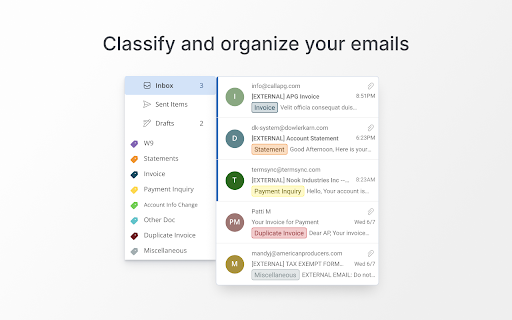
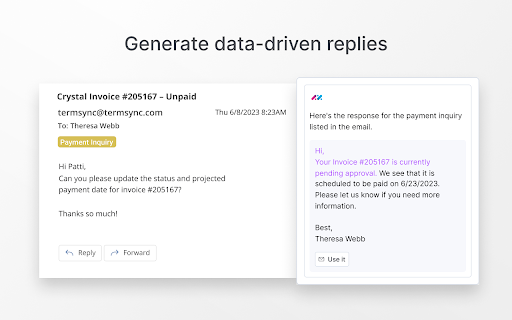
Generative AI that reads and organizes AP emails and writes detailed responses for you Take touchless AP processing to the next level with AI that handles all your vendor emails and account change requests, generates thorough replies to supplier inquiries, and processes invoices all the way to ‘okay-to-pay,’ freeing up your time for high-value tasks. Save time with email and invoice processing handled for you Email is the way you communicate with your vendors. Automating your entire invoice processing workflow right from your inbox saves you hours of time processing invoices and reading, categorizing, and responding to emails. Put generative AI to work for your AP team AppZen’s generative AI handles the overwhelming task of crafting data-driven, individualized responses so you don’t have to. No more hunting down data for replies to bank change requests, payment updates, and more. Maintain a small, powerful finance team Slash processing time from hours to minutes without increasing the AP team headcount. AppZen Inbox bridges the gap between your email and your existing ERP and P2P systems like SAP, Oracle, Workday, Coupa, Ariba, Netsuite, and more. By installing this extension, you agree to our terms of service and privacy policy. [https://www.appzen.com/terms-of-service] [https://www.appzen.com/privacy-policy]

Gmail AI Email Assistant - Mailmeteor
Meet an inbox that organizes itself, drafts replies for you, and writes alongside you. All without leaving Gmail. Mailmeteor for Gmail helps you save hours every day in your inbox. It brings powerful features to your Gmail workflow, such as: 🏷️ Auto-labels emails to help you focus 📝 Auto-drafts replies in your tone 💌 Mail merge directly from Gmail ✔ Email tracker to know when your emails are opened ⏰ Inbox time to monitor your time spent on emails 🗂️ Search and export emails in one click Most features are free to use. Upgrade to send more emails, get additional AI credits, and access advanced features, like email tracking, attachments, Autopilot, and more. - Best-rated add-on for Gmail - 7 million users on Google Sheets, rated 4.9/5 - Trusted by teams at Spotify, Uber, Pinterest, Shopify, and Change.org - Recommended by Google This extension works exclusively in Gmail, where your work happens. No need to add extra tools or switch to a different dashboard or SaaS. ➤ AI Email Assistant, including email categorization, drafts replies, email writer, and more. ➤ Email Tracker to know when your emails are opened or clicked ➤ Mail merge inside Gmail ™. We maximize your email deliverability and send emails directly from Gmail ™. ➤ Follow up with ease in Gmail ™. Send automated follow-ups in one click, without your recipients knowing. ➤ Designed to respect your privacy. ✓ AI Email Assistant built into Gmail ✓ Mail merge, with analytics ✓ Email Tracker (opens and clicks) ✓ Auto follow-up: send a reminder when not opened, not replied… ✓ Bounces detection: make sure you don’t follow up to dead email addresses ✓ Hubspot / CRM integration ✓ CSV emails export ✓ Available in English Once you've installed this extension, you'll be invited to enable AI Email Assistant features immediately. Alternatively, you can enable it by following these steps: 1. Access the Settings > Add-ons > Mailmeteor settings 2. Turn on the AI Email Assistant feature 3. Fine-tune the email categorization, pre-drafts, and other settings. Once enabled, your AI Email Assistant will: - organize your inbox, with smart labels - draft replies to important emails (to respond) - help you write emails faster Once you've installed this extension, here's how to send mass emails in your Gmail inbox: 1. Select the "Campaigns" tab, underneath Inbox / Starred / Sent 2. Click on "New campaign" 3. Write your email and select recipients 4. Once you're ready, send yourself a test email or preview 5. Click "Send emails" Your recipients will receive the emails just as you would have sent them, and your emails remain accessible in the "Sent" tab of your Gmail account. Once you’ve installed this extension for Gmail, here’s how to follow up in Gmail: 1. Compose a new message as usual 2. Instead of clicking on “Send”, click on the caret and select “Send with a follow-up” 3. Select a follow-up template or write a new message 4. Define when the follow-up should be sent (e.g. 3 days later, if no reply) 5. Click send SUPPORT AND DOCUMENTATION You will learn: ⚑ The best time to follow up with a prospect ⚑ A wide selection of email templates ⚑ Gmail best practices to improve your deliverability And also, everything you need to know before doing a mass mailing in Gmail ™, such as: ⚑ How to send mass emails in Gmail ™ ⚑ How to send mass customized emails with Gmail ™ ⚑ How to send a mass email without showing addresses in Gmail ™ ⚑ How to use your Gmail ™ contact list to send emails ⚑ Why Mailmeteor is better than Gmass, Lemlist, Yamm, Streak and Mailsuite FREE FOR EDUCATION Have a .EDU email address? Mailmeteor provides free licenses for students and staff, as part of its Education Program. Learn more: https://mailmeteor.com/education-program Mailmeteor turns your Gmail inbox into a complete email marketing solution: ✪ Follow up with ease to make sure your recipients reply ✪ Templates to reuse your best follow-up messages ✪ Skip following up when the recipient replies ✪ Bounce detection: remove invalid email addresses ✪ Mailmeteor Dashboard to do even more with your emails You can use Mailmeteor in many different ways. Here are some examples: ➤ Sales & Marketing: to boost your conversion and re-engage your leads at scale ➤ Customer care: to make sure a ticket is closed ➤ Finance: to put an end to unpaid invoices ➤ Marketing: personalized thank-you emails to HR recruiters, crowdfunding supporters, Product Hunt, business angels, friends & family. ➤ Job hunt: follow-up after an interview and make sure the recruiter doesn’t forget about you ➤ PR: Bump your email to the top of journalists' or influencers' inboxes. ➤ Email No Code: follow up with prospects without a line of code ➤ Events: Inviting people to an event (webinar, wedding, job-dating, fair, conference, meetup...) and reducing no-shows by sending a reminder shortly before the event. Here are the features we have built thanks to your feedback: ✓ Send newsletters in Gmail ✓ Multi follow-ups & email sequence ✓ Follow-up with images & attachments ✓ Templates management to write emails faster ✓ Open & Click Tracking ✓ More follow-up triggers, such as open/no-open ✓ Cold emailing & Mail merge in Gmail Mailmeteor complies with privacy laws (especially GDPR) to protect your data. Learn more about how we respect your privacy in our Privacy Policy in our Security center: https://mailmeteor.com/security Mailmeteor is audited by Google every year for optimal security. We're CASA Tier 3 compliant, with SOC 2 certification in progress. Gmail and Google are trademarks of Google Inc. Use of these trademarks is subject to Google permissions.

Jetwriter AI: Reply Emails, Ask Page, Summarize, Fix Grammar, and More
Write emails & messages, chat with page, improve writing, translate, and do much more. Powered by the most intelligent AI models Get personalized, context-aware AI help on any website with Jetwriter AI. Write emails and messages, chat with page, fix grammar, improve your writing, translate text, and much more - all in seconds. Powered by the world's most intelligent AI models. Free to try. 📧 ADVANCED GMAIL INTEGRATION: REFERENCES PAST EMAILS, WEB SEARCH, and HELP DOCS Generate personalized, context-aware replies in your exact tone directly from the Gmail compose window. Jetwriter AI learns your unique style from your sent emails, while seamlessly pulling accurate, real-time answers from your linked website, help docs, or live web searches. ✍️ GENERATE CONTEXT AWARE REPLIES IN YOUR VOICE Get AI assistance on email and messaging platforms such as Gmail, WhatsApp, LinkedIn, Outlook, Zendesk, and more. 🚀 HIGHEST QUALITY RESPONSES Go beyond generic AI. Our system is fully personalized to you, generating intelligent, context-aware responses. Powered by the world's most advanced AI models, including GPT-5.2 Thinking, Claude Sonnet 4.6, Gemini 3.1 Pro and more. 🌐 WEB SEARCH & READ LINKS Accesses the web to get the latest info for your replies. 📄 CHAT WITH ANY PAGE - Summarize articles - Find key information - Proofread your work - Explain complex terms ✨ SELECT ANY TEXT TO TRANSFORM - Correct grammar and spelling - Improve writing clarity and style - Rephrase and change the tone - Translate to any language - Create your own custom actions 👤 PERSONALIZED TO YOU - Teach the AI about you and your role for truly personalized responses. - Create different writing styles for various purposes. - Save your favorite prompts for one-click access. - Customize the length of AI responses. - Supports all languages. 🎙️ VOICE INPUT Save time with instant, accurate voice-to-prompt in any language. 🎨 MINIMAL, NON-INTRUSIVE DESIGN - No Layout Shifts: Unlike sidebar extensions, Jetwriter opens as a clean modal on top of the page. - Flexible: Resize and drag the modal anywhere on your screen. - Easy Access: Open via keyboard shortcut, highlighting text, right-click context menu, or the extension icon. - Integrated Buttons: Find AI reply buttons directly within popular sites such as Gmail, LinkedIn, WhatsApp Zoho, and more. - Rich Chat Experience: Supports multi-turn conversations, Markdown, code highlighting, and LaTeX. ⚡ SUPERIOR PERFORMANCE - Lightweight extension (

DeepRead AI: Web Summarizer & Response Generator
AI Copilot in your browser to apply Summarize, Translate, Solve & Generate Responses - Long articles, dense PDFs, technical docs, and endless videos slow you down every day. DeepRead AI is designed to eliminate information overload by turning large volumes of content into clear, structured, useful output. This Chrome extension helps you focus on what truly matters when browsing online, studying, researching, or replying to messages. - This extension works as an advanced AI copilot powered by modern AI models. It lets you summarize webpages, summarize PDFs, summarize YouTube videos, analyze screenshots and images, explain difficult text, translate content, solve math problems, and ask follow-up questions based on the page or highlighted text. This makes understanding online content faster, easier, and far more efficient. ⚡ - As a flexible web summarizer and browser AI assistant, DeepRead supports blogs, articles, documentation, reports, contracts, research papers, study material, transcripts, screenshots, and visual content. You can use it as a website summarizer AI tool, an article summarizer, a PDF summarizer, a YouTube summarizer, an AI translator, a math solver, and an AI reply generator in one workflow. It is built for learning, productivity, communication, and everyday browsing. 🚀 Get started in three simple steps: 1️⃣ Install from the Chrome Web Store 2️⃣ Open any page, PDF, image, video, or text you want to analyze 3️⃣ Highlight text or use the sidebar to summarize, explain, translate, solve, ask questions, or generate replies instantly 🌟 Core Capabilities ➤ Web page summarizer for instant results ➤ AI page explainer for difficult sections and technical text ➤ PDF summarizer for long documents, papers, and reports ➤ YouTube summarizer for transcript-based video understanding ➤ Screenshot and image AI analysis for visual context ➤ Highlight Summarize, Highlight Explain, Highlight Translate, and Highlight Ask actions ➤ AI chat with page context for follow-up questions ➤ AI reply generator for Gmail, LinkedIn, and YouTube comments ➤ AI translator for multilingual reading and browsing ➤ Math solver with step-by-step explanation support ➤ Multiple output formats including TL;DR, bullet points, structured notes, rewrite, and table mode ➤ Deep-reading assistant workflows for students, researchers, lawyers, engineers, and professionals 💡 Key Benefits - Instant summary generator for any webpage - Smart AI website summarizer technology for blogs, docs, articles, and research pages - Works like a modern upgrade to basic summarization tools by combining explain, summarize, translate, ask, solve, and reply generation - Summarize an article whenever needed for study, research, work, or fast review - AI to summarize web pages in seconds and improve productivity - Save time reading long documents, reports, transcripts, and technical references - Improve comprehension with structured summaries and simpler explanations - Enhance focus by filtering out irrelevant information - Translate content into your preferred language while browsing - Generate polished replies faster in email, professional networking, and comment workflows - Reduce tab switching by keeping AI actions inside the browser - Perfect for students, researchers, professionals, and heavy readers 💎 Who Uses This Extension Students rely on DeepRead for studying, exam preparation, lecture review, and summarizing textbooks or PDFs. Professionals use it to review reports, presentations, documentation, and business material. Researchers and analysts depend on AI summary features to speed up source review and comparison. Lawyers and legal professionals use it to read dense text more efficiently. Engineers use it to understand technical docs and API references faster. Content creators and marketers use it to research topics, summarize competitor content, and generate better replies quickly. 📘 Common Use Cases ▸ Students summarizing textbooks, study guides, and lectures ▸ Researchers processing articles, whitepapers, and academic papers ▸ Analysts reviewing long reports and business documents ▸ Developers reading technical documentation and API references ▸ Lawyers reviewing contracts, legal text, and dense policy documents ▸ Marketers scanning competitor websites and market research ▸ Professionals drafting Gmail and LinkedIn replies faster ▸ Creators replying to YouTube comments with better context ▸ Anyone who needs to summarize web content quickly and understand it better 🔍 Problems This Extension Solves Information overload from long pages and documents Slow reading and scanning speed Difficult terminology and dense language Repetitive research across multiple sources Loss of focus while reading online Time wasted on irrelevant content Too many tools for summarize, explain, translate, and reply tasks Too much context switching between browser, chatbot, notes, and email Manual rewriting of long content into useful notes Slow communication when replying to messages and comments 📦 Built-In Tools Article summarizer mode Web page summarizer mode PDF summarizer support YouTube summarizer support Image and screenshot AI analysis Text highlighter for key points, explanation, translation, and questions Question answering based on page content and user input Summary AI technology for fast structured output Site summarizer features for full-page analysis Chat with webpage context AI translator for multilingual content Math problem solver and explainer Gmail AI reply generator LinkedIn AI reply generator YouTube comment AI reply generator AI web page summarizer engine for everyday productivity ❓ How do I use the summarize web pages feature? 💡 Open any webpage and either highlight text or use the sidebar to generate a summary, explanation, translation, or question-driven answer instantly. ❓ Can it work as an article summarizer? 💡 Yes. You can process blogs, news articles, reports, essays, documentation, and research papers whenever you need fast understanding. ❓ Does it support PDFs and YouTube videos? 💡 Yes. DeepRead can summarize PDFs and YouTube transcript-based content, helping you understand long documents and videos much faster. ❓ Can it also explain difficult text? 💡 Yes. DeepRead works as an AI page explainer and deep-reading assistant for complex sections, academic content, legal language, and technical material. ❓ Does it support translation? 💡 Absolutely. You can translate selected text or page-based content and work with multilingual sources more easily. ❓ Can it solve math problems too? 💡 Yes. DeepRead can help solve math problems and explain the steps in a clearer way for study and review. ❓ What makes this different from other tools? 💡 DeepRead combines website summarizer AI features with explain, translate, solve, ask, image analysis, PDF support, YouTube summarization, and reply generation. It is more than a simple summary generator. ❓ Is it also a site analyzer? 💡 Yes. The extension includes AI website explainer and website summarizer AI features for complete page analysis and context-aware follow-up questions. ❓ Does it support different content types? 💡 Yes. It handles webpages, articles, PDFs, screenshots, images, YouTube videos, selected text, reports, guides, and technical documentation with AI summarize precision. ❓ Can it generate replies too? 💡 Yes. DeepRead can generate AI replies in Gmail, LinkedIn, and YouTube comments, helping you respond faster with better tone and context. ✨ Why Choose This Extension Works across webpages, articles, PDFs, videos, images, and documents Supports summarize, explain, translate, solve, ask, and reply generation in one Chrome extension Designed for productivity, study, research, and professional workflows Stronger than basic summarization alternatives because it combines reading and writing assistance Includes website summarizer, AI page summarizer, translator, math helper, and reply generator modes Privacy-focused product design with user-controlled workflows Useful for students, researchers, lawyers, engineers, analysts, creators, and professionals Works as a practical AI copilot instead of a single-purpose summarization tool DeepRead AI transforms how you consume information online by combining speed, clarity, and utility. The extension works across major websites, blogs, documentation platforms, PDFs, visual content, and communication surfaces. Whether you are preparing for exams, conducting market research, reviewing legal material, reading technical docs, understanding YouTube content, translating a page, solving a math problem, or replying to professional messages, this tool adapts to your workflow and reading style. 🚀 Take control of your online reading and writing experience. Turn information overload into clarity with every click. DeepRead AI helps you process content efficiently with AI summarizer technology, translation support, math help, and reply generation built directly into your browser. Save hours of reading time while maintaining strong comprehension, cleaner notes, better responses, and faster decision-making. Install DeepRead AI today and join users who are already reading smarter and replying faster.

AnswerAI - Homework AI Tutor & Study Helper
Your AI assistant ChatGPT Plugin.Answer questions and get AI answers quickly,write emails,articles,chatbot,learning assistant. Ask anything and learn everything with one of the leading AI educational apps for student success. Answer.AI is the only app that is there for students both in and out of the classroom, and revolutionizing the way you learn. With Answer.AI's web extension, your screen will become a powerhouse of personalized education and learning. You can screenshot or highlight any question on your browser and get step-by-step solutions, generate brainstorming drafts for any type of writing, chat with AskAI about tough concepts, master complex math questions with Geometry mode, and more. With over 6 million users, our mission is to help our evergrowing community achieve their milestones and crush their goals both in and out of the classroom. 🥳Here are some features you can look out for: 📍Upload a screenshot for instant answers Easily upload a screenshot of your question, and Answer.AI will analyze it to provide accurate answers—perfect for complex math problems and more. 📍Ask and Answer Click the Answer.AI icon to initiate a real-time conversation, or select any text on a webpage to receive detailed answers instantly. No matter the complexity, Answer.AI offers clear explanations. 📍Writing Assistant Answer.AI also serves as an AI-powered writing assistant, helping you create high-quality content in seconds, making it perfect for essays, articles, and more. 📍Smart Homework Solutions Submit your questions and get step-by-step solutions, ensuring you not only get the correct answer but understand the underlying concepts. 📍Highlight and Solve Answer.AI works on any website you visit and integrates smoothly into your Chrome browser. Simply highlight text or use the extension to get answers quickly and efficiently. 🌟 Getting Started: 1️⃣ Click the Answer.AI icon on your screen to start a conversation. 2️⃣ Highlight text on any webpage, click the Answer.AI icon, and receive an answer immediately. 🧑💻 How to use the Chrome Extension: 1️⃣ Click the "Add to Chrome" button. 2️⃣ Log in to your Answer.AI account. 3️⃣ Start using Answer.AI! You can open the Answer.AI sidebar anytime you need help. Answer.AI offers both free and premium versions. Free users receive limited access, while premium users enjoy enhanced features and unlimited usage. 📍What platforms does Answer.AI support? Answer.AI is available on iOS and Android (download via the Apple Store or Google Play), as well as a Chrome extension for Windows and Mac users. 💯Ready to upgrade your learning experience? Install Answer.AI today and leave your feedback—your suggestions help us continue to innovate. You can contact us at support@answerai.pro or go to our website, https://answerai.pro for more info. We love hearing from you!
