
afcehapodanikojlimiaflnakjfcgfpn
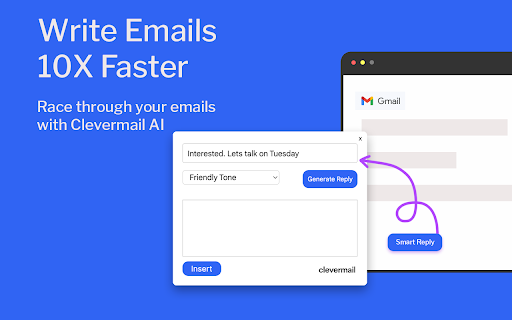
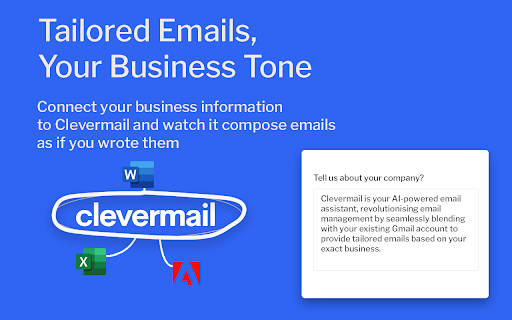
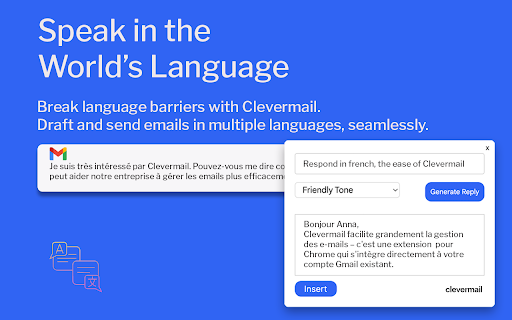
Race through your emails with Clevermail – Your AI-powered Gmail assistant. Clevermail is an innovative AI-powered email assistant that seamlessly integrates with Gmail via a Chrome extension. It enhances your email experience by generating personalized, professional emails based on your inputs and business context. With features like multilingual support and direct email sending, Clevermail is transforming the way professionals handle their email communication

Gmail AI Email Assistant - Mailmeteor
Meet an inbox that organizes itself, drafts replies for you, and writes alongside you. All without leaving Gmail. Mailmeteor for Gmail helps you save hours every day in your inbox. It brings powerful features to your Gmail workflow, such as: 🏷️ Auto-labels emails to help you focus 📝 Auto-drafts replies in your tone 💌 Mail merge directly from Gmail ✔ Email tracker to know when your emails are opened ⏰ Inbox time to monitor your time spent on emails 🗂️ Search and export emails in one click Most features are free to use. Upgrade to send more emails, get additional AI credits, and access advanced features, like email tracking, attachments, Autopilot, and more. - Best-rated add-on for Gmail - 7 million users on Google Sheets, rated 4.9/5 - Trusted by teams at Spotify, Uber, Pinterest, Shopify, and Change.org - Recommended by Google This extension works exclusively in Gmail, where your work happens. No need to add extra tools or switch to a different dashboard or SaaS. ➤ AI Email Assistant, including email categorization, drafts replies, email writer, and more. ➤ Email Tracker to know when your emails are opened or clicked ➤ Mail merge inside Gmail ™. We maximize your email deliverability and send emails directly from Gmail ™. ➤ Follow up with ease in Gmail ™. Send automated follow-ups in one click, without your recipients knowing. ➤ Designed to respect your privacy. ✓ AI Email Assistant built into Gmail ✓ Mail merge, with analytics ✓ Email Tracker (opens and clicks) ✓ Auto follow-up: send a reminder when not opened, not replied… ✓ Bounces detection: make sure you don’t follow up to dead email addresses ✓ Hubspot / CRM integration ✓ CSV emails export ✓ Available in English Once you've installed this extension, you'll be invited to enable AI Email Assistant features immediately. Alternatively, you can enable it by following these steps: 1. Access the Settings > Add-ons > Mailmeteor settings 2. Turn on the AI Email Assistant feature 3. Fine-tune the email categorization, pre-drafts, and other settings. Once enabled, your AI Email Assistant will: - organize your inbox, with smart labels - draft replies to important emails (to respond) - help you write emails faster Once you've installed this extension, here's how to send mass emails in your Gmail inbox: 1. Select the "Campaigns" tab, underneath Inbox / Starred / Sent 2. Click on "New campaign" 3. Write your email and select recipients 4. Once you're ready, send yourself a test email or preview 5. Click "Send emails" Your recipients will receive the emails just as you would have sent them, and your emails remain accessible in the "Sent" tab of your Gmail account. Once you’ve installed this extension for Gmail, here’s how to follow up in Gmail: 1. Compose a new message as usual 2. Instead of clicking on “Send”, click on the caret and select “Send with a follow-up” 3. Select a follow-up template or write a new message 4. Define when the follow-up should be sent (e.g. 3 days later, if no reply) 5. Click send SUPPORT AND DOCUMENTATION You will learn: ⚑ The best time to follow up with a prospect ⚑ A wide selection of email templates ⚑ Gmail best practices to improve your deliverability And also, everything you need to know before doing a mass mailing in Gmail ™, such as: ⚑ How to send mass emails in Gmail ™ ⚑ How to send mass customized emails with Gmail ™ ⚑ How to send a mass email without showing addresses in Gmail ™ ⚑ How to use your Gmail ™ contact list to send emails ⚑ Why Mailmeteor is better than Gmass, Lemlist, Yamm, Streak and Mailsuite FREE FOR EDUCATION Have a .EDU email address? Mailmeteor provides free licenses for students and staff, as part of its Education Program. Learn more: https://mailmeteor.com/education-program Mailmeteor turns your Gmail inbox into a complete email marketing solution: ✪ Follow up with ease to make sure your recipients reply ✪ Templates to reuse your best follow-up messages ✪ Skip following up when the recipient replies ✪ Bounce detection: remove invalid email addresses ✪ Mailmeteor Dashboard to do even more with your emails You can use Mailmeteor in many different ways. Here are some examples: ➤ Sales & Marketing: to boost your conversion and re-engage your leads at scale ➤ Customer care: to make sure a ticket is closed ➤ Finance: to put an end to unpaid invoices ➤ Marketing: personalized thank-you emails to HR recruiters, crowdfunding supporters, Product Hunt, business angels, friends & family. ➤ Job hunt: follow-up after an interview and make sure the recruiter doesn’t forget about you ➤ PR: Bump your email to the top of journalists' or influencers' inboxes. ➤ Email No Code: follow up with prospects without a line of code ➤ Events: Inviting people to an event (webinar, wedding, job-dating, fair, conference, meetup...) and reducing no-shows by sending a reminder shortly before the event. Here are the features we have built thanks to your feedback: ✓ Send newsletters in Gmail ✓ Multi follow-ups & email sequence ✓ Follow-up with images & attachments ✓ Templates management to write emails faster ✓ Open & Click Tracking ✓ More follow-up triggers, such as open/no-open ✓ Cold emailing & Mail merge in Gmail Mailmeteor complies with privacy laws (especially GDPR) to protect your data. Learn more about how we respect your privacy in our Privacy Policy in our Security center: https://mailmeteor.com/security Mailmeteor is audited by Google every year for optimal security. We're CASA Tier 3 compliant, with SOC 2 certification in progress. Gmail and Google are trademarks of Google Inc. Use of these trademarks is subject to Google permissions.

SimplyMail - AI Email Assistant for Gmail
AI-powered Gmail assistant. Get instant email summaries, smart categories, task extraction, and AI replies. Save hours on email. Transform Your Gmail Experience with AI-Powered Email Intelligence SimplyMail is your intelligent email assistant that helps you work smarter, not harder. Analyse, summarize, and manage your Gmail inbox with advanced AI—all with your explicit consent and complete privacy control. Smart Email Analysis Instant Summaries: Get the key points of any email in seconds Thread Summarization: Understand long email conversations at a glance Auto-Categorization: Automatically classify emails by type and priority Task Extraction: Pull action items from emails automatically AI Writing Assistant Smart Replies: Generate professional email responses with customizable tone Draft New Emails: Create emails from simple prompts Email Shortening: Condense lengthy emails while preserving key information Tone Control: Choose from Professional, Friendly, Direct, Confident, Formal, or Warm tones Privacy-First Design No Automatic Processing: All AI features require your explicit click—we never analyze emails without permission User Consent Required: Full control over when and how your emails are processed Secure Authentication: Protected by enterprise-grade Supabase authentication No Data Storage: Your email content is never stored on our servers How It Works Install SimplyMail and open Gmail Click the SimplyMail icon when viewing any email Choose your action: summarize, categorize, extract tasks, or generate a reply Get instant AI-powered results Free & Pro Plans Free Plan: Daily usage limits All core features included Perfect for light email users Perfect For Busy professionals managing high email volumes Teams who need to respond quickly and professionally Anyone who wants to save time on email management Remote workers juggling multiple conversations Executives who need email summaries fast Requirements Works exclusively with Gmail (mail.google.com) Chrome browser Free account registration

IntelliMail
Your AI email assistant Want to land an internship, be a pro at thank you emails and save countless hours everyday? Look no further than IntelliMail. Your free personal email assistant. Unlock productivity and save time with your personal email assistant that takes care of your email writing needs. Simply open Gmail, add context, and click the IntelliMail button to generate a perfectly crafted email in seconds. Say goodbye to wasted time and hello to increased efficiency with IntelliMail. *We do not read or collect any of your data.*

Mailbutler for Gmail
Improves your inbox with productivity-boosting features such as an AI-powered assistant, email tracking, and smart email scheduling. ⧓ Mailbutler: Your inbox, smarter. ⧓ Meet Mailbutler, the email extension that makes your Gmail inbox smarter. Mailbutler offers four powerful solutions designed to meet your dynamic email needs: Write professional, mistake-free emails with Mailbutler’s customizable AI. Personalize your messages and reach each recipient at the best time to maximize your chances of getting a reply. Build and maintain strong customer relationships in the increasingly competitive inbox environment. Get valuable insights into how your recipients engage with your messages, including when, where, how many times, and on which devices they have opened your emails and clicked your links. Use this data to eliminate guesswork and make informed business decisions. Turn your team inbox into a collaboration hub with live status indicators, email assignments, and real-time updates. Stay on top of your emails and make sure nothing slips through the cracks with private and shared notes and tasks, reminders, and colored tags. Unlock the full potential of your email signatures and promote your limited-time offers, products or services, and special events with customizable marketing messages and banners, videos, and call-to-action buttons. ⧓ Who is Mailbutler for? ⧓ Freelancers, independent professionals, and marketers Businesses, marketing teams, and sales teams that prioritize direct client communication Teams that need clear, easy, and productive internal communication Our members guide the development of our extension – we’re constantly upgrading and revamping features based on customer feedback Cross-platform compatibility means if other members of your team are using other email clients, Mailbutler still works perfectly Most importantly, Mailbutler helps you improve your customer communication and get new prospects, clients, and contacts All new Mailbutler members get a 14-day free trial so they can try out all our features and decide which plan suits their needs best. We don’t require any credit card details until you subscribe to a plan, so you can opt out at any time! Terms of Service: https://www.mailbutler.io/terms-and-conditions/
