
njpneibpplcgghbjcbfhcdcfigjnaaha


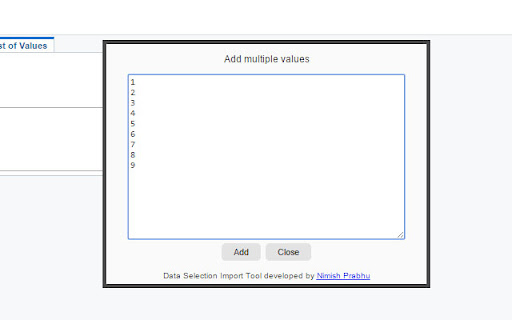

With this extension you can easily import list of values in data selection instead of having to enter them manually one at a time. In JD Edwards ERP users can run reports to produce data. Data selection filters the data in order to produce a subset of records that is processed by the report. Users can add data selection criteria while running reports. The process to add data selection involves clicking on "List of Values" tab followed by clicking on Add button and entering value, one at a time. This process becomes exhaustive when a bunch of values are required to be added to data selection. This Data Selection import tool extension helps users to directly copy paste list of values in a text box and click submit. Extension then perform the process of clicking add button, entering value in text field and clicking add for each line. Thus it saves plenty of time and efforts for end user and improves their productivity.

Mueller : JDE Data Selection Import Tool
Import list of values in data selection with one click. This extension revolutionizes the process of importing values into data selection within JD Edwards ERP by replacing the tedious task of manual entry with a seamless, automated solution. In JD Edwards ERP, reports are commonly used to generate data insights. To refine the scope of these reports, users define data selection criteria, which act as filters to extract specific subsets of records. However, adding these criteria manually requires navigating to the "List of Values" tab, clicking the "Add" button, and inputting each value individually—a repetitive and time-intensive process, particularly when dealing with extensive lists. The Data Selection Import Tool simplifies this workflow. By allowing users to paste an entire list of values into a text box and submit them in a single action, the extension automates the entire sequence: it clicks the "Add" button, enters each value into the field, and confirms the addition for every line in the list. This efficient automation saves users considerable time and effort, boosting productivity and ensuring a smoother, more streamlined reporting experience.

Workplace Pure Browser Extension
Print from your Chrome devices to Workplace Pure Konica Minolta Cloud Print allows you to experience the easiest and most comfortable way of printing. Choose from various options and print directly from the application, via browser from your smartphone and tablet or simply print from the Google environment. Print jobs will be send to the Workplace Pure platform and can be released via a secure follow-me authentication on any multifunctional system that is connected to Workplace Pure. Print options such as duplex printing or colour printing can still be individually adapted at the multifunctional system. This is the Workplace Pure Browser Extension. Use the Cloud Print of Workplace Pure directly from your Google Chrome browser.

Test & Feedback
Now everyone on the team can own quality. Capture findings, create issues, and collaborate with the team, directly from the browser. Test & Feedback - Now everyone on the team can own quality. Capture findings, create issues, and collaborate with the team, directly from the browser. Everyone in the team, be it product owners, developers, testers, UX designers etc., can now test their web-apps and give feedback, all directly from the browser on any platform: Windows, Mac, or Linux. All kinds of teams will now be able to drive quality in 3 easy steps – capture, create & collaborate. Capture - Take notes, screenshots with annotations, and screen recordings to capture problems. Automatically include rich data like user actions (as an image action log), page load data, and system information. Create - Create bugs, tasks, and feedback response work items to send feedback or report problems. Create test cases quickly based on the image action log while you explore your app. Automatically attach all your captured information. Collaborate - Work offline in standalone mode, then export your session to share findings with your team. For more integrated experiences with end-to-end traceability, connect to Azure DevOps Services or to Team Foundation Server 2015 or later. For example, you can explore user stories directly from the board, manage all feedback requests received, and easily track bugs, tasks and other work-items. To view completed exploratory sessions and get insights across all completed sessions, for example, details about sessions and work items that are created, explored, and weren’t explored, plus other data, go to your exploratory testing insights page. You can use the extension for FREE in these modes: Standalone and Connected Standalone Mode: Available to everyone. Any team, large or small, can use standalone mode to capture issues using screenshots with inline annotations and notes and then share the results using a session report. No connection to Azure DevOps Services or Team Foundation Server required. Connected Mode: Connect to Azure DevOps Services/Team Foundation Server to drive your exploratory testing and feedback flows. - Users with Basic access: Full capture and create capabilities to submit bugs, tasks and test cases. Includes collaboration capabilities like end-to-end traceability, rich insights across completed exploratory sessions, simplified bug/task tracking & triaging, and so on. - Users with Stakeholder access: Full capture and create capabilities, except for test cases, to submit feedback and respond to feedback requests from your team. Feedback experiences are available in Team Services and TFS 2017 or later only. Learn more https://docs.microsoft.com/en-us/azure/devops/test/perform-exploratory-tests?view=vsts

Oracle Guided Learning Editor
Oracle Guided Learning (OGL) is an enterprise cloud digital adoption platform that supports the creation of personalized and contextualized in-application guidance to simplify and accelerate user adoption of web-based applications. The Oracle Guided Learning Editor extension is required for OGL content developers and administrators to create, edit, and configure content from within the OGL console. Oracle Guided Learning helps organizations and product owners lower the cost of training and supporting users. It enables the creation of individualized and guided onboarding visualizations for end-users, serving as a learning and information interface embedded in a host application. The main purpose of Oracle Guided Learning is to accelerate the adoption of any web-based application, facilitating the process for both organizations and employees. By installing the Oracle Guided Learning extension software, you are agreeing to the following terms: 1. You may use the software subject to the following: (a) the software may be used solely for your internal business operation; (b) the software may not be modified or altered in any way; and (c) the software may not be redistributed. 2. The software is the intellectual property and copyrighted works of Oracle America, Inc. or a third party provider. All rights, title and interest not expressly granted with respect to the software are reserved. 3. You may not access, download, use or export the software in violation of U.S. export laws or regulations, or in violation of any other applicable laws or regulations. You agree to comply with all export laws, restrictions and regulations of any United States or applicable agency or authority, and to not directly or indirectly provide or otherwise make available any services and products of Oracle in violation of any such restrictions, laws or regulations, including, without limitation, laws, restrictions or regulations pertaining to the development, design, manufacture or production of nuclear, chemical or biological weapons or missile technology. 4. Disclaimer of Warranties. THE SOFTWARE IS PROVIDED ON AN "AS IS" BASIS. ORACLE EXPRESSLY DISCLAIMS ALL WARRANTIES OF ANY KIND, WHETHER EXPRESS OR IMPLIED, INCLUDING, BUT NOT LIMITED TO, THE IMPLIED WARRANTIES OF MERCHANTABILITY, FITNESS FOR A PARTICULAR PURPOSE AND NON-INFRINGEMENT. THE SOFTWARE IS USED AT YOUR OWN DISCRETION AND RISK. ORACLE SHALL HAVE NO RESPONSIBILITY FOR ANY DAMAGE TO YOUR COMPUTER SYSTEM OR LOSS OF DATA THAT RESULTS FROM THE DOWNLOAD OR USE OF THE SOFTWARE. 5. Limitation of Liability. IN NO EVENT SHALL ORACLE BE LIABLE FOR ANY DIRECT, INDIRECT, INCIDENTAL, SPECIAL OR CONSEQUENTIAL DAMAGES, OR DAMAGES FOR LOSS OF PROFITS, REVENUE, DATA OR DATA USE, INCURRED BY YOU OR ANY THIRD PARTY, WHETHER IN AN ACTION IN CONTRACT OR TORT, ARISING FROM YOUR ACCESS TO, OR USE OF, THE SOFTWARE. 6. Exclusions and Limitations. SOME JURISDICTIONS DO NOT ALLOW THE DISCLAIMER OR EXCLUSION OF CERTAIN WARRANTIES OR THE DISCLAIMER, EXCLUSION OR LIMITATION OF CERTAIN LIABILITIES. TO THE EXTENT THAT THEY ARE HELD TO BE LEGALLY INVALID, DISCLAIMERS, EXCLUSIONS AND LIMITATIONS SET FORTH ABOVE DO NOT APPLY AND ALL OTHER TERMS SHALL REMAIN IN FULL FORCE AND EFFECT. 7. All matters relating to your access to, and use of, the software shall be governed by U.S. federal law or the laws of the State of California. Any legal action or proceeding relating to your access to, or use of, the software shall be instituted in a state or federal court in San Francisco or Santa Clara County, California. You and Oracle agree to submit to the jurisdiction of, and agree that venue is proper in, these courts in any such legal action or proceeding.
