
njoicpmnlbhcinacogofeincbglclloi
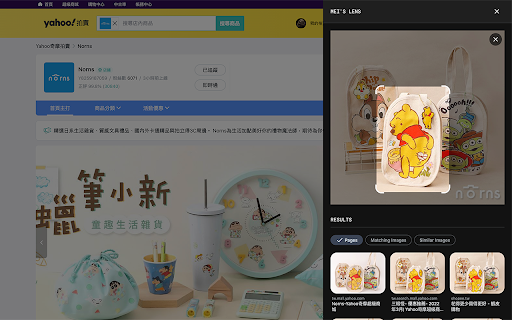
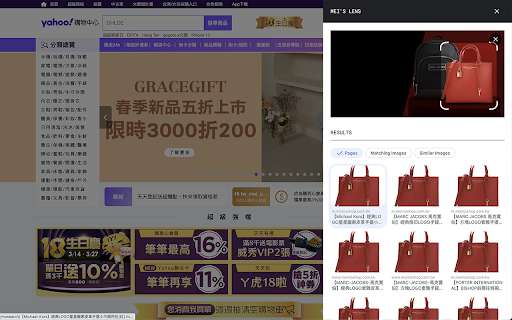
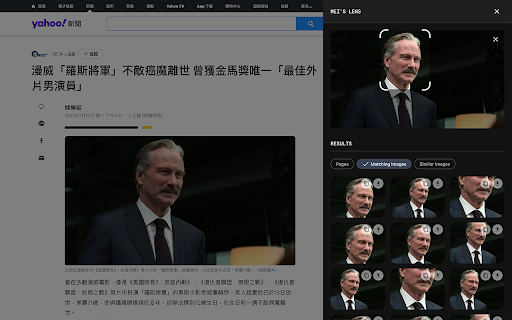
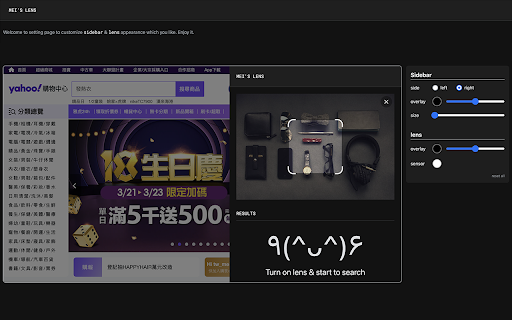
mei's lens provides search the web by image feature for web pages. 「mei's lens」provides search the web by image feature for web pages. With 「mei's lens」you could do the following stuff. - Pick & select image for searching by image. - Comes with light / dark mode. ※ Usage instructions: 1. Turn on「mei's lens」by context menu or browser bar icon.(「mei's lens」will apply image directly once tap image context menu).「mei's lens」 will ask for google account login for 1st time usage. (This is just for recording request count only) 2. Switch mode to select area which you like to search. ※ How to switch main image source? 1. Drag & drop image file or web page element into main image section. 2. Focus main image section then paste url、image、html string on it. 3. Double click main image section to pick up image you like. ※ Change Log: 1.0.5: a. Add identity permission to connect with user's google account. (This is just for recording request count only) 1.0.4: a. Add options page for customize appearance. 1.0.3: a. Keyboard shortcut: 「esc」for turn off「mei's lens」. b. Performance enhancement. 1.0.2: a. Keyboard shortcut: 「ctrl」+「shift」+「L」 for toggle「mei's lens」. b. Add several ways to switch image source. User can copy / paste url、image、html string on main image when focus on it. Besides that,DnD also support drag file or web element into main image to switch its source.

Pirate
Pirate - Provide users grab current web page's all images into files or clipboard. - How to use 「Pirate」? 1. Press contextMenu & choose 「Pirate」to turn it on. 2. Pick image you like to 「 COPY 」or 「 DOWNLOAD 」it. 3. You could also use search function to find images you like quickly.

Screenshot Search
select and capture any area on a web page, then effortlessly perform reverse image searches on Google Images With a single click on the extension icon, effortlessly capture any region of a webpage that piques your interest. No need to save or download images – just select and release. The extension offers two capture modes: - Auto-detect mode: Automatically identifies and highlights webpage elements as you hover over them. Simply click when the desired element is highlighted. - Manual selection mode: Click and drag to select any custom region on the page. Toggle between modes by pressing the Alt key during selection, or set your preferred default in the options page (right-click the extension icon). Watch the magic happen as your captured image is instantly sent to Google Images for a seamless visual search experience. Discover similar images, the origin of your captured image and get more information about the image. Why not rely on Chrome's default 'Search image with Google' feature? Because conducting a direct search on Google Images often yields distinct results. There are instances where navigating through Google Lens and selecting 'find image source' fails to provide any results whatsoever. - Celebrity Name Discovery: Easily uncover the name of a celebrity by capturing their face. - Online Video Item Identification (people, locations, objects): Identify and locate an item that caught your eye while watching an online video by pausing then capturing its image. - Selective Capture for Precision Search: Refine your search by capturing only the specific part you're interested in while excluding the rest, ensuring precise and focused results. - Search Inaccessible Web Images: Seamlessly search images that are otherwise difficult to access on web pages like backgrounds and programmatically restricted images using the mouse capture feature. - Online Shopping: Shoppers can capture product images they like and quickly find similar items or better deals across different websites. - Skip The Google Lens Step: Eliminate the need to go through google lens "Search image with Google" option each time you want to make a search on Google Images.

SmartLens AI - Alternative of Google Lens For PC
Free Google Lens alternative for PC, Windows & Mac. AI image analysis, OCR text extraction, QR/barcode scanner,Right-click any image SmartLens AI - The Best Free Alternative of Google Lens for PC, Windows & Mac Looking for Google Lens on your desktop? SmartLens AI brings powerful AI image analysis directly to your Chrome browser! This is a simple, easy-to-use Chrome extension that lets you search, detect, and analyze images with a single click. ✨ Why Choose SmartLens AI? SmartLens AI is the perfect Google Lens alternative for PC users. Whether you're on Windows or Mac, you can now enjoy Google Lens-like features right in your Chrome browser - completely FREE! 🤖 AI Image Analysis (Detect Image) - Analyze any image using advanced AI (powered by GPT-4 Vision) - Get detailed descriptions of what's in the image - Identify objects, people, places, and more - Works with any image on any website 📝 OCR Text Extraction - Extract text from images instantly - Copy text from screenshots, photos, documents - Supports multiple languages - Perfect for copying text from images 📱 QR Code & Barcode Scanner - Scan QR codes from any image - Read barcodes instantly - Get links, text, and data from QR codes ⬇️ One-Click Image Download - Download any image with a single click - No need to "Save As" - just click and download - Fast and easy image saving 📷 Webcam Capture Support - Capture images directly from your webcam - Analyze captured photos instantly - Perfect for scanning documents or QR codes 📤 Image Upload Support - Upload images from your computer - Drag and drop support - Paste images from clipboard - Analyze any image file (JPG, PNG, GIF, WebP) 🔎 Visual Search (Search Similar Images) - Find similar images on the web - Reverse image search functionality - Discover where an image appears online 📌 Method 1: Right-Click Context Menu Step 1: Install "SmartLens AI" extension in your Chrome browser Step 2: Right-click on any image on any website Step 3: Select "SmartLens AI" from the menu Step 4: Choose your desired option: • Analyze with AI - Get AI-powered image analysis • Extract Text (OCR) - Copy text from the image • Scan QR/Barcode - Read QR codes and barcodes • Search Similar Images - Find similar images online • Download Image - Save the image instantly • Copy Image URL - Copy the image link 📌 Method 2: Extension Popup Step 1: Click the SmartLens AI icon in your Chrome toolbar Step 2: Choose one of three tabs: • Upload - Upload an image from your computer or paste URL • Camera - Capture image using your webcam • History - View your previous analyses Step 3: Select analysis mode (Analyze, Extract Text, or QR Code) Step 4: Click "Search with SmartLens" and enjoy the results! 🎯 PERFECT FOR: ✅ Students - Extract text from textbook images ✅ Researchers - Analyze and identify images ✅ Shoppers - Scan QR codes and barcodes ✅ Content Creators - Quick image downloads ✅ Developers - OCR and image analysis ✅ Everyone - Google Lens features on desktop! 🔒 PRIVACY & SECURITY: - No data collection or tracking - Images are processed securely - No account required - Your data stays private 📋 SUPPORTED PLATFORMS: ✅ Windows PC (Windows 10, 11) ✅ Mac (macOS) ✅ Linux ✅ Chromebook ✅ Any device with Chrome browser 📧 SUPPORT: Having issues? We're here to help! - Click 👎 to report problems - We continuously improve based on your feedback ⭐ If you find SmartLens AI useful, please leave a 5-star review! Your support helps us improve and add more features.

Image to Text (OCR)
A Fast and simple document scanner app with high quality text output. Unlock the power of seamless text extraction with our Chrome extension! Transform images and PDFs into editable text effortlessly, right from your browser. ✅ Fast and Simple Scanner: Scan documents with high-quality PDF and Text output in a snap. ✅ Multilingual Support: Recognizes text in over 100 languages and variants from around the world. ✅ Context Menu Magic: Extract text from any image by simply right-clicking and selecting "Extract Text" from the context menu. ✅ Versatile OCR: Supports both PDF and Image to Text OCR for flexibility in document types. ✅ Screen Cropping: Crop your current screen to perform OCR on specific sections. ✅ Audio Playback: Play the extracted text as audio for a hands-free experience. ✅ Link Detection: Identify all the links present in the Image/PDF. ✅ Email Detection: Extract all email addresses from the Image/PDF. ✅ Internet Connection: Requires an active internet connection for optimal functionality. More Than a Hundred Languages Supported: Our extension is your global companion, supporting a diverse range of languages. Visit our homepage for the complete list: imagetext.xyz Open Source Project: We believe in collaboration! Check out the source code on GitHub: https://github.com/fxnoob/image-to-text-ocr Explore a world of possibilities with our Image to Text (OCR) Chrome extension. Download now and elevate your browsing experience!
