
acnlkdkaejckfnegikjjaeknjjckbnca


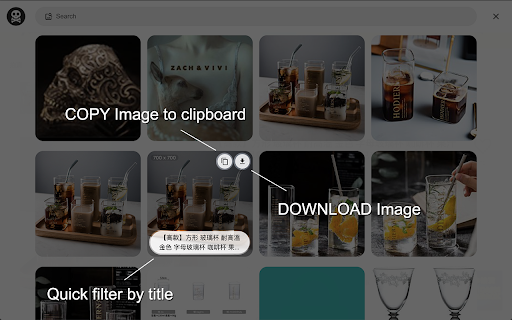

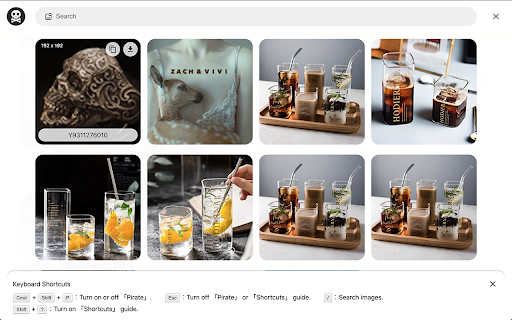
Pirate - Provide users grab current web page's all images into files or clipboard. - How to use 「Pirate」? 1. Press contextMenu & choose 「Pirate」to turn it on. 2. Pick image you like to 「 COPY 」or 「 DOWNLOAD 」it. 3. You could also use search function to find images you like quickly.

Image downloader - Imageye
Find and download all images on a web page with Image downloader. With this Image Downloader, you can find, browse, convert and download all the images present on a web page. Additionally, you can: - Filter based on pixel width and height - Filter based on URL - Bulk download all images at once - Select which images you want to download - Check the size of each image - Copy the URL of the original image - Choose between various layout options - Support all major websites (Instagram, Facebook, Twitter, ...) - Perform a reverse image search - Convert .webp to .jpg - Convert any image type to webp, jpg or png (If you are a web dev and you need to convert all the images of a webpage you can now do it in one click) - Side Panel - Sort by Position in page - Capture selection (beta) Imageye - Image Downloader is a tool that helps you find the images published on a web page. The images may be protected by copyright and you should always assume that they are. Before reusing an image, make sure you check its license and the specific terms of reuse. Do not use any image, illustration or photograph without researching its copyright status first.

Image Downloader | Suricata
Find and download all images on a web page in bulk or individually. You can filter the images based on image characteristics. You can select which image to download or download all images that pass filtering. You can choose a custom folder for the images and a custom file name sequence. Main features: • Very quick and clean group display of all images. • Download a single, multiple or all images in the web page. • Filter images by: width, height, type, orientation and aspect ratio or URL. • Custom or auto generated folders and files names. • Auto convert files to JPEG, PNG or WebP. • Side panel is supported.

Image Downloader - picture and photos saver
Find and download images from any web pages. Filter or select all at once to bulk download. Image Downloader let's make your life easier just in one click. This extension allows you to download all the images from the web pages in simple manner. This Chrome extension does not weigh a lot and simply does its job - download images. Help us to improve our product and leave a comment or request. Image Downloader is simple, fast, reliable and easy to work with. If you want instantly download image then you definitely should install our new and amazing Chrome extension. Don't forget to share this extension with friends. With this Picture Downloader you can find, browse and download all the images present in a web page. In addition you can: ➖ filter based on pixel width and height ➖ multiple formats available including PNG, JPEG, SVG, WEBP ➖ filter based on url ➖ bulk download all images in once ➖ select what images you want to download ➖ check the size of each image ➖ copy the url of the original image ➖ choose between various layout options ➖ supporting all principal websites (Instagram, Facebook, Twitter, ...) Now you can download all the images you might ever need. Every image format can be downloaded by this Photo Downloader extension. Our new application doesn't weigh a lot but simply does the job. Don't wait and install brand new extension and you'll get something special. Bulk Image Downloader (BID) makes it easy to download full sized images from almost any thumbnailed web gallery. Supports most popular image hosts such as imagevenue, imagefap, flickr and too many others to list here. You can right-click on the images you want to download and choose the save option or pull them from your browser cache, which will automatically appear when you view them in your browser. Unlike other Image Downloader extensions in the Chrome Store that charge you for different image download options. We are complete free and You can download with one click. Thank you for use it, if you like it, please give it 5 stars the extension!

Share-it
"Share it" is a browser extension that allows you to easily share and copy web pages in various formats. Sharing pages during everyday web browsing can be a hassle. Manually copying titles and URLs, searching for social media share buttons, and other tasks can be time-consuming. "Share it" solves these tasks with a single click. This extension is released as open-source software under the MIT license. The source code is available on GitHub, and contributions from the community, such as bug reports, feature improvements, and pull requests, are welcome. https://github.com/psephopaiktes/share-it Features: - Simple and intuitive UI - Operable with keyboard only - Customizable sharing formats - Lightweight and fast performance Functions: - Add to Google Calendar - Add to Trello - Analyze with PageSpeed Insights - Analyze with Wappalyzer - Check in Wayback Machine - Copy link as HTML - Copy link as Markdown - Copy link as Rich Text - Copy title - Copy title & URL - Hatena Bookmark - Open shorten Amazon URL - Open with Google Translate - Post to Blogger - Post to Bluesky - Post to Buffer - Post to Hacker News - Post to Mastodon - Post to Threads - Post to Tumblr - Post to WordPress - Post to X - Post to note - Print - Save to Instapaper - Save to Pinterest - Save to Pocket - Save to Raindrop.io - Save to Raycast Notes - Save to Refind - Search RSS on Feedly - Send via Email - Send via Gmail - Send via Outlook - Send via SMS - Send with Messenger - Send with Viber - Share on Digg - Share on Facebook - Share on Flipboard - Share on LINE - Share on LinkedIn - Share on Plurk - Share on Snapchat - Share on Telegram - Share on VKontakte - Share on Weibo - Share on WhatsApp - Share with OS Extensions - Show QR code - Submit to Reddit - Send page to ChatGPT - Send page to Claude - Send page to Microsoft Copilot - Send page to Grok - Send page to Perplexity
