
njfalnkngflpodcniomgljfkopmnedma
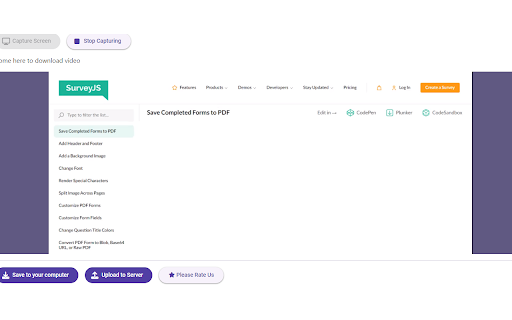
Screen Recorder is a software that allows you to capture and record your computer screen right in the browser! Capture, Download, and Share Your Screen with Ease Introducing the ultimate screen capture solution for Chrome users! Our powerful Chrome extension is designed to help you capture your entire screen, specific tabs, or application windows effortlessly. Whether you're a professional, educator, or everyday user, our extension simplifies screen capturing, saving, and sharing. Entire Screen: Capture everything on your screen with a single click. Specific Tabs: Select and capture individual browser tabs for focused content. Application Windows: Capture specific application windows to highlight your workflow. Easy Download: Save your captures directly to your computer in high-quality formats. Choose between popular image formats like PNG and JPEG. For video captures, save in the widely compatible WEBM format. Seamless Upload and Share: Upload to Server: Instantly upload your captures to our secure server. Sharable Link: Get a shareable link to your uploaded captures, making it easy to share with colleagues, friends, or on social media. Privacy and Security: Rest assured that your uploads are stored securely with robust privacy measures. Convert to MP4: Convert your video captures from WEBM to MP4 for broader compatibility and easier sharing. Use our built-in conversion tool to ensure your videos can be viewed on any device or platform. User-Friendly Interface: Intuitive Design: Our extension is designed with simplicity in mind, ensuring a seamless user experience. Quick Access: Easily access capture options from the extension icon in your browser toolbar. Real-Time Preview: Preview your captures before saving or uploading to ensure accuracy. Enhanced Productivity: Annotations and Markers: Add annotations, highlights, and markers to your captures for clearer communication. Clipboard Support: Quickly copy captures to your clipboard for immediate use in documents and presentations. Customizable Settings: Adjust capture settings to fit your specific needs, including resolution and format options. Integration and Compatibility: Cloud Integration: Option to save captures directly to popular cloud storage services. Cross-Platform Support: Works seamlessly on Windows, macOS, and Linux. Browser Compatibility: Fully compatible with the latest versions of Chrome. Support and Updates: Regular Updates: We continuously improve our extension with new features and enhancements. Dedicated Support: Our support team is always ready to assist you with any questions or issues. Why Choose Our Extension? Efficiency: Streamline your workflow with quick and easy screen captures. Flexibility: Capture, save, and share your screen in multiple ways. Reliability: Trust our secure server and robust features to handle your screen captures. How It Works: Install the Extension: Add our extension to your Chrome browser from the Chrome Web Store. Select Capture Mode: Choose to capture your entire screen, a specific tab, or a window. Capture and Save: Capture the screen and save it directly to your computer or upload it to our server. Share or Convert: Get a shareable link for your upload or convert your video to MP4 format. Testimonials: John D.: "This extension has transformed how I share information with my team. The upload and share feature is a game-changer!" Sarah K.: "I love how easy it is to capture specific tabs and windows. The MP4 conversion makes sharing videos so much simpler." Get Started Today! Don’t miss out on the most efficient and user-friendly screen capture solution for Chrome. Install our extension now and start capturing, saving, and sharing your screen with ease. Download the Extension Today

Loom – Screen Recorder & Screen Capture
Record your screen and camera with one click. Share that content in an instant with a link. Loom is the industry leading screen recording tool. Join more than 14 million people across 200,000 companies who use Loom to record their screen, share their thoughts visually, and provide asynchronous feedback. With Loom you can record your screen and instantly get a link to share with anyone. It’s the fastest and easiest way to screen capture and stay connected with your team. Whether you’re screen recording a product demo, giving feedback, or simply sharing your thoughts, Loom makes it simple to stay in the loop with async video. KEY FEATURES 📽️ Record your screen, camera, microphone, and internal audio 💾 Automatically save videos to the cloud and share them instantly with a link 💬 Get notified when someone views, reacts, or comments on your video 😀 Leave time-based comments and emoji reactions 📚 Manage your Loom video library on-the-go and across devices 🔒 Choose who can see your video with security and access controls ⏬ Download recordings to your camera roll 📽️ Screen Recorder 📽️ - Record your screen, camera, or both for free - iOS and Android apps to record your mobile phone - Record in 720p, 1080p, 1440p, or 4k HD - Add flair to your video with camera frames, backgrounds, and camera effects like blurring 💾 Video Hosting 💾 - Store your videos inside of Loom HQ - Upload Zoom and Google Meet recordings directly into Loom to search and find later - Create hashtags to keep track of important videos 🪄 Share With A Link 🪄 - Our recordings finish so fast that we had to file multiple patents - Anyone in the world can watch your screen recording for free - Share your videos to LinkedIn, Twitter, or publish to the Google Search index 🗣️ Drive Engagement 🗣️ - Use comments and emoji reactions to boost engagement - Respond with your own Loom in the comments to create a video message thread - Loom videos automatically display in Slack and Microsoft Teams ⏱️ Meeting Replacement ⏱️ - Send a Loom instead of having another standup meeting - Record a presentation with Loom and send it to your audience ahead of time - Screen record your next weekly update to add rich visual context and your own personal touch TRUSTED BY THE BEST Over 14 million people across 200,000 companies use Loom to record, share, and review asynchronous video. From HubSpot, to Atlassian, to Netflix, Loom is the screen recording and collaboration tool of choice for top companies. EVERYTHING YOU NEED AND MORE Using Loom, you can collaborate with your team, add time-stamped comments and reactions to those videos, and save videos you’ve recorded to your device. Now, you can spend less time crafting the perfect email between meetings, and say it with video using Loom. ABOUT LOOM Loom is the leading video communication platform for async work. Engineered for simplicity and speed, you can record, watch, and share videos to move work forward whether you're at your desk or on the move. LOOM IN THE NEWS "Why are we all trapped in enterprise chat apps if we talk 6X faster than we type, and our brain processes visual info 60,000X faster than text?...now is the time for Loom." – TechCrunch "It fills this gap between writing an email and taking the time to have a meeting or conference...it's rare to have something that's low friction and high impact, while also adding personal connection." – Forbes “Asynchronous video is catching on fast, and Loom thinks it's going to change the way we work. And maybe do everything else, too.” – Protocol

Screen Recorder for Google Chrome™
Screen Recorder is a software that allows you to capture and record your computer screen right in the browser! Use this free screen recorder software to make video recordings / screen recordings directly from the Chrome browser and share these video recordings with your friends/colleagues. To begin using the software Screen Recorder for Google Chrome™, simply click on "Start Capture" to begin recording your computer screen. Once you have finished recording your video, click on "Stop capture" to stop the video. You can save the video you made onto your computer/Google Drive. Its simple and easy to use Screen recorder to make video tutorials/software help videos etc and much more. Disclaimer: Please note this extension is NOT made by Google and is made by an independent development team. All copyrights belong to their respective owners. Google doesn’t endorse or sponsor this Chrome extension. Screen Recorder for Google Chrome™ is not owned by, is not licensed by and is not a subsidiary of Google Inc.

Screen Capture and Screen Recorder
Screen capture and screen recorder tool to record screen. Get more out of your screen captures! Take screenshots for free. Introducing the Ultimate Screen Capture and Screen Recording Extension for Chrome! Are you tired of the limited screenshot and screen recording capabilities of your browser? Look no further! Our Chrome browser extension is here to revolutionize your online experience. With an array of powerful features designed to cater to all your screen capture and recording needs, this simple yet versatile extension is completely free, giving you the tools you need without breaking the bank. 📷 Capture Your Screen ✔ Whole Page Say goodbye to tedious scrolling and stitching! Our extension allows you to capture entire web pages in a single, seamless screenshot. Whether it's a lengthy article, a captivating webpage, or an extensive document, you can capture it all with ease. ✔ Visible Area Sometimes, you don't need the whole page. Our extension lets you snap a screenshot of just the visible area on your screen, saving you time and ensuring you get exactly what you need. ✔ Selected Area Precision matters. Select and capturing a specific area of your screen, is perfect for highlighting important information or showcasing a particular part of a webpage. 🎥 Record Your Screen Like a Pro ✔ Desktop Bring your screen to life! Record your entire desktop to create comprehensive tutorials, presentations, or demonstrations. ✔ Current Tab Focus on what matters most! Capture only the content within the current browser tab. Ideal for recording webinars, video conferences, or gameplay without distractions. ✔ Record Yourself Personalize your content! With the option to record yourself via your device's camera, you can add a personal touch to your screen recordings. Perfect for vlogs, video messages, or commentary. Our extension is not only feature-rich but also incredibly user-friendly. You'll be capturing screenshots and recording your screen like a pro in no time. Best of all, it's completely free, so there are no hidden costs or subscriptions to worry about. Whether you're a student, a professional, or just someone who loves to share content online, our Chrome browser extension is your go-to tool for all your screen capture and screen recording needs. Elevate your online presence, streamline your workflow, and unlock new possibilities today!

Awesome Screen Recorder & Screenshot
The best screen recorder and screen capture & screenshot tool to record screen. Want to share your screen for purposes such as reporting technical issues, creating product demos, or crafting how-to tutorials? Here are 🔟 reasons to choose Awesome Screen Recorder & Screenshot. 1️⃣ Provide stable service for more than 10 years 2️⃣ Loved by more than 4 million users across different platforms 👍 3️⃣ Local Screen Recorder & Cloud Screen Recorder 2 in 1 4️⃣ Screenshot/Screen Capture & Screen Recording 2 in 1 5️⃣ Record in WebM or MP4 6️⃣ Powerful features specially designed for work and educational scenarios 7️⃣ No ads and respect your privacy 8️⃣ Easy to use 9️⃣ Instantly share your screenshots and screen recordings 🔟 Most importantly, your voice matters! 🗣 & continuous improvements Here are some features for recording screens and capturing screenshots: 🎦🎦🎦 Screen Recorder 🎦🎦🎦 🎥 Record ▸ Record your Desktop (Entire Screen or Window), Current Tab or Camera only ▸ Include your voice in recording with the Microphone option on ▸ Include your face in your video by embedding your webcam ▸ Choose video dimensions from 720p, 1080p or 4K 💾 Save ▸ Save recordings to your local disk ▸ Save recordings to your online account ▸ Download uploaded videos in the MP4 or WebM format 🖍 Annotate & Edit ▸ Annotate the screen while recording ▸ Annotate and edit the video after recording Prefer to screenshot web pages as images? No problem, you can set the Capture tab as the primary tab. 📷 Screen Capture ▸ Capture a screenshot of the page you visit, full page, selected area or visible part ▸ Capture a screenshot of your entire screen or a specific application window ▸ Capture visible part, entire screen or app window after delay 🖍 Annotate Screenshot ▸ Resize or crop a screenshot to the size you need ▸ Annotate your screenshot with rectangles, circles, arrows, lines, etc. ▸ Add text to your screenshot with or without background color, change text font and font size ▸ Blur sensitive information on your screenshot ▸ Highlight important part on your screenshot ▸ Select a local image or paste a copied image from your clipboard to annotate 📥 Save & Share Screenshot ▸ Save screenshot as image in PNG or JPG format, or download screenshot as PDF ▸ One click to save screenshot to your Awesome Screenshot account and get a shareable link ▸ Send a screenshot to a destination in Jira, Slack, Trello, Asana, GitHub ▸ Copy a screenshot directly when capturing selected area for quick pasting 📧 Contact us📧 If you have any questions, suggestions, or feature requests, feel free to contact us by clicking Feedback (recommended) in our browser extension’s popup menu or by this page https://www.awesomescreenshot.com/contact_us. Thank you.
