
nlipoenfbbikpbjkfpfillcgkoblgpmj


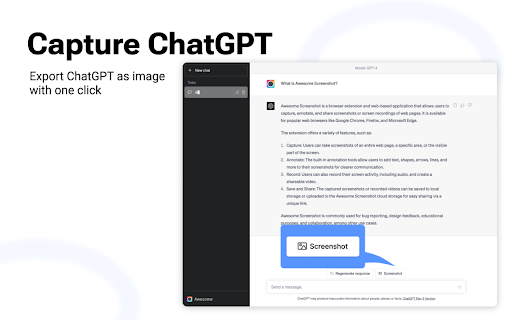
The best screen recorder and screen capture & screenshot tool to record screen. Want to share your screen for purposes such as reporting technical issues, creating product demos, or crafting how-to tutorials? Here are 🔟 reasons to choose Awesome Screen Recorder & Screenshot. 1️⃣ Provide stable service for more than 10 years 2️⃣ Loved by more than 4 million users across different platforms 👍 3️⃣ Local Screen Recorder & Cloud Screen Recorder 2 in 1 4️⃣ Screenshot/Screen Capture & Screen Recording 2 in 1 5️⃣ Record in WebM or MP4 6️⃣ Powerful features specially designed for work and educational scenarios 7️⃣ No ads and respect your privacy 8️⃣ Easy to use 9️⃣ Instantly share your screenshots and screen recordings 🔟 Most importantly, your voice matters! 🗣 & continuous improvements Here are some features for recording screens and capturing screenshots: 🎦🎦🎦 Screen Recorder 🎦🎦🎦 🎥 Record ▸ Record your Desktop (Entire Screen or Window), Current Tab or Camera only ▸ Include your voice in recording with the Microphone option on ▸ Include your face in your video by embedding your webcam ▸ Choose video dimensions from 720p, 1080p or 4K 💾 Save ▸ Save recordings to your local disk ▸ Save recordings to your online account ▸ Download uploaded videos in the MP4 or WebM format 🖍 Annotate & Edit ▸ Annotate the screen while recording ▸ Annotate and edit the video after recording Prefer to screenshot web pages as images? No problem, you can set the Capture tab as the primary tab. 📷 Screen Capture ▸ Capture a screenshot of the page you visit, full page, selected area or visible part ▸ Capture a screenshot of your entire screen or a specific application window ▸ Capture visible part, entire screen or app window after delay 🖍 Annotate Screenshot ▸ Resize or crop a screenshot to the size you need ▸ Annotate your screenshot with rectangles, circles, arrows, lines, etc. ▸ Add text to your screenshot with or without background color, change text font and font size ▸ Blur sensitive information on your screenshot ▸ Highlight important part on your screenshot ▸ Select a local image or paste a copied image from your clipboard to annotate 📥 Save & Share Screenshot ▸ Save screenshot as image in PNG or JPG format, or download screenshot as PDF ▸ One click to save screenshot to your Awesome Screenshot account and get a shareable link ▸ Send a screenshot to a destination in Jira, Slack, Trello, Asana, GitHub ▸ Copy a screenshot directly when capturing selected area for quick pasting 📧 Contact us📧 If you have any questions, suggestions, or feature requests, feel free to contact us by clicking Feedback (recommended) in our browser extension’s popup menu or by this page https://www.awesomescreenshot.com/contact_us. Thank you.

Screen capture and recorder - Screenshot Tool
Record screen and camera, screenshot, edit, and share via Google Drive Unveiling a Comprehensive Screen Capture and Screen Recorder Tool Navigating the world of screenshots and screen recordings just became simpler. This versatile tool is your one-stop solution for all your screen capture and screen recording needs, designed with a vast array of features tailored for today's digital age. ⚡SCREEN CAPTURE FEATURES⚡ ⭐ The screenshot function lets you effortlessly capture a full webpage, a designated section, or just the currently visible area. ⭐ After making a screen capture, you can immediately dive into editing, then save in formats like PDF, JPEG, and PNG. ⭐ Quick storage ensures no lag, and the offline mode offers screen capture without any data worries. ❗ Elevate your screenshots with powerful editing tools: 👉 Easy sharing to Google Drive or through a link. 👉 Copy your screen captures to your clipboard instantly. 👉 Resize, crop, and tailor your captures. 👉 Annotations with various shapes, perfect for highlighting. 👉 Insert and modify text to convey more with your screenshot. 👉 Emphasize vital points with the highlight feature. ⚡SCREEN RECORDER FEATURES⚡ ⭐ Dive into the seamless world of screen recording with this tool, allowing you to grab videos and get an immediate sharing link, making collaborations a breeze. ⭐ From product walkthroughs to feedback rounds, the screen recorder ensures you stay synced with your team, thanks to the async video feature. ❗ Screen recorder capabilities include: 👉 Recording your desktop, a particular browser tab, or your camera feed. 👉 Integrate your reactions into the screen recording by embedding your webcam. 👉 Add a personal touch with voiceovers via the microphone option. 👉 Store your recordings either locally or on Google Drive. 👉 Choice of WebM or MP4 download formats. 👉 Instant sharing links after each recording session. In sum, for those seeking a robust screenshot, and screen recorder tool, this Chrome extension is the answer, housing a myriad of options for all your capturing and recording desires.

Screenshot - Webpage Screen Capture
Convenient screenshot tool. Capture, edit and save them to jpeg, gif or png, drop comments and share. Screenshot is an all-in-one platform for all your needs. Just choose what you need now! This handy tool integrates seamlessly into your browser, providing a quick and efficient way to capture the content you see on your screen. All for Free & No sign in needed! Here are some features: ▸ Whole Page screen capture - No matter how long the page is, you can turn the page into a picture for easy editing and sharing. ▸ Visible Area screen capture - Fast capture the viewable area of the current web page. ▸ Selected Area screen capture - Select and capture anything you want. Our extension is not only feature-rich but also incredibly user-friendly. You'll be capturing screenshots in no time. Best of all, it's completely free, so there are no hidden costs or subscriptions to worry about. If you have any questions, suggestions or feature requests, feel free to submit to our Screeshot team.

Screen Recorder & Screenshot App for Chrome | Scrnli
Screen recorder for Chrome, take screenshots, record screen and video, capture, edit and share instantly Scrnli is a powerful screen recorder and screenshot tool for Chrome that lets you capture your screen, record video, take screenshots, and share content instantly. Use Scrnli to record your screen, capture full pages, edit screenshots, and create video recordings for work, study, or communication. Why Choose Scrnli screen recorder and screenshot app Screenshot Tool for Chrome - Capture full page, selected area, or visible screen Screen Recorder for Chrome - Record screen, browser tab, or desktop video Edit Screenshots - Annotate, draw, add text, arrows, and highlights Instant Capture - Take screenshots and record screen with one click Easy Sharing - Share screenshots and videos instantly via link Save and Download - Save screenshots and screen recordings locally Lightweight Extension - Works smoothly without slowing down Chrome Secure and Private - Your data stays safe and under your control What You Can Do with Scrnli Take Screenshots - Capture full page screenshots or selected areas Record Screen Video - Record tutorials, meetings, and presentations Create Tutorials - Record screen and explain processes visually Improve Communication - Share screenshots and videos instead of text Save Important Content - Capture and store useful information How to Use Screen Recorder & Screenshot Tool 1. Install Scrnli from the Chrome Web Store 2. Click the extension icon 3. Choose screenshot or screen recording mode 4. Capture your screen or record video 5. Edit, save, or share instantly Capture and record your screen in seconds with this easy-to-use screen recorder for Chrome. Full Page Screenshot - Capture entire web pages Visible Screen Capture - Capture what you see Area Screenshot - Select and capture specific areas Instant Editing - Add text, arrows, and highlights Screen Recorder Features Record Screen - Capture desktop, browser tab, or window Video Recording - Record video with smooth performance Quick Sharing - Share recordings instantly Save Video - Download recordings for offline use Why Users Install Scrnli Screen Recorder • Easy screenshot and screen recording tool • Fast capture and editing features • Share screenshots and videos instantly • Lightweight and simple to use • Perfect for work, study, and daily tasks Privacy and Security Scrnli Screen Recorder does not collect or store personal data. Your screenshots and recordings remain private.

ScreenClip - Screenshot, Comment & Annotate
ScreenClip is the easiest and most powerful screenshot extension for Chrome. With ScreenClip, you can take screenshots of entire web pages, selected areas, or even individual elements. You can add annotations or comments to your screenshots, and save them to your computer or cloud storage. ✓ Take screenshots of entire web pages and visible areas. ✓ Automatically copy the image to your clipboard so you can paste it anywhere. ✓ Use the snipping tool to capture specific parts of the webpage. ✓ Add annotations to your screenshots, such as text + arrow, arrows, rectangles, and text labels. ✓ Stand out texts or elements with the highlighter tool. ✓ Draw with the pen tool. ✓ Securely obfuscate sensitive information with the blur tool. ✓ Enable and edit screenshot hotkeys to capture even faster. ✓ Save your screenshots to your computer or browser storage. ✓ Easy access your previous screenshots. Sync your browser extension with ScreenClip's Cloud Storage (for free!) to enable even more possibilities, like: ✓ Automatically generate and copy shareable links. ✓ Write and reply to comments. ✓ Edit your annotations in ScreenClip's web editor. ✓ See clip previews when sharing on messaging apps. ✓ Sync with your Google Drive account. ✓ Generate interactive picture viewers when sharing the link within CMS. ✓ Show embedded interactive picture viewers on websites by pasting the auto-generated HTML code. ScreenClip is the perfect tool for anyone who needs to take screenshots, annotate, save, and share them. It's easy to use, powerful, and versatile. Give ScreenClip a try today!
