
njeoacbbipahjonmjgdgpoflepldehae
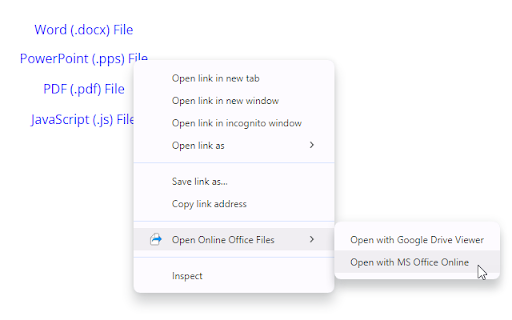
Supported services Google Drive Viewer™ and MS Office Online™ Viewer. Files should be online and publicly accessible. Supports various file formats including ZIP, DXF, PSD and many more. Visit our home page for complete list. Extension not created by Google or Microsoft.

Office Web
Displays online office documents in the browser (.doc*, .ppt*, .xls*, .odt) View office apps by intercepting their downloads and parsing it to an online viewer engine. Once viewed, you may download the file via the download button on the viewer page or by resuming the intercepted download through the downloads panel (ctrl + J) . Otherwise, disable the extension to download office files directly.

Office Tools
Quicker way to access the Google Office Tools. By downloading our Office Tools New Tab extension, you’ll get faster access to your everyday Google Office Tools, from docs and sheets, to slides, even Google maps and translate Just open a new tab and access Google Office Tools straight from your browser - Providing the best search results by changing your search engine on the new tab to Bing - Access to all the Google Office Tools, including Google Maps & Translate straight from your browser - Easy view time of day - Quick links to your favorite social media platforms By clicking "Add to chrome", I accept and agree to installing the Office Tools™ extension and setting Chrome™ New Tab and new tab search engine to that provided by the service and the Privacy(https://triplex.media/privacy_policy.html) and Terms of Use(https://triplex.media/terms.html).

Docs Viewer
Easily view PDF and MS Office documents in your browser. Docs Viewer is an extension that let you open and view a wide range of online documents right in your browser (new tab). Simply add the add-on to your browser and start surfing. Once you see a document link (i.e. .doc, .docx, .ppt, .pdf), please right-click on the link and then select - View Document - from context menu. The document will be rendered and opened in a new tab. You can also, print the document to PDF or send it to a printer right away (via the print button within the page). Please note that this add-on uses the google gview engine to render the document. Moreover, it supports a wide range of documents, including pdf, doc, docx, ppt, and more. If you have a feature request or found a bug to report, please fill out the bug report form on the add-on's homepage (https://mybrowseraddon.com/docs-viewer.html).

OpenOffice Calc online for xls spreadsheets
Create and edit xls and xlsx spreadsheets with OpenOffice Calc online OpenOffice Excel online for XLS spreadsheets is an extension that allows to create, edit and view any Microsoft Excel spreadsheet in both xls and xlsx formats. It is a spreadsheet processor integrated with our file manager to manage only XLS file types with this desktop app. The OpenOffice Excel main features are: - Wizards that guides you through choosing and using a comprehensive range of advanced spreadsheet functions. - Flexible cell formatting options: rotating contents, templates, backgrounds, borders, and many more. - Possibility to cross-tabulate and summarise. - Creating formulas using words. - The Intelligent Sum Button inserts a sum function or a subtotal automatically, depending on context. - Range of templates from Extensions repository for ready-made spreadsheet solutions. - Advanced Styles and Formatting. - Save your spreadsheets in OpenDocument format, the new international standard for office documents. But you are free to use your old Microsoft Excel spreadsheets, or save your work in Excel format or use Portable Document Format (.pdf). - Integrated with a file manager to save, upload and download xls files. This extension uses the platform http://www.offidocs.com. It is an integration with an Open Office Linux desktop application. In concrete, it is a desktop app running through our OffiDocs API. It is available for free online users but it also allows the integration with premium users and on-premises OffiDocs deployments where the OffiDocs OpenOffice Excel is installed. IMPORTANT: This extension scans the URLs browsed in order to detect XLS files. The XLS files detected appear in a list located in the extension popup that are retrieved from our servers. The scanning is performed from our servers so your URL are reported to our system. No personal data is collected. This scan can be disabled with a checkbox that appears in the extension popup. If you disable this scanning, this functionality is not available so then the extension functionality is very limited.
