
mfjlpophppgflakehjnjkanmlhkbelfi
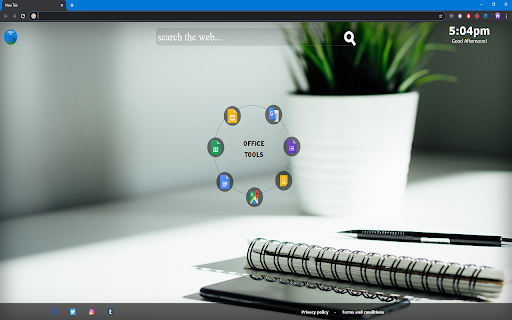
Quicker way to access the Google Office Tools. By downloading our Office Tools New Tab extension, you’ll get faster access to your everyday Google Office Tools, from docs and sheets, to slides, even Google maps and translate Just open a new tab and access Google Office Tools straight from your browser - Providing the best search results by changing your search engine on the new tab to Bing - Access to all the Google Office Tools, including Google Maps & Translate straight from your browser - Easy view time of day - Quick links to your favorite social media platforms By clicking "Add to chrome", I accept and agree to installing the Office Tools™ extension and setting Chrome™ New Tab and new tab search engine to that provided by the service and the Privacy(https://triplex.media/privacy_policy.html) and Terms of Use(https://triplex.media/terms.html).

1 Click Google Docs
This extension allows you to create a new Google Doc with just one click. Are you tired of clicking to Google Drive to create a new Google Doc? Create new Google Docucments with just one click with this extension. Create a document quickly today using our simple software extension. This will open a new Google document with just one click. This extension is a timesaver if you need to create online documents on a regular basis.

PDF Converter
With our PDF Extension. When you open a New Browser Tab life is easier to quickly and easily convert documents to PDF Simple open new tab, and drag and drop your into the browser for an instant conversion. Easy to use interface to convert files quickly and easily. Key Features Include - Providing the best search results by changing your search engine on the new tab to Bing - Drag and drop convert feature for faster conversion - Quick view time of day - Access to your social media platforms By clicking "Add to chrome", I accept and agree to installing the PDF Converter Chrome™ extension and setting Chrome™ New Tab and new tab search engine to that provided by the service and the Privacy (https://triplex.media/privacy_policy.html) and Terms of Use(https://triplex.media/terms.html).

Editor for Docs, Sheets & Slides
View, edit and select the layout of Google Docs, Sheets, and Slides with an easy access via extension menu It’s a perfect tool for working with Google Docs, Sheets, and Slides. Easy access to Google Drive files with opportunity to select layout and pin the file during your work. Convenience layout options allows to compare several documents or stay with opened file in the corner of the screen during the Skype call. Evaluate the advanced functional that widens your opportunities: - Create and edit Google Docs, Sheets, and Slides with just one click. Easy access saves your time during the work - Select layout for opened files - Stay focused on the one current file using the pin button In case of any questions please contact the developer team using the contact form.

Document Editor
Create, edit and share Docs, Sheets, Slides, Word, Excel, PowerPoint documents. Work with others on shared projects. Tools for Create, edit and share Docs, Sheets, Slides, Word, Excel, PowerPoint documents. Work with others on shared projects, in real-time. This extension provides quick links to edit documents right away. You can create or edit a new document by simply clicking the icon on the extension. You can create and edit documents, spreadsheets, diagrams, shapes, forms, presentations, and, database on the browser. It's easy to use thanks to the intuitive interface, so inexperienced users have no problems in figuring out all that it has to offer.
