
njebjbcipckdajebnkkmjnjomaomblen


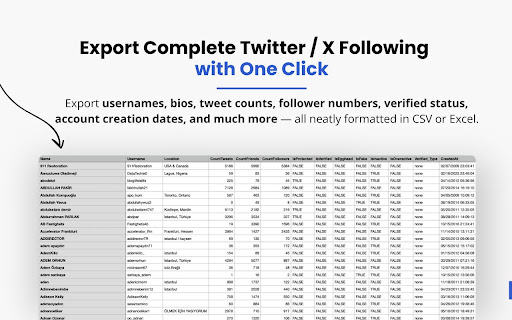
Export your following to a CSV or XLSX file. Circleboom Twitter makes it effortless to export the complete following list of any public Twitter/X account with rich, structured data. As an official enterprise partner of Twitter/X, Circleboom ensures compliance, speed, and safety — no scraping hacks or third-party risks. Whether you're researching competitors, exploring audience interests, or mapping influencer networks, this Chrome extension helps you get the insights you need. Forget manually scrolling and copying one by one. With the Export Followings feature, you can download who someone follows, including full metadata like usernames, bios, follower counts, tweet volume, verified status, and more. Simply enter a username, click “Export Followings,” and receive a clean CSV or Excel file within seconds. ✔ Export Twitter/X followings of any public account ✔ Discover who your competitors or favorite creators follow ✔ Analyze patterns in connections and interests ✔ Includes bios, follower/following counts, tweet activity, verification status ✔ Ideal for market research, influencer mapping, outreach lists ✔ Clean, well-structured CSV/Excel output – ready for action ✔ 100% secure – powered by official Twitter/X API via Circleboom ✔ Easy to use – no technical skills required Unlock powerful insights from any Twitter/X following list! Start exporting now with Circleboom – create your account at Circleboom.com and use the Chrome extension today.

Export Chrome History
Export your Chrome History as an Excel-readable CSV file or as a JSON file. To use this extension, click the puzzle piece in the top right, then click on Export Chrome History. This extension is limited by Chrome's 3 month limit - this is separate from your google account's history. If you have a Google account and need browser history from more than 3 months ago, please search online for help with Google Takeout instead. Version 1.0.1.0 * Indicate that the "Forever" option is limited by Chrome's 3 month (90 day) browsing history memory. * Pad the .csv minute and second times. For example, the time goes from 5:3:7 to 5:03:07 when viewed in plain text.

Twitter Comments Exporter
Easily export and download Tweets & Replies from any user to XLSX/CSV. Effortlessly export tweets from a Twitter user with one-click. Seamlessly download and archive tweets for social media analysis, comprehensive reporting, personal records, or digital marketing strategies. Our tool provides an easy and efficient way to export Twitter data, ensuring you never lose important tweets. Try our Twitter export feature today and simplify your social media data management. ⚙️ Get Started 1.Enter Username. 2.Choose export type. 3.Click the 'Export' button. 🔒 Data Privacy Your data privacy is paramount. All data processing occurs on your local machine; it never transits through our servers, ensuring no one else has access to your collected data. 👋 Contact For support or inquiries, reach out to us at lazytechofficial@gmail.com ⚠️ Disclaimer TWITTER is a trademark of X Corp. Twitter Comments Exporter is an independent tool and is not affiliated with, endorsed, sponsored, or otherwise connected to X Corp., Twitter, Inc., or any of their affiliates or subsidiaries.

Twitter/X Exporter - Export Tweets, Followers, Bookmarks to CSV
Twitter Exporter: The Ultimate Tool to Export X / Twitter Data Twitter Exporter is a professional browser extension designed for data analysts, marketers, and content creators. It allows you to scrape and export public data from any Twitter / X account into usable file formats with just one click. Whether you need to analyze competitor strategies, backup your own tweets, or monitor brand sentiment, this tool makes it easy to "Export Twitter / X Data" securely and efficiently. 🔥 CORE FEATURES We support comprehensive data extraction for all major X / Twitter modules: ✅ Export X / Twitter Replies Download user replies and comments to analyze interaction patterns and engagement. ✅ Export X / Twitter Followers Quickly export the followers list of any account to identify potential leads and analyze audience demographics. ✅ Export X / Twitter Following Export the list of people a user is following to understand their network and interests. ✅ Export X / Twitter Bookmarks Batch export and backup your saved bookmarks so you never lose valuable content. ✅ Export X / Twitter Search Results Enter any keyword or hashtag and bulk export the search results. Perfect for trend analysis and brand monitoring. 📂 EXPORT FORMATS We offer flexible export options to fit your workflow: • Export X / Twitter Data to Excel (xlsx) Formatted specifically for Microsoft Excel. Data is organized into columns for immediate analysis. • Export X / Twitter Data to CSV Universal comma-separated format. Perfect for importing into databases or processing with Python/Pandas. • Export X / Twitter Data to JSON Includes full metadata structure. Ideal for developers who need raw data for custom applications. ⚡ WHY CHOOSE TWITTER EXPORTER? Privacy First & Secure All data processing happens locally in your browser. We do not require your password, and your data is never uploaded to third-party servers. Rich Data Fields Our export files are packed with details, including: Tweet Content, Creation Date, Like Count, Retweet Count, Reply Count, Permalink, User ID, and more. Easy to Use Clean and intuitive interface. No coding skills required—simply click "Export" to start. Always Updated We actively maintain the extension to ensure compatibility with the latest Twitter (X.com) interface changes. 🎯 USE CASES Marketers: Lead generation and competitor analysis. Researchers: Social media data mining and sentiment analysis. Content Creators: Backup personal archives and track engagement. Install Twitter Exporter now to unlock the power of X / Twitter data! Disclaimer: Twitter Exporter is a third-party extension and is not affiliated with Twitter, Inc. or X Corp.

Twitter Comment Export Tool
Easily export and download Tweets & Replies from any users to XLSX/CSV. Effortlessly export tweets from a Twitter user with one-click. Seamlessly download and archive tweets for social media analysis, comprehensive reporting, personal records, or digital marketing strategies. Our tool provides an easy and efficient way to export Twitter data, ensuring you never lose important tweets. Try our Twitter export feature today and simplify your social media data management. ⚙️ Get Started 1.Enter Username. 2.Choose export type. 3.Click the 'Export' button. 🔒 Data Privacy Your data privacy is paramount. All data processing occurs on your local machine; it never transits through our servers, ensuring no one else has access to your collected data. 👋 Contact For support or inquiries, reach out to us at lazytechofficial@gmail.com ⚠️ Disclaimer TWITTER and X are trademarks of X Corp. Twitter Comment Export Tool is an independent tool and is not affiliated with, endorsed, sponsored, or otherwise connected to X Corp., Twitter, Inc., or any of their affiliates or subsidiaries.
