
ajigebgoglcjjjkleiiomgbogggihibe

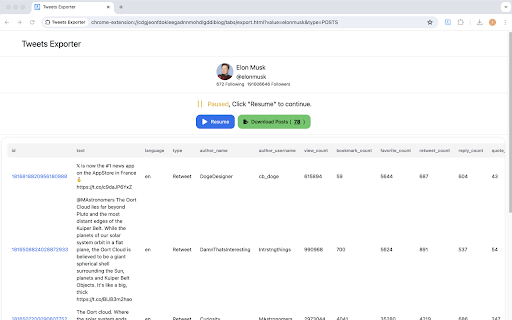

Easily export and download Tweets & Replies from any users to XLSX/CSV. Effortlessly export tweets from a Twitter user with one-click. Seamlessly download and archive tweets for social media analysis, comprehensive reporting, personal records, or digital marketing strategies. Our tool provides an easy and efficient way to export Twitter data, ensuring you never lose important tweets. Try our Twitter export feature today and simplify your social media data management. ⚙️ Get Started 1.Enter Username. 2.Choose export type. 3.Click the 'Export' button. 🔒 Data Privacy Your data privacy is paramount. All data processing occurs on your local machine; it never transits through our servers, ensuring no one else has access to your collected data. 👋 Contact For support or inquiries, reach out to us at lazytechofficial@gmail.com ⚠️ Disclaimer TWITTER and X are trademarks of X Corp. Twitter Comment Export Tool is an independent tool and is not affiliated with, endorsed, sponsored, or otherwise connected to X Corp., Twitter, Inc., or any of their affiliates or subsidiaries.

TwExtract - export anyone's tweets to CSV
Export and download all tweets from a user to CSV/Excel for Twitter If you're looking for a way to export all the tweets of a specific Twitter user to a CSV file, you might find Twitter Exporter to be a helpful Chrome extension. With Twitter Exporter, you can quickly and easily copy and paste the Twitter username of the user you're interested in and start exporting their tweets. 🙂How it works: 1. Copy the Twitter handle(e.g., @NASA, copy NASA) and paste it into the extension. 2. If you need to export tweets from specific dates, you can select a start date and an end date. 3. Click the "Start Export" button. 📋The exported CSV file contains the following columns: 1.id: The unique identifier for the tweet. 2.tweetText: The text of the tweet. 3.tweetURL: The URL of the tweet. 4.tweetType 5.tweetAuthor 6.handle: If it is a tweet, show the tweet author's handle, and if it is a retweet, show the original author's handle of the tweet being retweeted. 7.replyCount: The number of replies to the tweet. 8.quoteCount: The number of times the tweet has been quoted. 9.retweetCount: The number of times the tweet has been retweeted. 10.likeCount: The number of likes the tweet has received. 11.views: The number of views the tweet has received.(a retweet does not include views data and will be represented by a "-") 12.bookmarkCount: The number of times the tweet has been bookmarked. 13.createdAt: The date and time the tweet was created. 14.allMediaURL: The URLs of any media (e.g., images, videos) included in the tweet. 15.videoURL: if the tweet contains a video, this URL is the source address of the highest quality video. 🔒Data Privacy: Protecting the security and privacy of user data is of utmost importance to us, and we highly value the trust of our users. Therefore, we adhere to all privacy regulations and guidelines, including the General Data Protection Regulation (GDPR) and the California Consumer Privacy Act (CCPA). 📘Disclaimer: Twitter is a trademark of Twitter, Inc. TwExtract is an independent browser extension and is not affiliated with Twitter. By using our product, users acknowledge that they have read and agreed to this disclaimer. For any questions or concerns, please contact us. 📝Changelogs: 2023/6/24 version 1.1.0:Fix bugs 2023/6/29 version 1.2.0:Fix the occasional issue of views column not appearing in the exported data 2023/8/8 version 2.0.0: 1. Added a new setting option: `scrape interval`. This allows users to set the interval for bulk fetching tweets. We recommend setting this to 15 seconds. 2. Twitter has introduced rate limits. TwExtract will now automatically handle these rate limits. You don't need to do anything - the rate limits will not affect you or your account in any way. 3. Fix bugs 2023/8/30 version 2.1.0:Fix bug 2023/8/31 version 2.2.0:Fix bug 2023/10/12 version 2.3.0:Fix bug 2023/10/15 version 2.4.0: 1. You can choose whether to include retweets in the exported CSV. 2. You can choose whether to include replies in the exported CSV 2024/1/7 version 2.5.0: 1. Add a field named 'handle' to display the user's handle; if it is a tweet, show the tweet author's handle, and if it is a retweet, show the original author's handle of the tweet being retweeted. 2. Add a field named 'videoURL'; if the tweet contains a video, this URL is the source address of the highest quality video. 3. Add the ability to select a start date and an end date to help you export tweets from specific dates. 2024/5/18 version 2.7.0: Compatible with X 2025/1/3 version 2.8.1 2025/4/30 version 2.8.2: Fix issue 2025/10/18 version 2.8.11: Fix issue 2026/2/3 version 2.9.0: Fix issue ✉️Contact us: we're constantly developing new features to make your browsing experience even better. If you have any feedback or suggestions, please don't hesitate to reach out to us at xtcodetech@gmail.com. We'd love to hear from you and improve our extension to meet your needs. Please note, TwExtract is a freemium software. You can export up to 200 tweets per export for free. You need to upgrade to export more.

Twitter Comment Exporter - Export Twitter/X comments into CSV or Excel
Export and download all tweets to CSV or Excel for Twitter/X 1. Enter a Tweet link 2. Click the start button “parse” 🔥 Upgrade ✔︎ Support http://x.com and http://twitter.com ✔︎ Continue task progress from history ✔︎ Support export field: Twiiter Comment Exporter uses the Twitter website to load tweet comments. There is some limit on websites, Twitter does not always show all comments on the website. 🔒 DATA PRIVACY We will save the links you export on the server side for easy access to related records anytime through the plugin's history module. 🚫Disclaimer Twitter and X are trademarks of Twitter LLC. This extension is not affiliated with Twitter, Inc. and is not endorsed by Twitter, Inc.

Export Twitter Replies
Export all tweet replies to a CSV file with one click. TwComment Exporter is a Chrome extension that lets you effortlessly export comments to tweets, including comment content, associated metadata, and commenter user information, directly to a CSV file. Ideal for researchers, marketers, and anyone analyzing Twitter interactions. 🏆 Advantage Twitter usually shows only about 200 comments per tweet. However, with our Chrome extension, you can export all the comments for a tweet—excluding those flagged as offensive by Twitter—into a CSV file. 🟢 indicates the normal time interval for requests 🟠 indicates the cooldown period's time interval 🔴 indicates the time interval for request errors 📃 How to Start Exporting? - Enter the tweet link or open the extension on the tweet detail page, and the extension will automatically fill in the tweet link - Click the 'Start Exporting' Button ⚠️ Caution To avoid being flagged by Twitter's risk control for frequent data exports, we suggest creating a dedicated Twitter account for exporting data. 📬 Contact If you have any questions or suggestions to improve the extension, please feel free to contact us at jfl913@gmail.com. 📃 Terms Each time, you are entitled to export up to 50 data entries for free. To export more, you need to upgrade to Pro. 🔒 Data Privacy All the data you process stays on your local computer and never goes through our servers. ℹ️ Statement Twitter is a trademark of Twitter, LLC. TwComment Exporter is not affiliated with, endorsed, sponsored, or otherwise related to Twitter, Inc. or any of its affiliates or subsidiaries.

TwCommentExport - Export Twitter Comments
Export Twitter tweet comments/replies to CSV or Excel with one click. You can download comments from any tweet for analysis TwCommentExport is perfect for social media marketers, PR professionals, researchers, and anyone looking to analyze Twitter/X conversations effectively. Whether you're conducting market research, monitoring brand sentiment, or studying public opinion, this tool simplifies the data collection process and empowers you with valuable insights. In 2026 and beyond, Twitter will typically display only around 200 comments for any given tweet. However, our Chrome extension empowers users to export all comments (excluding those flagged as offensive by Twitter) associated with a tweet into a comprehensive CSV file. This means you can access and analyze every single reply, going beyond the standard limitations 🙂How it works: 1. Copy the Twitter/X tweet url and paste it into the extension. 2. Click the "Start Export" button. 📋The exported CSV file contains the following columns: ID: unique identifier for the reply. Name: The display name of the user who posted the reply. Handle: The Twitter username of the user (preceded by the @symbol). TweetText: The full text content of the reply. TweetCreateTime: The timestamp for when the reply was posted. TweetURL: The direct URL to the specific reply on Twitter. Type: The type of interaction (e.g., reply, tweet). ReplyCount: The number of replies to the reply. QuoteCount: How many times the reply has been quoted by others. RetweetCount: The number of retweets the reply has received. LikeCount: The total number of likes for the reply. BookmarkCount: How many times the reply has been bookmarked. Views: The number of times the reply has been viewed. AllImageURL: URLs of any images included in the reply. VideoURL: The URL of any video content included in the reply. Bio: The biography field from the user's Twitter profile. CanDM: Indicates whether the user's settings allow for them to be direct messaged by others. AccountCreateDate: The date when the user's Twitter account was created. Location: The location provided in the user's profile (note that this is self-reported by users). FollowersCount: The number of followers the user has. FollowingCount: The number of accounts the user is following. TotalFavouritesByUser: The total number of tweets the user has liked/favorited. MediaCount: The number of media uploads (photos and videos) the user has posted. ProfileBannerURL: The URL of the user's profile banner image. ProfileURL: The direct URL to the user's profile page. AvatarURL: The direct URL to the user's profile picture (avatar). PostCount: The total number of tweets posted by the user. Verified: Indicates whether the user has a verified account. IsBlueVerified: Specifically indicates whether the user has received the 'blue checkmark' verification from Twitter 🔒Data Privacy: Safeguarding user data privacy and security is our top priority. We deeply value our users' trust and are committed to upholding the highest data protection standards, strictly adhering to privacy regulations like GDPR and CCPA. ✉️Contact us: If you have any feedbacks or suggestions, please don't hesitate to reach out to us at xtcodetech+twcomment@gmail.com.
