
lcckooiphipnhinacpmhddhdcpiaadgb
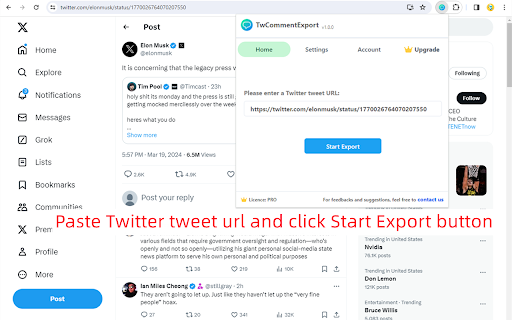
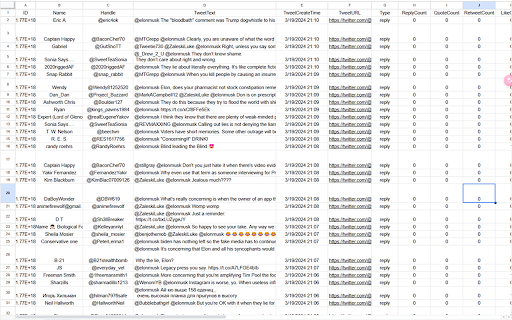
Export Twitter tweet comments/replies to CSV or Excel with one click. You can download comments from any tweet for analysis TwCommentExport is perfect for social media marketers, PR professionals, researchers, and anyone looking to analyze Twitter/X conversations effectively. Whether you're conducting market research, monitoring brand sentiment, or studying public opinion, this tool simplifies the data collection process and empowers you with valuable insights. In 2026 and beyond, Twitter will typically display only around 200 comments for any given tweet. However, our Chrome extension empowers users to export all comments (excluding those flagged as offensive by Twitter) associated with a tweet into a comprehensive CSV file. This means you can access and analyze every single reply, going beyond the standard limitations 🙂How it works: 1. Copy the Twitter/X tweet url and paste it into the extension. 2. Click the "Start Export" button. 📋The exported CSV file contains the following columns: ID: unique identifier for the reply. Name: The display name of the user who posted the reply. Handle: The Twitter username of the user (preceded by the @symbol). TweetText: The full text content of the reply. TweetCreateTime: The timestamp for when the reply was posted. TweetURL: The direct URL to the specific reply on Twitter. Type: The type of interaction (e.g., reply, tweet). ReplyCount: The number of replies to the reply. QuoteCount: How many times the reply has been quoted by others. RetweetCount: The number of retweets the reply has received. LikeCount: The total number of likes for the reply. BookmarkCount: How many times the reply has been bookmarked. Views: The number of times the reply has been viewed. AllImageURL: URLs of any images included in the reply. VideoURL: The URL of any video content included in the reply. Bio: The biography field from the user's Twitter profile. CanDM: Indicates whether the user's settings allow for them to be direct messaged by others. AccountCreateDate: The date when the user's Twitter account was created. Location: The location provided in the user's profile (note that this is self-reported by users). FollowersCount: The number of followers the user has. FollowingCount: The number of accounts the user is following. TotalFavouritesByUser: The total number of tweets the user has liked/favorited. MediaCount: The number of media uploads (photos and videos) the user has posted. ProfileBannerURL: The URL of the user's profile banner image. ProfileURL: The direct URL to the user's profile page. AvatarURL: The direct URL to the user's profile picture (avatar). PostCount: The total number of tweets posted by the user. Verified: Indicates whether the user has a verified account. IsBlueVerified: Specifically indicates whether the user has received the 'blue checkmark' verification from Twitter 🔒Data Privacy: Safeguarding user data privacy and security is our top priority. We deeply value our users' trust and are committed to upholding the highest data protection standards, strictly adhering to privacy regulations like GDPR and CCPA. ✉️Contact us: If you have any feedbacks or suggestions, please don't hesitate to reach out to us at xtcodetech+twcomment@gmail.com.

Instant Data Scraper
Instant Data Scraper extracts data from web pages and exports it as Excel or CSV files Instant Data Scraper is an automated data extraction tool for any website. It uses AI to predict which data is most relevant on a HTML page and allows saving it to Excel or CSV file (XLS, XLSX, CSV). This tool does not require website specific scripts, instead it uses heuristic AI analysis of HTML structure to detect data for extraction. If the prediction is not satisfactory, it lets the user customize the selections for greater accuracy. This type of scraping technology is much more convenient, because it does not require large user created libraries of scraping scripts, which often become filled with outdated and redundant versions. This means that our scraping method works just as well with small and lesser known websites, as it does with global giants like Amazon. Also, our users do not need to have any coding, json or xml skills! Instant Data Scraper FEATURES: * Detecting data for extraction with AI. * Detecting when dynamic data has loaded. * Delay and maximum wait time customization for desired crawling speed * Support for pagination on websites. * Automatic navigation to next page via buttons or links. * Support for infinite scrolling. * Extracted data preview with copy and paste support. * Data export to Excel spreadsheet or CSV file. * Extracted data column renaming and filtering. This extension is completely FREE. Instant Data Scraper works well in unison with SEO tools, CRM recruiter systems, sales leads management tools or email marketing campaigns. Web scraping and data downloading is made easy with our tool. Furthermore, you have data security and privacy as the scraped data does not leave your browser. Instant Data Scraper USE CASES: * Lead generation for companies and freelancers. * Growth hackers looking for easy ways to collect data. * Recruiters looking for job candidates. * Crawl results from search engines. * Get product pricing data from e-commerce websites. * Amazon sellers, distributors and review analysts. * Get email and addresses and phone numbers from directories. * Get contact info from professional association websites. * Scrape reviews and ratings. * Analyze posts for likes, comments, connection and contacts. * Extract emails and ID from social media profiles. Developer promise: This extension does not contain any malware or spyware beyond standard Google Analytics.

Twitter Comments Exporter
Easily export and download Tweets & Replies from any user to XLSX/CSV. Effortlessly export tweets from a Twitter user with one-click. Seamlessly download and archive tweets for social media analysis, comprehensive reporting, personal records, or digital marketing strategies. Our tool provides an easy and efficient way to export Twitter data, ensuring you never lose important tweets. Try our Twitter export feature today and simplify your social media data management. ⚙️ Get Started 1.Enter Username. 2.Choose export type. 3.Click the 'Export' button. 🔒 Data Privacy Your data privacy is paramount. All data processing occurs on your local machine; it never transits through our servers, ensuring no one else has access to your collected data. 👋 Contact For support or inquiries, reach out to us at lazytechofficial@gmail.com ⚠️ Disclaimer TWITTER is a trademark of X Corp. Twitter Comments Exporter is an independent tool and is not affiliated with, endorsed, sponsored, or otherwise connected to X Corp., Twitter, Inc., or any of their affiliates or subsidiaries.

Comment Export Tool
Easily export TikTok comments & replies to CSV/Excel with one click. 💡 Features ✓ Export comments from TikTok video. ✓ Export replies from TikTok video. ✓ Supports CSV format. ✓ Extract comments and replies, including: comment_id, reply_to_which_comment, user_id, username, nick_name, comment, comment_time, like_count, author_liked, reply_count, pinned_to_top, user_homepage. ⚙️ Get Started 1. Enter the TikTok video link. 2. Click the 'EXPORT' button. 🔒 Data Privacy Your data privacy is paramount. All data processing occurs locally on your machine, ensuring it never transits through our servers. This guarantees that no one else has access to your collected data. ⚠️ Disclaimer TIKTOK is a trademark of TikTok Ltd. TikTok Comment Export Tool is an independent tool and is not affiliated with, endorsed, sponsored, or otherwise connected to TikTok Ltd., ByteDance Ltd., or any of their affiliates or subsidiaries.

Twitter Comment Export Tool
Easily export and download Tweets & Replies from any users to XLSX/CSV. Effortlessly export tweets from a Twitter user with one-click. Seamlessly download and archive tweets for social media analysis, comprehensive reporting, personal records, or digital marketing strategies. Our tool provides an easy and efficient way to export Twitter data, ensuring you never lose important tweets. Try our Twitter export feature today and simplify your social media data management. ⚙️ Get Started 1.Enter Username. 2.Choose export type. 3.Click the 'Export' button. 🔒 Data Privacy Your data privacy is paramount. All data processing occurs on your local machine; it never transits through our servers, ensuring no one else has access to your collected data. 👋 Contact For support or inquiries, reach out to us at lazytechofficial@gmail.com ⚠️ Disclaimer TWITTER and X are trademarks of X Corp. Twitter Comment Export Tool is an independent tool and is not affiliated with, endorsed, sponsored, or otherwise connected to X Corp., Twitter, Inc., or any of their affiliates or subsidiaries.
