
ofaokhiedipichpaobibbnahnkdoiiah
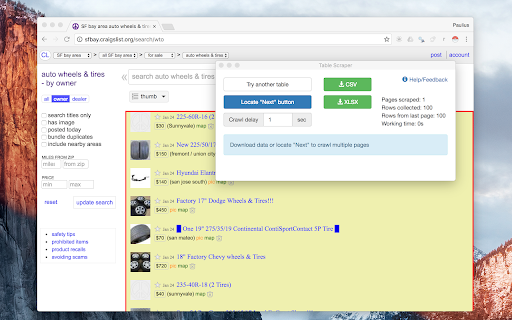
Instant Data Scraper extracts data from web pages and exports it as Excel or CSV files Instant Data Scraper is an automated data extraction tool for any website. It uses AI to predict which data is most relevant on a HTML page and allows saving it to Excel or CSV file (XLS, XLSX, CSV). This tool does not require website specific scripts, instead it uses heuristic AI analysis of HTML structure to detect data for extraction. If the prediction is not satisfactory, it lets the user customize the selections for greater accuracy. This type of scraping technology is much more convenient, because it does not require large user created libraries of scraping scripts, which often become filled with outdated and redundant versions. This means that our scraping method works just as well with small and lesser known websites, as it does with global giants like Amazon. Also, our users do not need to have any coding, json or xml skills! Instant Data Scraper FEATURES: * Detecting data for extraction with AI. * Detecting when dynamic data has loaded. * Delay and maximum wait time customization for desired crawling speed * Support for pagination on websites. * Automatic navigation to next page via buttons or links. * Support for infinite scrolling. * Extracted data preview with copy and paste support. * Data export to Excel spreadsheet or CSV file. * Extracted data column renaming and filtering. This extension is completely FREE. Instant Data Scraper works well in unison with SEO tools, CRM recruiter systems, sales leads management tools or email marketing campaigns. Web scraping and data downloading is made easy with our tool. Furthermore, you have data security and privacy as the scraped data does not leave your browser. Instant Data Scraper USE CASES: * Lead generation for companies and freelancers. * Growth hackers looking for easy ways to collect data. * Recruiters looking for job candidates. * Crawl results from search engines. * Get product pricing data from e-commerce websites. * Amazon sellers, distributors and review analysts. * Get email and addresses and phone numbers from directories. * Get contact info from professional association websites. * Scrape reviews and ratings. * Analyze posts for likes, comments, connection and contacts. * Extract emails and ID from social media profiles. Developer promise: This extension does not contain any malware or spyware beyond standard Google Analytics.

G Business Explorer - G Map Leads Finder
A tool for business leads, one click to find lead from Google Maps, includes phone numbers, emails, social media profiles, and more. With G Business Explorer, effortlessly uncover valuable commercial leads while searching for businesses on Google Maps. The tool seamlessly integrates with Google Maps, enabling you to search for businesses using specific keywords such as "restaurants in new york" Once you've identified potential leads, simply click on "Find" button, and watch as it works its magic. Within seconds, you'll have access to a treasure trove of business leads, including contact information like phone numbers, email addresses, and even social media profiles. 🔹 Seamless integration with Google Maps for effortless lead generation. 🔹 Instantly retrieve valuable business leads with a single click. 🔹 Access contact information, including phone numbers, email addresses, and social media profiles.

Maps Scraper & Leads Extractor - MapsLeads
Automatically extract business names, addresses, photos, coordinates, websites, emails, social media and more from Bing Maps. With this tool, can effortlessly search for businesses and extract valuable information such as business names, addresses, photos, coordinates, websites, emails, and social media profiles. Designed to enhance productivity and streamline lead acquisition, "Maps Scraper & Leads Extractor" is your go-to solution for gathering leads directly from Bing Maps. Simply click the "Start Find" button, and watch as the extension swiftly compiles all the essential data into a convenient Excel or CSV spreadsheet. Whether you're a marketer, sales professional, or business owner, This tool empowers you to effortlessly build a comprehensive database of potential clients. 🌈 Efficiently search and extract business information from Bing Maps. 🌈 Gather leads including website URLs, email addresses, and social media profiles. 🌈 Export data to Excel or CSV for easy analysis and integration with other tools. 🌈 Streamline lead generation and save valuable time and effort. This tool is designed for: ✅ B2B Marketers - Find quality email addresses and essential features to attract your next major client. ✅ SaaS Companies - Enhance your outreach teams' effectiveness in expanding and retaining your customer base. ✅ Sales Teams - Utilize our comprehensive tool suite to reach a larger customer base and close more deals. ✅ Growth Hackers - Achieve accurate and efficient user base growth without dedicating all your time to outreach.

Maps Scraper by Presto
Extract Business Listings from Bing Maps and OpenStreetMap. Powerful Way to Find Clients. Presto is Maps Scraper and Lead Extractor Maps Scraper by Presto (also known as Presto Maps Scraper, and Presto Map Lead Extractor) helps you extract business listings from Bing Maps and OpenStreetMap. FOR WHOM AND WHY Is your business targeting small businesses: Restaurants, bars, grocery stores, garages, hairdressers, small clothing shops, art galleries, and so on? If that's the case, you've probably found yourself spending COUNTLESS hours browsing the Web building a prospection file. Emails, websites, addresses, and phone numbers are scattered all over the place, and, if not an intern, YOU will have to spend precious time gathering them before you can even get started prospecting. This is the modern equivalent of "Take the phone book, go to 'A' and start dialing". Using this software and data from maps, you can: * Find leads literally at any place in the world * Quickly filter and analyze leads in Excel The app is not magic. It extracts all available data from Online maps. Without this software, you can do it manually or hire a virtual assistant to do this job. Functionality: 📍 Extract listings from Bing maps 📍 Extract listings from Open Street maps (OSM) 📊 Download as Excel with proper column types or in CSV ✨ The resulting spreadsheet contains 22 columns including phone numbers, venue name, and address (both English and localized variants), website, average rating, etc. Please note: this app is freemium software. You can use a limited version for free or upgrade for unlimited usage. The download feature is limited to the recent 40 records. 1. Click on the “puzzle” icon at the toolbar. Find Presto’s icon and pin to the toolbar for quick access. 2. Search for something on Bing Maps - http://bing.com/maps/ 3. See the number of results increasing over the toolbar icon 4. Download all records collected by clicking the “Download records” button in the extension’s popup 1) Click on the “puzzle” icon at the toolbar. Find Presto’s icon and pin to the toolbar for quick access. 2) Go to https://overpass-turbo.eu/ You can use any Oversee gateway - https://wiki.openstreetmap.org/wiki/Overpass_API 3) Perform search by pressing “Run” - the query language is described there: https://wiki.openstreetmap.org/wiki/Overpass_API 4) See the number of results increasing over the toolbar icon 5) Download all records collected by clicking the “Download records” button in the extension’s popup 5.1) Clear results if you don’t need them and want to collect from scratch If you see that your queries are slow on the web it could break Presto functionality. uuid: Unique ID listing_url: URL of the listing created_at: Record timestamp query: First search query that returned this listing | name: Venue name (International) fulladdr: Full address (International) local_name: Venue name (Local) local_fulladdr: Full address (Local) phone_number: First phone number international_phone_number: First phone number (International format) phone_numbers: Comma-delimited phone numbers latitude: Latitude longitude: Longitude primary_category: Primary category categories: Comma-delimited categories reviews: Reviews count rating: Rating url: Venue website URL domain: Venue domain name thumbnail: Venue thumbnail URL addr1, addr2, addr3, addr3: Address components district: District timezone: Timezone reviews_url: URL of the place's reviews claimed: Is the place claimed by the owner fid: Feature ID: Unique identifier for geographical features on the map cid: Customer ID: Unique identifier for a business listing The OpenStreemMap is a trademark of the OpenStreetMap Foundation, and is used with their permission. This product are not endorsed by or affiliated with the OpenStreetMap Foundation. The Bing is a trademark of the Microsoft Corporation. This product are not endorsed by or affiliated with the Microsoft Corporation.

Visual Web Scraper
Easily extract data from any website and export as CSV or JSON files. With Visual Web Scraper, you can begin extracting data from any site using a visual interface within a minute. All you have to do is click on the section of the page where you want to extract data from. No technical skills are required to use it. Visual Web Scraper simplifies the scraping process while keeping you in control. Key features of Visual Web Scraper: - Fully Visual Interface: Easy to use for users at any level. - Flexible Data Extraction: Can extract various data types like text, images, and links from any web page. - Real-Time Monitoring: Monitor the progress of the data extraction in real time. - Multiple Export Options: Export extracted data in CSV or JSON formats. - Wide Compatibility: Successfully tested on popular platforms like Twitter and Amazon. Can work on any website. - Rename Data Columns: Users can rename the extracted data columns as per their needs. - Automatic Page Traversal: Automatically navigates pages using 'load more' buttons to continue data extraction. - High-Quality Output: Provides precise data extraction with advanced selection algorithms. - Infinite Scroll Support: Supports extracting data from sites with infinite scrolling. - Pagination Support: Works efficiently on traditionally paginated sites too. Use cases for Visual Web Scraper: - Market Research: Enables businesses to make informed decisions by collecting critical data like competitor pricing, product specs, customer reviews, market trends. - Lead Generation: Businesses can extract contact info, business details from online directories, social media, company websites for targeted lead acquisition. - Content Aggregation: Content creators, marketers can collect articles, blog posts, images, videos from various sites. - Competitor Analysis: Analyze competitor strategies by extracting product info, pricing, promotions, customer feedback from their sites. - Financial Analysis: Financial analysts, investors can collect financial data, stock prices, market trends, economic indicators from finance sites. - Academic Research: Researchers can extract information from academic databases, journals for projects, publications. - Brand Monitoring & Reputation Management: Monitor brand mentions, customer feedback, sentiments from social media, review sites. - Supply Chain Management: Collect supplier data, product availability, pricing, shipping details across e-commerce, supplier sites. - Legal & Regulatory Compliance: Extract regulatory requirements, industry standards, case laws from government, legal databases. - E-Commerce Optimization: Optimize product listings, pricing, inventory by extracting data from competitor sites, marketplaces. Visual Web Scraper, a free Chrome extension, effortlessly extracts data from websites. All operations are performed within your browser, ensuring your data remains secure. You can provide feedback to help improve the extension. Thanks for your support!
