
nhgmkdlehlinjkkondibdjpnbmidjbke
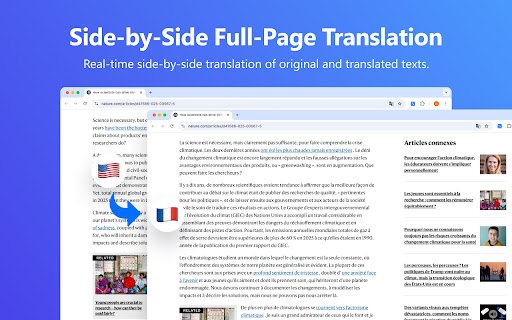


Free AI-powered translator for any word, phrase, and sentence across multi-language as you browse the web. Say goodbye to language barriers with LightPDF Translator! This lightweight Chrome extension seamlessly integrates into your browser, offering a powerful AI translator for reading, working, and studying—all within Chrome. Simply customize your preferred language in the settings, and LightPDF Translator will automatically translate entire webpage instantly while preserving the original layout. Unlike translator extensions that only show translations, LightPDF Translator displays side-by-side comparisons of the original text and translated text - ideal for language learners to study grammar and expressions. Simply highlight any word or phrase for instant translation, ensuring seamless workflow and study sessions. 1. Instant AI Translation LightPDF Translator lets you quickly translate web content into your preferred languages quickly. No more navigation through complicated interface - just install the extension and enjoy real-time translation as you browse. 2. Full-Page Translation Translate entire webpages instantly. Whether it's a short paragraph or a lengthy article, LightPDF Translator automatically displays the original text alongside the translation for easy comparison. 3. Text-Selection Translation Highlight any text for quick translation. Simply select words or phrases, and LightPDF Translator will automatically detect and translate them into your target language - perfect for quick reference without interrupting your flow. 4. Diverse Language Support Supports 20 languages at the moment, including English, Spanish, French, German, Chinese, Japanese,and any 13 others - even minor languages are covered. More languages will be added soon! 5. AI-Powered Accurate Translation Leverage different LLM models, LightPDF Translator delivers precise, context-aware translations for a nature and seamless experience. 6. More Translation Service from LightPDF You can also translate PDFs, images, and videos with other tools from LightPDF. 7. Privacy and Data Security LightPDF takes users' privacy and data security as our top concern. We will not store your translated content on our server. All your sensitive information remains confidential to yourself. 8. Feedbacks and Complaints We value your feedback and complaints. If you have any suggestions, feedbacks and complaints when using our tool, please email us at support@lightpdf.com. We also appreciate your rating and review if you like us. How to Use LightPDF Translator Extension: 1. Once installed, open a webpage on your Chrome and launch this extension. 2. Configure the AI model and your target language. 3. Click Translate and let the AI translate the full-page content for you. 4. You can also highlight specific text for quick, on-the-spot translations. Perfect For: 1. Language Leaners: Study grammar, vocabulary, and expressions with the side-by-side translation. 2. Professionals: Communicate and collaborate across languages without barriers. 3. Students: Simplify research and study in multiple foreign languages. 4. Others: Navigate foreign websites and content effortlessly. Download now to experience the power of LightPDF Translator in your webpage browsing without foreign language barriers!

KISS Translator
A minimalist bilingual translation extension that supports webpage, text selection, and video subtitle translation. - [x] Keep it simple, smart - [x] Open source - [x] Adapt to common browsers - [x] Supports multiple translation services - [x] Custom translation interface - [x] Covers common translation scenarios - [x] Web bilingual translation - [x] Input box translation - [x] Seletction translation - [x] Open the translation box on any page - [x] Favorite Words - [x] Mouseover translation - [x] YouTube subtitle translation - [x] Support for various translation effects - [x] Customizable text recognition and full-text translation - [x] Customizable translation styles - [x] Support for rich text translation and display - [x] Support for displaying only the translated text (hiding the original text) - [x] Advanced translation API features - [x] Aggregate and send translated texts in batches - [x] AI contextual conversation memory - [x] Customizable AI terminology dictionary - [x] AI-powered subtitle segmentation and translation - [x] Customizable hooks and parameters - [x] Cross-client data synchronization - [x] KISS-Worker(cloudflare/docker) - [x] WebDAV - [x] Custom translation rules - [x] Rule subscription/rule sharing - [x] Customized terminology - [x] Custom shortcut keys - `Alt+Q` Toggle Translation - `Alt+C` Toggle Styles - `Alt+K` Open Setting Popup - `Alt+S` Open Translate Popup / Translate Selected Text - `Alt+O` Open Options Page - `Alt+I` Input Box Translation

百贝翻译助手
浏览器专用插件,集成整页翻译/划词翻译/双语对照功能,支持Google/DeepL等多个翻译服务。 百贝翻译助手可将整个网页翻译为中文,帮助满足用户外文文献阅读和新闻阅读等需求,支持中文与英语、法语、德语、西班牙语、俄语、韩语、日语等互译。 ★整页翻译 在网页空白处点击右键,选择“翻译整页/显示原文”,即可完成全文翻译,谷歌内核的浏览器均适用。同时还提供自动整页翻译功能,记住你的整页翻译习惯。 ★划词翻译 如果你开启“快速划词翻译”,鼠标选中英文文本,将在鼠标附近出现翻译结果。 ★双语翻译 如果你开启“显示双语对照”,将进行双语对照翻译,同时显示原文和对应译文。 ★快捷键 用户可以使用快捷键来使用每一个翻译功能。 激活该扩展程序 :Alt+G 翻译整页/显示原文:Alt+T 开启/关闭划词翻译:未设置

DeepSeek Sidebar · 划词翻译 / AI 侧边栏 / 对话导出 Markdown
任意网页一键唤出 DeepSeek 侧边栏:划词翻译、自定义 Prompt 右键/悬浮快捷菜单、一键导出对话为 Markdown(说话人/引用/标题均可配置),无需切换页面,专注阅读与写作。 DeepSeek AI侧边栏助手,划词一键呼出AI侧边栏,切换网页常驻,专注阅读辅助。 1. 支持DeepSeek 登录,浏览历史会话,新建会话。 2. 支持切换暗色主题 3. 支持调整侧边栏位置和侧边栏宽度。 4. 支持在切换tab 时保持侧边栏状态。 5. 支持在右键菜单和悬浮快捷菜单中自定义按钮,对选中文字进行promt 拼接。 内置支持释意、翻译、网页总结。 例如:请翻译这个单词:{text} 为中文。 {text} 是选中的文字,{pageUrl} 为当前页面网址。 可在设置页面进行promt设置。 非常适合在阅读文件和深度思考的时候,作为辅助工具沉浸式工作学习。

LuLu Translate
LuLu Translate, the world-leading cross-platform translation software, supports translation by selecting words.
