
nllbkopolbhblfkanomhojoedogjhifg
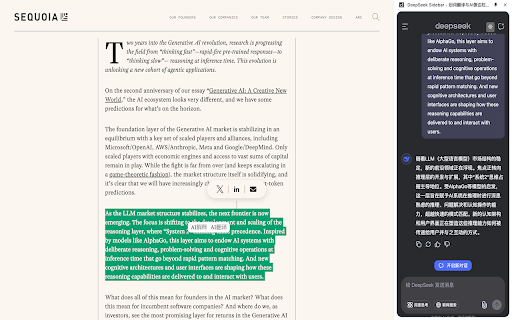


任意网页一键唤出 DeepSeek 侧边栏:划词翻译、自定义 Prompt 右键/悬浮快捷菜单、一键导出对话为 Markdown(说话人/引用/标题均可配置),无需切换页面,专注阅读与写作。 DeepSeek AI侧边栏助手,划词一键呼出AI侧边栏,切换网页常驻,专注阅读辅助。 1. 支持DeepSeek 登录,浏览历史会话,新建会话。 2. 支持切换暗色主题 3. 支持调整侧边栏位置和侧边栏宽度。 4. 支持在切换tab 时保持侧边栏状态。 5. 支持在右键菜单和悬浮快捷菜单中自定义按钮,对选中文字进行promt 拼接。 内置支持释意、翻译、网页总结。 例如:请翻译这个单词:{text} 为中文。 {text} 是选中的文字,{pageUrl} 为当前页面网址。 可在设置页面进行promt设置。 非常适合在阅读文件和深度思考的时候,作为辅助工具沉浸式工作学习。

Deepseek AI助手|R1|V3 | 联网
DeepSeek utilizes advanced AI technology to provide users with an intuitive and efficient web content analysis and response tool. Users only need to select text on a webpage, and DeepSeek can invoke powerful AI models to provide in-depth analysis and answers. Usage: 1. Use by selecting web text: Select any text on the webpage, click the DeepSeek icon next to it, and a dialog window will pop up for intelligent responses. 2. Use via shortcut keys: Whether or not you have selected text, you can directly use the shortcut to bring up the dialog window. (Note: Shortcut keys are customizable; users can modify them in the browser's extension management page.) Features: 1. Contextual Text Selection: Highlight any text on a webpage, and a popup window will appear for quick AI-driven responses. 2. API Key Integration: Supports users entering their own API Key to access DeepSeek models. 3. Draggable & Resizable Window: The reply window is draggable and resizable so that users can place it anywhere on their screen as needed. 4. AI Streaming Response: Supports streaming responses from AI models allowing real-time interaction while generating replies. 5. Markdown Rendering: Renders AI replies in Markdown format for easy viewing of formatted content like lists, code blocks, etc. 6. Math Formula Rendering Support using LaTeX syntax for rendering mathematical formulas conveniently viewable as expressions. 7. One-Click Copying: Easily copy AI replies with one click onto your clipboard for quick usage. 8. Re-answer Option: If unsatisfied with an AI reply, easily re-ask questions for new answers. 9. Code Copy Functionality Enhances copying of code snippets functionality 10.Language Switching Feature Allows switching answer language types based on user preference 11.Multi-turn Conversation Supports multi-turn conversation enabling continuous deep interaction without being limited by single queries 12.Shortcut Keys Quickly summon session windows through custom shortcuts Installation Instructions: 1.Visit Chrome Store search DeepSeek extension 2.Click "Add To Chrome" button install 3.After installation Click top-right corner extension icon enter your API key activate custom ai service 4.Select text on webpages then click Deep Seek icon get smart answers

Kimi Sidebar · 划词翻译 / AI 侧边栏 / 一键导出 Markdown
---- Kimi sidebar assistant helps you unswitch the page on any web page and try out Kimi AI. 1. Support kimi login and browse historical sessions. 2.Support switching dark theme 3. Supports adjusting the sidebar position and sidebar width. 4. Supports maintaining the sidebar status when switching tabs. 5. Support custom buttons in the right-click menu and floating shortcut menu, and prompt gluing of selected text. Built-in support for interpretation, translation, and web page summary. For example: Please translate this word: {text} into Chinese. {text} is the selected text, {pageUrl} is the current page URL. Promt settings can be made on the settings page. It is very suitable as an auxiliary tool for immersive work and study when reading documents and thinking deeply.

划词翻译 - 网页划词翻译 | 沙拉词典 | 网络翻译器
免费的划词翻译,丰富的词典释义,便捷的生词本功能。集成包括DeepL、Chatgpt、百度、谷歌四大顶尖的翻译引擎,还为您提供网页、PDF、图片、沙拉词典等翻译服务。 【划词翻译 - 词典释义,网络翻译器,沙拉划词,生词本】 💻划词翻译,集成权威的词典,聚合谷歌翻译、百度翻译、Deepl、ChatGPT等AI翻译引擎,翻译结果准确度非常高,遇到生词可一键添加至生词本! 💻为什么选择我们? ✨【集成权威词典】:集成百度、牛津、沙拉、彩云小译等权威词典,浏览英文网页时一键划词翻译,准确度非常高! ✨【集成强大的翻译引擎】:集成谷歌、百度、DeepL、ChatGPT等强大的AI翻译引擎,在专业领域确保输出高质量的翻译结果! 💻我们有哪些功能? ✨【划词翻译】:鼠标划词翻译,有强大的词典释义功能,可一键添加至生词本,方便复习巩固单词的学习,英语学习者的常用翻译器! ✨【网页翻译】:浏览外文网站时,一键网页翻译,支持双语对照,基本不改动原有排版,阅读体验极佳! ✨【图片翻译】:一键识图,秒出翻译结果,无需二次编辑,收获了跨境电商行业的一致好评,大大提高工作效率,翻译完成后复制粘贴即可使用。 ✨【PDF翻译】:DeepL、ChatGPT、谷歌、百度等翻译引擎强强联合,格式还原度高,学术报告、商务合同翻译后依旧规范! ✨【字幕翻译】:支持YouTube等多家主流平台的字幕翻译,双语字幕实时对照,无语言障碍看视频! ✨【在线翻译】:支持百种语言互译,搭配了Google翻译、百度翻译等多种强大引擎,保留历史记录,便捷高效。 ✨【AI功能】:新增AI划词,AI总结,AI润色功能,助力翻译。 任务中心上线啦!完成指定任务即可领取积分,轻松兑换会员和多种福利。 💻立即下载划词翻译,开启您的高效工作和学习之旅!

划词翻译
虽则如云,匪我思存。 这是一款极其简洁的英文单词翻译插件,源代码放在 https://github.com/1ocalhost/dict。
