
nemjnpfmngeipdjjjecgjgeognbcmkbl
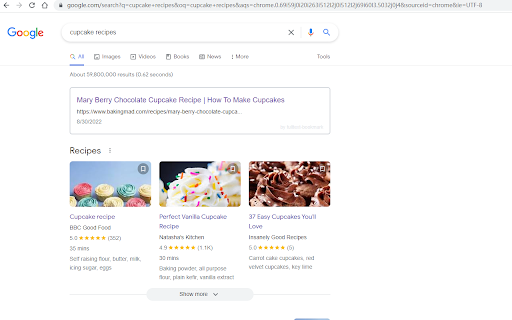
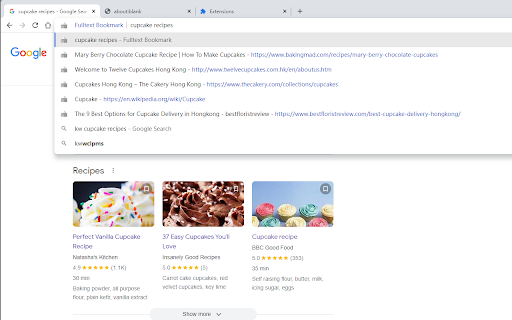

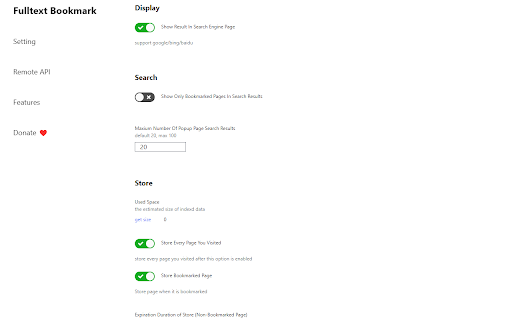
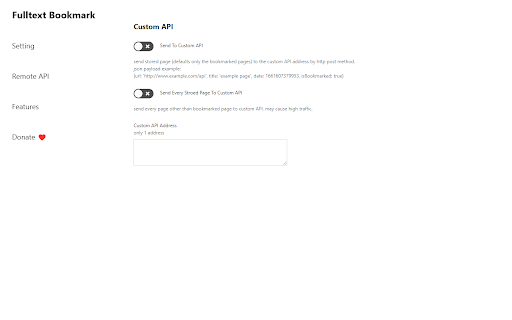
Fulltext-search all the browsing history/bookmarks. 🎇new! ⌨️ a new backup and restore feature. You can now export your data into a csv file. You can also import it back into the extension to restore your data. ---- 🔍 a better broswing history search tool. 💾 archive every page you visit, so you can later fulltext search them. 🦉 bookmark interesting weibo and search them. 🥇 best matched search result will be dispalyed in the search engine page as you search (support google/bing/baidu). 📎 search in the chrome searchbar by typing 'kw' first (short for 'keyword'). 📜 or search in the extension popup page for more results. 😺 everything stored in local storage, no accounts, no cloud, no privacy issues, totally free.(except you have to provide your openai api key if you want to use AskGPT function. You can also choose to close this function as you like.) ✉️ send your browsing history to custom remote api as you like. 🤖 Ask OpenAI GPT-3.5 about your archived pages, and it will answer with references. --- v1.1.3: fix known bugs and improve text segmentation performance v1.1.4: fix bugs on reading existed bookmarks v1.2.1: add Ask GPT function v1.2.2: fix bugs v1.2.3: fix bugs v1.2.4: add backup/restore function

Site History Express: Quick Navigate
Quickly access recently visited pages on the current site. When you're on a website, simply click the extension icon to view your browsing history for the current website. Pin the extension icon to your browser for quick and easy access. If you click the extension icon on a new tab, it will show your complete browsing history across all websites. Use the keyword search to quickly find specific pages in your history. Keyboard shortcuts for super-fast navigation: • Previous: ArrowUp • Next: ArrowDown • Jump Up: Shift + ArrowUp • Jump Down: Shift + ArrowDown • Open: Enter • Open in New Tab: Shift + Enter • Toggle Filter Scope: Tab Set a custom keyboard shortcut to instantly open your history: 1. Go to chrome://extensions/shortcuts 2. Find Site History Express 3. Set your shortcut (e.g., Ctrl + Shift + 8) "Site History Express" is the new name for "Fiteprint". This is an open source project: https://github.com/site-history-express/site-history-express

Bookmark, AI Tagging, Cache & Screenshot | PageOrg
Organize, ai tagging bookmarks. Cache page offline. Take, edit screenshots. Team collaboration. 1. Bookmark Management: Import bookmarks and search by text, tags, domain, or URL. 2. Browsing History Search: Import browsing history and search by text, date range, domain, or URL. 3. Easy Bookmark Organization: Edit titles inline, bulk-apply and drag & drop tags, and leverage AI-driven auto-tagging for efficient organization. 4. Offline Page Caching: Cache pages locally for offline access with an option to auto-cache bookmarked pages. All data is stored locally to ensure privacy. 5. Screenshot Capture & Editing: Capture, annotate, and download screenshots easily, or upload to share via a unique link. 6. Cross-Device Sync & Collaboration: Sync data across devices and collaborate on bookmarks with friends and colleagues for seamless teamwork. Introduction: Page Org – the ultimate Chrome extension for seamlessly managing bookmarks, browsing history, and more across devices, with powerful collaboration tools for teams. Cache pages for offline access, capture and annotate screenshots. Organize, search, cache and share content—all with productivity-focused features designed to streamline your workflow. With Page Org, elevate your browsing experience through tools that let you: ✔️ Efficiently Manage Bookmarks & Browsing History : Import bookmarks and history, then find what you need quickly by searching through keywords, tags, domains, URLs, or date ranges. Advanced Tagging & Editing: Edit titles inline, bulk-apply and drag & drop tags, and let AI-powered auto-tagging organize your collection faster than ever. ✔️ Offline Page Caching: Cache any page for offline access, with options to auto-cache bookmarked pages—all stored locally for your privacy. ✔️ Enhanced Screenshot Capture & Editing: Capture, annotate, and edit screenshots on any page. Save locally or upload to share through a unique link. ✔️ Cross-Device Sync & Collaboration: Download our app for mobile, sync data across devices, and create channels to collaboratively manage bookmarks and tags with friends or colleagues for efficient teamwork. Our Help Center offers step-by-step guidance and tips for maximizing productivity. Say goodbye to cluttered bookmarks and disorganized browsing history. Experience streamlined browsing with Page Org, your partner in efficient online organization.

iLaunch: Manage Bookmark,History,Tab and More
Manage bookmark, history, tab, extension & Quick command launch tool With commands, you can use browser like a pro. Using iLaunch, you can use browser like a professional, with shortcut commands, quickly start and manage open tabs, bookmarks, browsing history, efficiently manage your extensions, you can also perform all sorts of actions and more, it is your efficiency multiplier tool. Quick start hotkey by default Windows: alt+Q Mac: control+Q You can also visit "chrome://extensions/shortcuts" management interface to set it by yourself "/action" - enter "/a" quick start. Integrate more than 50 actions to improve efficiency, such as mute tabs, create various documents, full screen, clear cache, etc. "/bookmarks" - enter the "/b" quick start. With this command you can quickly search and browse your bookmarks. "/extensions" - enter the "/e" quick start. With this command, you can quickly manage your extensions. "/history" - enter the "/h" quick start. With this command, you can quickly search your history. "/tabs" - enter the "/t" quick start. With this command, you can quickly switch, open, search tabs. "/remove" - enter the "/r" quick start. With this command, you can quickly search and close open tabs and delete useless bookmarks. ●Associative search Support search engine customization, and it can intelligently associative search to quickly find what you need. ●Multiple themes It contains multiple themes, light mode, dark mode..., you can use different color schemes according to your own preferences. ●Minimalist mode Hide shortcut command buttons to let you use browser like a pro. iLaunch lets you use browser more efficiently.

MarkMagic - Effortless Bookmark Manager
Introducing MarkMagic, the enchanting browser extension that transforms bookmark management into a seamless experience. Discover the magic of effortless link status checks, robust content compliance assurance, and intuitive sorting options based on addition or usage time. Beyond the basics of bookmark deletion and archiving, MarkMagic is continuously evolving. Stay tuned for upcoming features that will revolutionize your browsing experience, including the ability to detect duplicate links, identify empty folders, and significantly enhance scanning speed. MarkMagic is not just limited to conventional methods; future updates will harness the power of AI for advanced semantic content analysis, surpassing simple string matching. Unlock a new level of bookmark management with MarkMagic's upcoming upgrades, offering unparalleled data analysis, seamless categorization, dynamic tagging, intuitive association, and automated responses tailored to user actions. MarkMagic – where innovation meets enchantment for an elevated bookmark management journey.
