
akidhgondomkboblkncnijoiofggpgfo
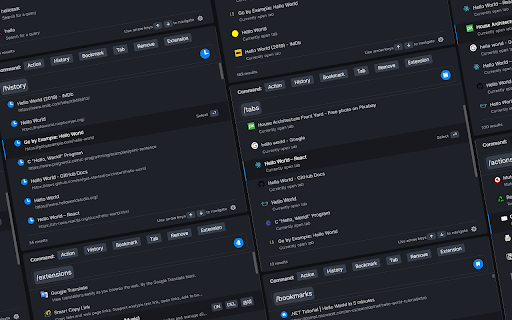

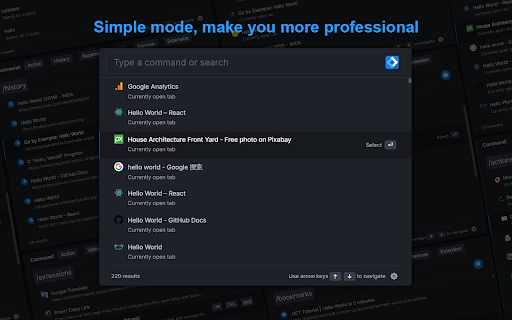
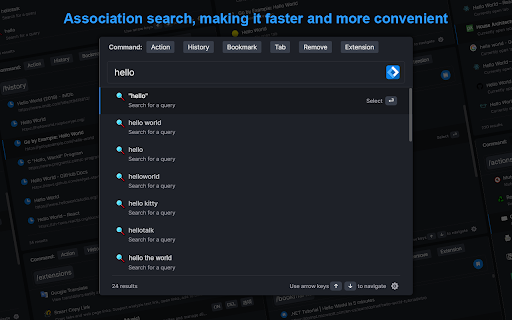

Manage bookmark, history, tab, extension & Quick command launch tool With commands, you can use browser like a pro. Using iLaunch, you can use browser like a professional, with shortcut commands, quickly start and manage open tabs, bookmarks, browsing history, efficiently manage your extensions, you can also perform all sorts of actions and more, it is your efficiency multiplier tool. Quick start hotkey by default Windows: alt+Q Mac: control+Q You can also visit "chrome://extensions/shortcuts" management interface to set it by yourself "/action" - enter "/a" quick start. Integrate more than 50 actions to improve efficiency, such as mute tabs, create various documents, full screen, clear cache, etc. "/bookmarks" - enter the "/b" quick start. With this command you can quickly search and browse your bookmarks. "/extensions" - enter the "/e" quick start. With this command, you can quickly manage your extensions. "/history" - enter the "/h" quick start. With this command, you can quickly search your history. "/tabs" - enter the "/t" quick start. With this command, you can quickly switch, open, search tabs. "/remove" - enter the "/r" quick start. With this command, you can quickly search and close open tabs and delete useless bookmarks. ●Associative search Support search engine customization, and it can intelligently associative search to quickly find what you need. ●Multiple themes It contains multiple themes, light mode, dark mode..., you can use different color schemes according to your own preferences. ●Minimalist mode Hide shortcut command buttons to let you use browser like a pro. iLaunch lets you use browser more efficiently.

Bookmarkify - Bookmark Manager
Save, organize, and revisit your favorite websites. Bookmarkify is a visual all-in-one bookmark manager for the web. The Visual Bookmark Manager Built for Designers & Creatives Stop losing great design inspiration. Bookmarkify helps you save, organize, and rediscover websites, images, and videos — all in one beautiful visual library. Unlike boring bookmark lists, Bookmarkify shows you full visual previews of your saved content. Find exactly what you need, when you need it. Team Collaboration Save bookmarks together with your design team. Share inspiration in real-time and build a shared reference library. Design Analysis Extract color palettes and typography from any bookmarked website. Instantly see fonts, brand colors, and design systems. Keyboard Shortcuts Navigate faster with hotkeys: G (Grid), F (Fullscreen), M (Mobile), T (Three-column), L (Long), I (List), A (Assets) Redesigned Interface A cleaner, more intuitive UI that stays out of your way while you work. Save More Than Websites Bookmark websites, images, and videos. Right-click any image to save it instantly to your collection. 7 View Modes Grid • Fullscreen • Three-column • Long • Mobile • List • Assets/Moodboard Customize how you browse your bookmarks for different workflows. Bulk Download Export all images from your collection as a ZIP file — perfect for moodboards and presentations. 💼 PERFECT FOR → UI/UX Designers collecting interface inspiration → Graphic Designers building visual references → Web Designers saving layout ideas → Brand Designers analyzing color palettes and typography → Creative Directors curating team moodboards → Freelancers organizing client projects → Design Teams collaborating on shared inspiration 1. Click the Bookmarkify icon or press CTRL+D (Cmd+D on Mac) 2. Add tags and notes to organize your bookmark 3. Access your visual library anytime from the extension 4. Collaborate with your team or keep it personal Join thousands of designers who've replaced messy bookmark folders with a visual inspiration system that actually works. 📌 Install Bookmarkify now — your future self will thank you. 🔐 Privacy First Your bookmarks are stored locally by default. Team features use secure cloud sync only when you choose to collaborate. 💬 Questions or Feedback? Visit bookmarkify.io or reach out — we'd love to hear from you!

TabStacks: tab and history search
View and search through open tabs and browser history. TabStacks is a vertical tab menu that helps you find the content you were looking for. Filter the tabs you have open and TabStacks will list the open tabs that match. If TabStacks can't find an open tab, it searches through your history to see if you had a tab open previously! TabStacks is designed to be keyboard and screen reader accessible. Press [CTRL]+[SHIFT]+[K] to open the menu, start typing to filter your tabs, and use the [DOWN] arrow key to navigate to the tab you want, and [ENTER] to open that tab. You can always use your mouse as well. You can search through your history during a tab search by pressing [CTRL+SHIFT+S]. You can close a tab by highlighting it in the list using the arrow keys or right-click and pressing [DELETE] or by clicking the close button on the tab. TabStacks is a high performance and secure extension for Chrome. TabStacks doesn't download external files, doesn't store any information about your activity. *** UPDATES *** Version 2.0.2 * Fixed bug where the popup doesn't close on tab change * Added a settings item to allow the option to hold the popup open Version 2.0.1 * The default keyboard shortcut for toggling the search is now CTRL+SHIFT+S due to the browser using nearly all possible combinations of CTRL+ a single key. * The keyboard shortcut key is now configurable, you can modify it in the settings page. Click the gear icon at upper right of the popup to access settings. * Minor cosmetic updates to the settings page. Version 2.0 * Tabs shown in the popup are synchronized with the state of the tabs in the browser: * Title updates are reflected in real-time. * New or deleted tabs are reflected in the tab list. * Close tabs using a button on the tab. Close buttons show on hover or focus. * Tabs display an audio icon if playing audio. * For audible tabs, clicking the icon will mute and unmute the tab. * Settings page has been added, click the gear icon top-right to access settings. Version 1.0.8 * Added lazy loading for site icons to speed up rendering * Reduced requested browser permissions Version 1.0.7 * Linux support for launching TabStacks from keyboard with [CTRL+SHIFT+K]. * PopupMenu now has a max-height instead of fixed height. * Fixed bug on Windows where the scroll bar was rendered even if the tabs would not scroll. Version 1.0.6 * Improved search algorithm for both tabs and history. * Searches much longer history time period. * Tabs in the current window always appear at top when popup is opened (User suggestion). * URLs for tabs appear on focus or mouseover (User suggestion). * Engineering improvements under the hood to use Web Components for rendering.

tabOS - Tab management, ChatGPT 4o, Docs/Images, RSS/YouTube/Reddit feeds
Enhance your New tab/Sidebar - Manage tabs, ChatGPT prompted chats, RSS/YouTube/Reddit feeds, write documents and save images. Meet tabOS - An operating system (sort of! 😇) for your browser. Add it with one click to gain a powerful new tab where you can manage your tabs and tab groups. Try it for free. Stop jumping from tab to tab, from tool to tool, losing your focus and time in the process. Declutter your browser by saving tabs not used at the moment, effortlessly create relevant tab groups, take notes anywhere, save images, and get answers from your library of AI helpers. Lay out everything on the same page to save time and discover new insights from your data. Stay on top of the news by creating and subscribing to RSS feeds, all inside your new tab. 🧑🏭 Assemble your custom-prompted AI helpers in a new tab, and then use them side-by-side with your web apps via the side panel view. Add powerful documents and note-taking capabilities anywhere. Integrate next-level, intuitive, and familiar tab and tab group management. Combined, these elements forge the comprehensive ecosystem of tabOS. 👌 Drag and drop to save and close your tabs and tab groups. Create and rearrange groups and organize them all in easy-to-use and familiar grid, column, list, and tree views. Additional features include discarding tabs, searching your library, and picking up where you left off, all within the new tab. ⭢ Tab Management: Easily handle your tabs with options to open, close, and manage them effortlessly. ⭢ Tab Groups: Organize your tabs into visually distinct groups for improved focus and organization. ⭢ Tab Folders: Further categorize your tab groups into folders for streamlined navigation. ⭢ Discard Tabs: Free up resources by discarding tabs without losing track of them. ⭢ Pin Tabs: Keep important tabs always accessible by pinning them to the browser window. ⭢ Move Tabs: Reorder and move tabs between windows and groups with a simple drag-and-drop. ⭢ Windows Management: Manage multiple cloud desktops to enhance multitasking and reduce context-switching. Bookmarks Integration: Seamless integration with your bookmarks for quick access and management. ⭢ Documents: Create and edit documents directly in your browser. ⭢ Notes: Take quick notes, save ideas, and manage to-do lists dynamically. ⭢ Markdown Support: Write and format using Markdown for clear, structured documents. ⭢ To-Do Lists: Organize tasks effectively with customizable to-do lists. ⭢ Bullet Point Lists: Make concise lists for easy readability and organization. ⭢ Code Snippets: Store and manage code blocks with syntax highlighting. ⭢ Highlight Colors: Visually prioritize information with color-coded highlights. ⭢ Images: Insert and manage images within your documents and notes. ⭢ Cloud Drive: Integrate seamlessly with your cloud storage for anywhere access to files. ⭢ AI Chats: Engage with AI-driven chat for help and queries. Custom Prompted Assistants: Tailor AI prompts to your specific workflow needs. ⭢ Vision AI: Utilize AI for image recognition and contextual actions. ⭢ ChatGPT 3.5 & 4.0 & Turbo: Choose from a range of AI versions, including the most advanced, for a personalized experience. ⭢ Global search: Powerful search across your entire workspace, including tabs, bookmarks, and cloud files. ⭢ Search open tabs: Quickly find and jump to the content within your currently open tabs. ⭢ Fuzzy search: Smart search technology that finds what you need, even with partial or misspelled queries. ⭢ Share data: Share tabs, documents, and notes easily with others. ⭢ Shared folders: Collaborate with team members using shared cloud folders. ⭢ Shared documents: Work on documents simultaneously for real-time collaboration. ⭢ Live collaboration: Interact and collaborate in live sessions with colleagues and friends. ⭢ New Tab view: A fresh perspective every time you open a new tab, with the option to pick up where you left off. ⭢ Sidepanel view: Multi-task with ease by using tabOS next to your web apps. ⭢ Web app: Access all your data from anywhere via our fully featured web app ⇨ Free Plan: Get started with the core functionalities without any cost.. Try out with an anonymous account. ⇨ Pro Plan & AI Plus Plan: Scale up as needed with extra cloud storage and AI sorting capabilities. ⇨ Automatic Daily Backups: Ensure all your data is secure and up-to-date with daily automatic backups.

Better History
Replace the default browser history with this better history display. Powerful history manager for Chromium
