
nefaieamogpbokobidmgceonnjbakgof
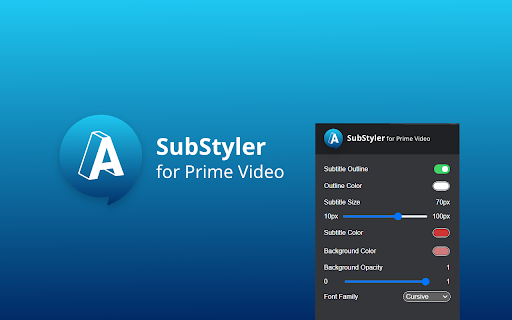
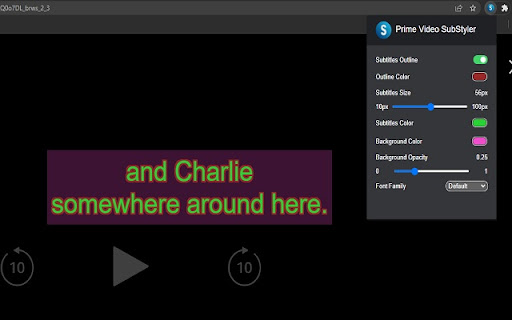
Extension to customize captions and subtitles on Prime VIdeo. Change text size, font, color and add background. Wake up your inner artist and express your creativity by customizing PrimeVideo subtitle style. Even though you usually don’t use movie captions, you may consider starting after checking out all the settings this extension has to offer. Now you’re able to: - Choose custom text color, - Adjust text size, - Add text outline and choose its color, - Add text background, choose its color and adjust the opacity - Choose font family Feeling artistic? Here’s another bonus: all the colors can be chosen either from a built-in color picker or by entering RGB value, creating almost endless style possibilities. Take the subtitle customization to the next level with Prime Video SubStyler and let your imagination run wild!! Too many options? Worry not! Check out some basic settings, such as text size and background. All you need to do is add Prime Video SubStyler extension to your browser, manage available options in the control panel and adjust subtitles to your own preferences. It’s as simple as that! Disclaimer : Prime Video is a trademark of Amazon.com, Inc.. This website & extension hold no association or affiliation with Amazon Prime Video or any third-party companies.

Subtitles for Language Learning (Prime Video)
Add foreign language subtitle display and dictionary function on Amazon Prime Video. Enjoy Learning Languages with Movies, TV Shows, and Anime on Amazon Prime Video. Add subtitle display and dictionary function in various languages. Supports 79 languages. Even when official Amazon subtitles do not exist, it will be possible to search for and load subtitles from OpenSubtitles.org or local files. Main functions - Multilingual subtitle display - Subtitle function other than that provided by Amazon - 79 languages by mouse over-> Dictionary function to 79 languages - Dictionary function by character selection - Link function to dictionary site by word click - A function to move the playback position by pressing the button displayed to the left of the subtitles or the "E" and "D" keys. - Ability to translate one sentence with Google Translate - Playback speed change function (shortcut keys "S" "F") - Video brightness, saturation, contrast change function - Opening and closing function of subtitle viewer

Customized subtitles, works with Disney Plus
Independent software - not affiliated with Disney. Change Disney+ subtitle fonts, colors, sizes, outlines and backgrounds. Customized subtitles for use with Disney streaming - Make captions your own ⚠️ Independent software - not affiliated with, endorsed by, or sponsored by The Walt Disney Company or Disney+. Disney and Disney+ are trademarks of their respective owners. Bring creativity to your Disney Plus viewing by personalizing subtitle style. Even if you usually skip captions, you may start using them once you explore all the customization options. With this extension you can: Add outlines with your chosen color Add backgrounds with adjustable opacity All colors can be chosen with a built-in picker or by entering RGB values, giving you endless styling choices. Simply add the extension to your browser, open the control panel, and adjust Disney Plus subtitles to your preferences.

Movie Subtitles
Add your own subtitles almost anywhere you want such as Disney, Netflix, YouTube and many more! Add your own subtitles on almost any video/movie streaming platform you can think of, such as Amazon Prime, Netflix (with some restrictions), Disney+ (with some restrictions), Youtube, Twitch and many more! Unfortunately, Movie Subtitles does not have a subtitle search. You have to download the subtitles online before you can use them in the extension. There are many websites that offer free subtitles. Two of the most popular ones are opensubtitles.org and yts-subs.com. Once you’ve got the subtitles you're good to go! Movie Subtitles was originally developed to facilitate language learning and comes with many useful features for that purpose, such as the ability to jump between dialogues, skip silence and many more! Features: - Skip silence (scenes between dialogues) - Skip music (if supported by the subtitle file) - Synchronize subtitles - Adjust subtitle style - Select/Copy subtitle text (in edit mode) - Upload subtitles in 40+ languages - Supported formats (.txt, .srt, .sub) - Shortcuts (not on Netflix) Movie Subtitles is an open-source project. If you have any ideas for improvement, found a bug, or want to contribute in some other way, you're welcome to do so! https://github.com/gignupg/Movie-Subtitles If you want to use Movie Subtitles to skip certain scenes of a movie, such as violent scenes, sexual scenes etc. check out the article on Medium I wrote about this topic: https://gignu.medium.com/how-to-skip-violent-scenes-and-adult-content-in-movies-3c7d89b813ad - The extension was built using Ixieyang's React Boilerplate https://github.com/lxieyang/chrome-extension-boilerplate-react License: This project is licensed under the MIT License

Apple TV SubStyler: Customize subtitles [QVI]
Extension to customize captions and subtitles on Apple TV. Change text size, font, color and add background. Wake up your inner artist and express your creativity by customizing AppleTV+ subtitle style. Even though you usually don’t use movie captions, you may consider starting after checking out all the settings this extension has to offer. Now you’re able to: - Choose custom text color,🌈 - Adjust text size,📏 - Add text outline and choose its color,🌈 - Add text background, choose its color and adjust the opacity🌈 - Choose font family🔤 Feeling artistic? Here’s another bonus: all the colors can be chosen either from a built-in color picker or by entering RGB value, creating almost endless style possibilities. Take the subtitle customization to the next level with AppleTV+ SubStyler and let your imagination run wild!! Too many options? Worry not! Check out some basic settings, such as text size and background. All you need to do is add AppleTV+ Substyler extension to your browser, manage available options in the control panel and adjust subtitles to your own preferences. It’s as simple as that! ❗**Disclaimer: All product and company names are trademarks or registered trademarks of their respective holders. This extension holds no association or affiliation with them or any third-party companies.**❗ This extension is part of the Quality Viewership Initiative, a collaborative effort to enhance the understanding of audience engagement. It collects anonymous, aggregated viewing insights to support creators and studios in improving the quality of their content. You can stop sharing your information at any time by switching the toggle on the options page.
