
dmnpbfajdeblnfifkpkmhignhpnjking
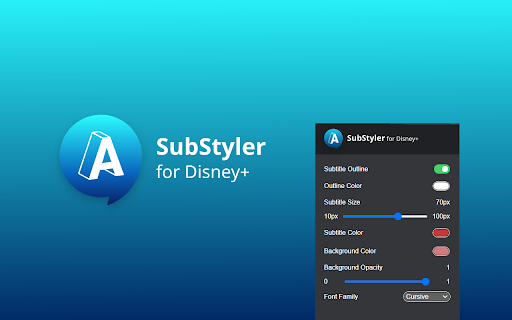
Independent software - not affiliated with Disney. Change Disney+ subtitle fonts, colors, sizes, outlines and backgrounds. Customized subtitles for use with Disney streaming - Make captions your own ⚠️ Independent software - not affiliated with, endorsed by, or sponsored by The Walt Disney Company or Disney+. Disney and Disney+ are trademarks of their respective owners. Bring creativity to your Disney Plus viewing by personalizing subtitle style. Even if you usually skip captions, you may start using them once you explore all the customization options. With this extension you can: Add outlines with your chosen color Add backgrounds with adjustable opacity All colors can be chosen with a built-in picker or by entering RGB values, giving you endless styling choices. Simply add the extension to your browser, open the control panel, and adjust Disney Plus subtitles to your preferences.

Double Subtitles for Disney+ by MovieLingo
Extension allows for displaying additional subtitles above the standard Disney+ ones. Boost your Disney+ experiences with "Double Subtitles for Disney+" by Movielingo! 🎬🌐 Do what you love, and learn languages in an easy, enjoyable way. 🎓🌟 Double Subtitles extension allows for displaying additional subtitles above the standard Disney+ ones. Select the language of additional subtitles from the list in extension pop-up window. 📝🔀 Fun, ease, and effectiveness, all in one extension! 😁🚀 Regardless of your level, "Double Subtitles for Disney+" is your personal language tutor at your fingertips. 👨🏫🌍 Click on the extension. ➡️ Add it to your Chrome browser. 🔀🖱️ Refresh the Disney+ page. 🔄 That's it! Now, just choose the language you want to learn from extension pop-up window, and start enjoying your learning. 🎉🗣️ Join us and start your multilingual journey today! 🚀🌍 Note: This extension is not affiliated with, endorsed by, or connected to any of the companies or products mentioned. All trademarks and registered trademarks belong to their respective owners.

Subtitle Reader works with Disney+
Independent software - not affiliated with Disney. Turn Disney+ subtitles into audio with text-to-speech in 13 languages. Subtitle Reader for use with Disney streaming - Listen to subtitles with text-to-speech ⚠️ Independent software - not affiliated with, endorsed by, or sponsored by The Walt Disney Company or Disney+. Disney and Disney+ are trademarks of their respective owners. Transform your Disney Plus viewing into an auditory experience. Subtitle Reader uses text-to-speech to convert subtitles into spoken voice, adding a new accessibility layer for language learners, multilingual audiences, and anyone who prefers listening to reading. Install the extension in Chrome Control everything from the popup panel Adjust volume and pitch Switch between male and female voices Reset to defaults with one click Toggle the extension on/off instantly Ideal for language learners, accessibility needs, or anyone who wants a new way to enjoy Disney Plus Enjoy Disney+ in a new dimension where subtitles become audio - making your viewing more inclusive and immersive.

Disney Plus Subtitle Translator - Dual Subtitles
Translate Disney+ official subtitles. Display bilingual subtitles, and customize their style and position. 🎯 Introducing DisneyPlus Subtitle Translator, a specialized tool crafted for DisneyPlus videos. This unique subtitle translator enhances the original DisneyPlus subtitles by providing bilingual or dual subtitles. 🌍 DisneyPlus Subtitle Translator can seamlessly translate the official subtitles or captions of videos hosted on disneyplus.com into a wide array of commonly used languages. 🛠 Customize the subtitles to your liking with adjustable styles. You have the flexibility to set styles for bilingual subtitles independently, including options such as font size, font color, font weight, opacity, and background color. 🚠 The subtitles are housed within a draggable box, allowing you to effortlessly adjust their position according to your preferences. 👉 Key Features: ✅ Display bilingual subtitles ✅ Support for most languages ✅ Adjustable subtitle styles ✅ Draggable subtitle position ✅ Download subtitles with one click ✅ Full-screen support 🏗 If you have any questions, feel free to reach out to me at support@disneyplus-subtitle-translator.com.

HBO Max SubStyler: Customize subtitles [QVI]
Extension to customize captions and subtitles on HBO Max. Change text size, font, color and add background. Wake up your inner artist 🎨 and express your creativity by customizing HBO Max subtitle style 🖋️. Even though you usually don’t use movie captions 🎬, you may consider starting after checking out all the settings this extension has to offer. [Works also with MAX in US services 🇺🇸] Now you’re able to: Choose custom text color 🌈, Adjust text size 📏, Add text outline and choose its color 🖍️, Add text background, choose its color and adjust the opacity 🌫️, Choose font family 🅰️. Feeling artistic 🎭? Here’s another bonus: all the colors can be chosen either from a built-in color picker 🎨 or by entering RGB value, creating almost endless style possibilities. Take the subtitle customization to the next level with HBO Max SubStyler and let your imagination run wild 🌀!! Too many options 🤔? Worry not! Check out some basic settings, such as text size and background. All you need to do is add HBOMax SubStyler extension to your browser 🌐, manage available options in the control panel 🕹️ and adjust subtitles to your own preferences. It’s as simple as that ✔️! This extension is part of the Quality Viewership Initiative, a collaborative effort to enhance the understanding of audience engagement. It collects anonymous, aggregated viewing insights to support creators and studios in improving the quality of their content. You can stop sharing your information at any time by switching the toggle on the options page. ❗*Disclaimer: All product and company names are trademarks ™️ or registered trademarks ®️ of their respective holders. This extension holds no association or affiliation with them or any third-party companies.*❗
