
nabelcoiaepnnjjgdgkjlgfjmfhjdpid
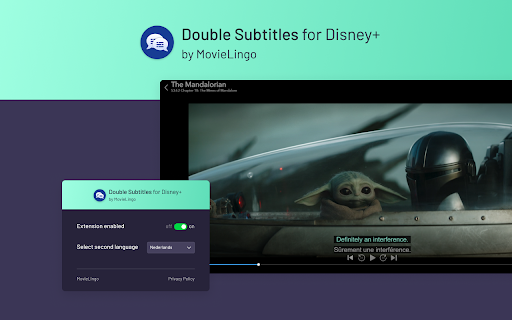
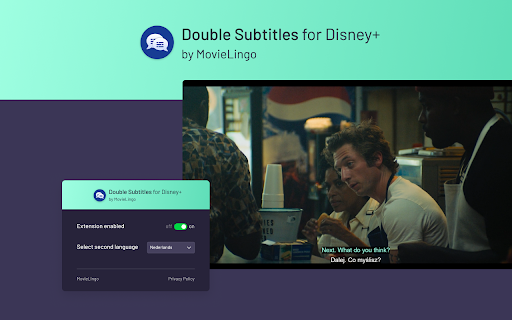

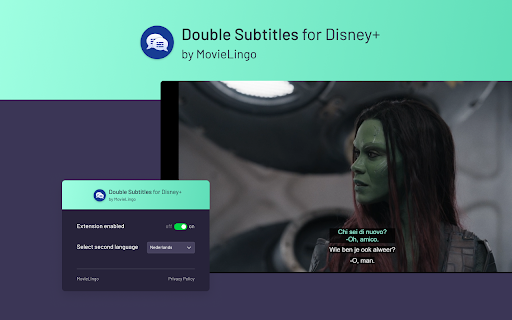
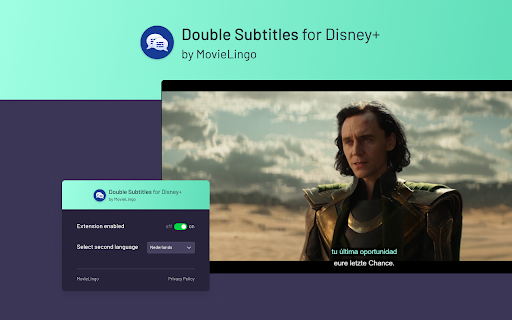
Extension allows for displaying additional subtitles above the standard Disney+ ones. Boost your Disney+ experiences with "Double Subtitles for Disney+" by Movielingo! 🎬🌐 Do what you love, and learn languages in an easy, enjoyable way. 🎓🌟 Double Subtitles extension allows for displaying additional subtitles above the standard Disney+ ones. Select the language of additional subtitles from the list in extension pop-up window. 📝🔀 Fun, ease, and effectiveness, all in one extension! 😁🚀 Regardless of your level, "Double Subtitles for Disney+" is your personal language tutor at your fingertips. 👨🏫🌍 Click on the extension. ➡️ Add it to your Chrome browser. 🔀🖱️ Refresh the Disney+ page. 🔄 That's it! Now, just choose the language you want to learn from extension pop-up window, and start enjoying your learning. 🎉🗣️ Join us and start your multilingual journey today! 🚀🌍 Note: This extension is not affiliated with, endorsed by, or connected to any of the companies or products mentioned. All trademarks and registered trademarks belong to their respective owners.

Trancy - AI Translator & Dual Subtitles
Trancy provides bilingual subtitle for platforms like YouTube, Disney+, as well as AI translator for websites. Boosting language skills does not require intentional rote memorization. Trancy invites you to adapt and master new languages by watching your favorite videos and browsing daily websites. We help you understand video and web page text, gradually accumulate vocabulary, and enhance your listening and speaking skills. In addition, Trancy also provides functions for collecting videos, sentences, and words. You can use these to build a personal learning library for constant review and reinforcement. The immersive language learning process is not only easy but also highly efficient.

Sublo - Subtitle Translator for Netflix, HBO Max, Disney+ & More
Translate subtitles into 40+ languages on Netflix, HBO Max, Amazon Prime, Disney+ and more. Watch any show in your language. Sublo – Subtitle Translation for Netflix, HBO Max, Amazon Prime & More Watch any show or movie in your language — or learn a new one — with real-time subtitle translation across all major streaming platforms. Sublo adds a second subtitle track directly on top of your video player. While the original subtitles run as usual, Sublo simultaneously shows a translated version in any of 30+ languages — no extensions to disable, no settings to dig through, no interruptions to your watching experience. Install Sublo from the Chrome Web Store Open Netflix, HBO Max, Prime Video, Disney+, or any other supported platform Start playing a video with subtitles enabled Sublo automatically detects the subtitles and displays the translation below or above them Customize font size, color, position, and opacity directly from the popup That's it. No account required to get started. Watch your favorite Shows with translated Subtitles on Netflix, HBO Max, Prime, Disney+, YouTube and many more. Unlimited subtitle translation — no daily cap Everything in Free Upgrade directly from the extension popup or at subloapp.com. Font size (12–48px) Font color Background color and opacity Font weight (normal or bold) Position (top or bottom of screen) Edge offset Two subtitle tracks can be configured independently — for example, show the original English at the bottom and a German translation directly above it. DESIGNED FOR 🎓 Language learners — Immerse yourself in your target language while keeping the original as a safety net. Studies show that reading subtitles in both your native language and your target language significantly accelerates vocabulary acquisition and listening comprehension. 🌍 Bilingual households — One family member wants German, another wants English? Run both at the same time without compromise. 🌐 International viewers — Access content in languages you're comfortable with, regardless of what the platform natively supports. 🎬 Film enthusiasts — Watch foreign-language films with subtitles in your language while preserving the original dialogue for a more authentic experience. Sublo does not collect or store any personal data. Subtitle content is sent to our translation service to generate translations, but is never stored or associated with your identity. No browsing history is recorded. The extension only activates on supported streaming platforms. Does Sublo work in fullscreen? Yes. Sublo is designed to work in fullscreen mode across all supported platforms. The overlay repositions automatically when you enter or exit fullscreen. Do I need to create an account? No. The free plan works immediately after installation without any registration. To unlock Pro, you purchase a license key which you enter once in the popup — no account, no password. Will Sublo interfere with the platform's built-in subtitles? No. Sublo runs alongside the platform's existing subtitle system without modifying it. The original subtitles are unaffected. Which languages can be translated? Any of the 30+ languages listed above can be used as source or target language. Auto-detect is also available for the source language. What happens when the free daily limit is reached? Sublo stops showing the translated subtitle track. The original subtitles on the platform continue to work normally. The limit resets at midnight. Is my video content or subtitle data sold to third parties? No. Subtitle text is only used to generate translations and is never sold or shared with third parties. See our privacy policy for full details. Does it work with anime on Crunchyroll? Yes, Crunchyroll is fully supported. Sublo uses a PerformanceObserver to detect subtitle file requests at the network level, making it compatible even with streaming platforms that load subtitles via Web Workers or background processes. It supports WebVTT, TTML/IMSC, and SRT subtitle formats. DASH manifest parsing allows Sublo to proactively load segmented subtitle tracks without requiring any user interaction beyond enabling subtitles once in the player. Sublo is built and maintained independently. For support or feedback, contact info@trackable.pro or visit subloapp.com. Sublo is not affiliated with Netflix, HBO Max, Amazon, Disney, Apple, or any other streaming platform mentioned above. All trademarks belong to their respective owners.

Lingosive: YouTube & Netflix & HBO Immersive AI Dual Subtitles
YouTube, Netflix, HBO Max, Prime & Disney+: Get immersive translate & dual subtitles. Master languages with Lingosive's AI tools. 🌍✨ Convert Your Browser Into a Language Learning Laboratory! Master a new language while watching your favorite content on YouTube, Netflix, HBO Max, Disney+, and Prime Video with the most advanced AI-powered language learning extension! 🚀 🔥 Key Extension Features (Unlimited Access): 📺 Unlimited Dual Subtitles – Watch with bilingual, color-coded subtitles on all supported streaming platforms without any restrictions. 🤖 AI Word Explanation – Click any word for instant AI-driven explanations, including context-aware meanings, synonyms, and usage notes. 🔍 Word Scene Finder – See words in action! Instantly find any word in 50 million+ real movie and series clips. 🎨 Smart Color System – Visually track your progress! Words are color-coded based on your level (Green: Known, Blue: Learning, Orange: Hard). 💾 Unlimited Word Management – Save and organize as many words or phrases as you want. There are no limits to building your personal vocabulary library. 📱 Lingosive Mobile & Content Library: Practice anywhere with our massive mobile-optimized library: 🎥 400,000+ Videos & Podcasts – Series clips, movies, and educational content at your fingertips. 📖 15,000+ Books – Read everything from classics to modern works with instant translation and AI support on your mobile device. 💡 Why Lingosive? Unlike Language Reactor, Trancy, Lingopie, LingQ, or InterSub, Lingosive offers the smoothest, most reliable dual subtitle experience. While others struggle with stability, Lingosive provides a seamless Context Engine that connects you to 50 million+ real-life scenes, ensuring you learn language as it is naturally spoken. 🔄 Seamless 3-Platform Sync: Your progress, saved words, and reading history are perfectly synced across the Chrome Extension, App Store, and Play Store. Start learning on your computer and continue exactly where you left off on your phone! 🌍 Supported Languages: English, Spanish, French, German, Italian, Turkish, Portuguese, Japanese, Russian, Korean, Chinese (Simplified), Chinese (Traditional), Azerbaijani, Persian, Arabic, Vietnamese, Polish, Bengali, Indonesian, Urdu, Swahili, Hindi, Punjabi, Marathi, Tamil, Telugu, Thai, Malay, Ukrainian, Dutch, Greek, Romanian, Czech, Hebrew, Swedish, Hungarian, Danish, and Finnish. 🚀 Join 10,000+ learners! Download now and transform your screen time into a natural language-learning adventure!

Streaming enhanced Netflix Disney Prime Video
Skip ads, intros, credits and add adjust speed, etc. on Netflix, Prime video, Disney+, Crunchyroll and HBO max. You can customize which features are enabled in the Settings. This extension enhances your streaming experience by automatically: • Block Ads • Skipping Intros & Recaps • Skipping Credits • Displaying TMDB ratings for all shows • Hide Movie button • Adding customizable playback speed control (keyboard shortcuts: s, d) • Automatically start to play videos in fullscreen • Go fullscreen on double click • Scroll to change the volume • Netflix: • Remembers and selects your last-used profile automatically • Blocks the “Are you still watching?” inactivity warning • Remove games from Netflix • Amazon Prime Video: • Skips self-promotional ads (for Prime Video productions) • Filters out paid content (movies, series) from the home page • Moves the category "Continue" to the top of the page • Hide the Xray Quick View over a video • Removes the blur effect when hovering over videos • Crunchyroll: • Remembers and selects your last-used profile automatically • Adds filters to the release calendar, so it is useable • Video size expanded to entire window • Disable the numpad controls • Prime Video • Disney+ (Hotstar, STAR+) • Crunchyroll • HBO Max To use the extension on an Android phone, download Firefox. • At any time the websites can update their UI, which may break various features of the extension. • If you encounter any issues, please report them on the [Github issue tracker](https://github.com/Dreamlinerm/Netflix-Prime-Auto-Skip/issues). • You can also write a review to report issues. Please avoid giving a bad rating, as I will always respond regardless of the rating, since I receive an E-mail. • Since I am a single developer, I may not be able to fix issues immediately. Please be patient and I will do my best to resolve them as soon as possible. ☔ Safe & Open Source This extension is open-source! Feel free to contribute or explore the code on [Github](https://github.com/Dreamlinerm/Netflix-Prime-Auto-Skip). 💕 Enjoying Streaming enhanced? If you'd like to support further development, you can buy me a [coffee](https://github.com/sponsors/Dreamlinerm). If you’re enjoying the enhanced streaming experience, please consider leaving a 5-star review! Disclaimer Netflix, Prime Video, Disney+ (Hotstar, STAR+), Crunchyroll and HBO max are trademarks and the author of this addon is not affiliated with these companies.
