
ndakideadaglgpbblmppfonobpdgggin
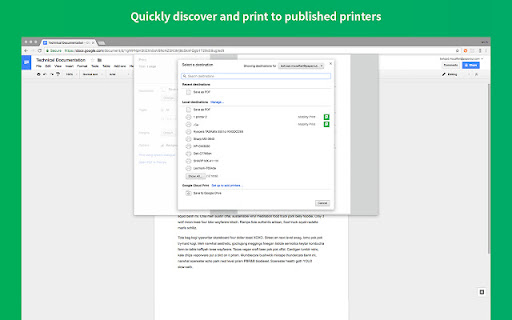

This extension requires Chrome version 114+ Simplify printing from your own ChromeBook for organizations using PaperCut Mobility Print This extension makes it ultra-easy to print to any brand or model of printer, locally, or over the internet. Your network administrator has done the hard work for you by publishing all available printers, meaning you don’t need to worry about anything other than installing this extension and printing! For the Administrator OK… so if you’ve read down this far, you’re probably a real techie and likely a Sys Admin! Hello friend :-) If this is your first taste of Mobility Print, pop over and take the tour, or sit back and relax and watch on YouTube. TL;DR PaperCut Mobility Print offers a simple mobile & BYOD print solution across multiple vendors, servers, apps and technologies. It’s perfect for businesses supporting a mobile workforce, or schools/colleges/classroom with 1:1 laptop programs. It doesn’t matter if your end-users want to print via a phone, tablet or laptop, or if they follow Team Mac, Team Windows, or Team “Not-Sure-What-I-Have”, printing will just-work (without the need to call your helpdesk of course!) With Mobility Print's Cloud Print feature, your users can print securely over the internet. If you manage the Chromebooks at your organization, then you can easily deploy Mobility Print using Google Workspace, allowing users to print from anywhere by simply pressing Ctrl+P. For BYOD environments, simply send your users a link, and Mobility Print will guide them through a couple of steps to configure printing themselves. Release history 1.4.5 (14 April 2026) * Fixed an issue in the Mobility Print authentication dialog where users were shown incorrect sign-in error messages even when using valid credentials. [MOB-3181] * Improved performance of caching discovered printers. [MOB-3167] * Further improvements to printer discovery performance. [MOB-3161] 1.4.4 ( 20 Jan 2026) * Fixed an issue in Mobility Print where Chrome users printing were limited to a maximum of 100 copies per job. [MOB-2274] * Enhanced logging. [MOB-3150] * Improved performance for all printer discovery methods. [MOB-3154] 1.4.3 (21 Oct 2024) * When using Print Deploy, the Mobility Print Chrome extension will now report the extension version and Chromebook Asset ID to the Print Deploy server. This information will be displayed in an upcoming feature in Print Deploy. [MOB-3066] * Fixed an issue that caused printing to fail when using Print Deploy with print queue names that use some non-standard print queue characters. [MOB-3076] * Fixed an issue that caused printing to fail when printing documents with very long document names. An error "Message too long for RSA" was generated when this error occurred. [MOB-3060] 1.4.1 (11 Apr 2024) * Public release of PaperCut Mobility Print Extension, enabling customers to migrate from the Mobility Print App. 1.4.0 (3 Apr 2024) * Extension now uses Manifest 3 * Early access release 1.3.8 (23 Aug 2022) * Automatically migrate Cloud Print app data from the extension for seamless use with existing BYOD and managed app installs. [MOB-2769] * Fixed a possible popup window creation issue on Chrome 102+. [MOB-2855] 1.3.7 (22 Jul 2022) * Support for IP based filtering of printers. [MOB-2767] Port the following fixes from the Mobility Print app. * Fixed an issue preventing print jobs from being available for submission in some circumstances when a large number of printers are discovered using Cloud Print. [MOB-2714] * Fixed an issue that may result in slow printer retrieval or no printers being shown for selection when a large number of printers are discovered using Cloud Print. [MOB-2714] * Use simplified printer discovery without fetching printer capabilities when using local network. [MOB-2685] * Fix several issues that may occasionally trigger login dialog to be shown without Google Sign in button [MOB-2655]. * Fix an issue where local storage clean-up may sometimes fail to complete. 1.3.6 (14 Jan 2022) * Use friendly display names for printer page sizes names as reported from the CUPS / PPD 1.3.3 (18 Aug 2021) * Added ability to hide username and password authentication when used with Print Deploy. [PD-1063] 1.2.1 (15 Feb 2021) * Added "Sign in with Google" authentication for PaperCut Print Deploy. [PD-604] 1.1.4 (21 Sep 2020) * Fixed an issue where invalid credentials error message was shown when printer access is restricted by group access setting. [MOB-1184] * Fixed an issue where enter key on login screen incorrectly failed first login attempt. [MOB-2020] 1.1.2 (09 Jul 2020) * Improved handling of Cloud Print link expiration and propagation by admin policy [MOB-2198] 1.1.1 (22 Jun 2020) * Reduced the length of the Cloud Print invite link URL. [MOB-2179] 1.1.0 (9 Jun 2020) * Added a new Cloud Print feature that allows Chromebook users who are not connected to the local network to submit print jobs securely over the internet. Initially this feature is behind a feature toggle for limited early access but the public beta is coming soon. 1.0.249 (27 Feb 2020) * Simplified requirements for sysadmins when deploying of managed Chromebooks through G Suite using known host. Configuration policy will no longer require a protocol or port number [MOB-1942] 1.0.241 (6 Nov 2019) * Added Chromebook support for Print Deploy. You can now connect Mobility Print queues to zones and deploy the print queues to managed Chromebooks. Chromebooks must be running ChromeOS version 42 or higher and have the PaperCut Mobility Print app installed. [PD-315] * Chromebooks can now connect to the Print Deploy server if the server doesn't have a configured SSL certificate. [PD-479] 1.0.223 (21 May 2019) * Fixed an issue that stopped the Spanish language version from installing. 1.0.209 (22 Feb 2019) * Fixed an issue that intermittently caused the authentication dialog to freeze when the user clicked the "Sign in with Google" button. * Fixed an issue that caused the authentication dialog to incorrectly display when a user clicked on 'Remember me' using 'Sign in with Google' prior to version 1.0.204 1.0.204 (21 Feb 2019) * Fixed an issue that caused the login screen to present incorrectly when the user had previously clicked 'Remember me'. 1.0.193 (12 Feb 2019) * Updated to use the new Google Sign-In API. Mobility Print Server and the Mobility Print app for Chromebook need to be at this current version before March 2019 to avoid broken functionality with the 'Sign in with Google' button. 1.0.187 (19 Nov 2018) * Fixed an issue that caused printer discovery to fail when the Mobility Print server has an IPv6 address. 1.0.181 (17 July 2018) * Fixed an issue where printers were not found when Mobility Print was behind some firewalls and proxies. 1.0.179 (14 July 2018) * Fixed an issue where requested permissions caused the app to be disabled

Screencastify - Screen Video Recorder
An easy-to-use screen recorder for your browser. Capture, edit and share videos in seconds. An easy-to-use screen recorder for Chrome. Capture, edit and share videos in seconds. Screencastify, now part of Castify is Chrome's simplest free screen recorder and interactive video platform, empowering anyone to become a better communicator by recording, editing, and sharing videos in seconds. Plus, easily turn any video into an assessment by adding Interactive Questions. With Screencastify, use simple yet powerful screen recording tools to: ▸ Record your desktop, browser tab, and/or webcam ▸ Edit video from your browser ▸ Edit YouTube videos ▸ Translate and add voiceovers on any video in 90+ Languages ▸ Share your video in multiple ways ▸ Add Interactive Questions to videos and see analytics to measure engagement ▸ Request video submissions with Submit Educators, professionals, and personal creators across the world use Screencastify screen recorder as a simple way to communicate more effectively through video. 🎬 Join a massive community of video creators ✔ Millions of weekly users ✔ Hundreds of millions of videos recorded ✔ Incredibly easy to learn and use 🎥 Create engaging videos with our easy-to-use screen recorder ▸ Record your browser tab, desktop, and/or your webcam ▸ Narrate with your microphone’s audio ▸ Embed your webcam into the recording ▸ Annotate in real time to highlight key points ▸ Add captions to make your video more accessible ▸ Add questions to check viewer comprehension ✂️ Simple video editing ▸ Trim the start and end of your videos ▸ Draw on your tab with the pen tool ▸ Merge, crop, and add text to videos 🚀 Share with your audience, wherever they are ▸ Share directly from Screencastify ▸ View and share videos on Google Drive ▸ Share to Google Classroom ▸ Export as MP4, animated GIF, or MP3 ▸ See who has viewed your videos ▸ Translate the captions on your video into 50+ languages 👀Available free ▸ Create your first 10 videos free or upgrade for unlimited video creation ▸ Record videos up to 30 minutes for free 🎓 Education ▸ Create instructional videos to engage your students ▸ Add Interactive Questions to turn videos into assessments ▸ Personalize learning by creating differentiated videos for each level ▸ Embrace flipped classrooms or blended learning with video lessons ▸ Have your students practice foreign languages or public speaking ▸ Empower student video creation with Submit assignments 🏛️ At Work ▸ Eliminate emails or meetings in favor of more effective, async communication ▸ Create performance review videos for coworkers ▸ Share engaging messages with your customers, users, and colleagues ▸ Create training and onboarding videos that captivate your employees ▸ Cancel meetings by sharing video instead 🌍 Everyday creators ▸ With millions of weekly users, we’ve helped creators share countless ideas for videos to life - from professional YouTubers to personal trainers and attorneys to UFO hunters. What are you waiting for? Install Screencastify and inspire the world with your video communication. 📝 Specs: ▸ Screencasts are captured as webm/vp8 files with ogg vorbis audio ▸ Videos can be saved to your local disk as various file types (GIF, MP4, etc), directly to your Google Drive, or you can simply share the link ▸ Screencastify screen recorder does not depend on any external software (like Java, Flash or other plugins) so it runs on Chrome OS, Chromebooks, and Chromeboxes ▸ Screen recording is a CPU intensive task. Older or weaker computers may lag if multiple programs and tabs are open at the same time as a screencast

Promethean® Screen Share
Promethean® Screen Share Put classroom collaboration into the hands of students and teachers. The Promethean Screen Share Chrome extension is designed for teachers and students to interact with a Promethean ActivPanel Elements series from anywhere in the classroom. With the Promethean Screen Share Chrome extension, students and teachers can wirelessly share from their laptop to the ActivPanel Elements series panel. No sign in required. NOTES: The Promethean Screen Share Chrome extension requires Promethean ActivPanel Elements (Nickel, Cobalt, Titanium) series panels with panel firmware version 3.2 or newer. Promethean Screen Share must be enabled on ActivPanel Elements series panels.

Kami for Google Chrome™
Kami is an interactive learning platform empowering students and enhancing the way teachers teach, feedback, and assess. Kami’s game-changing learning platform turns any resource into interactive, accessible experiences that spark curiosity and success. Trusted by over 50+ million users, it brings learning to life—engaging every student, including English language learners with built-in tools to help them thrive. Teachers save hours every week on teaching, grading, and planning lessons. School leaders gain a powerful, cost-effective solution that drives insight and real impact. Results from the Kami Teacher Survey 2023 | 1665 respondents | USA only | 95% Confidence | 2% Margin of error Seamlessly works with Canvas, D2L Brightspace, Google Classroom, Microsoft Teams and Schoology. Ready for more? Try Kami for free today www.kamiapp.com

Make Money
A simple clicking game where you try to earn as much money as possible! How rich can you get? A simple clicking game where you try to earn as much money as possible! Use your income to buy new items and upgrades to increase your income, and earn even more money. Progress from being broke to becoming the richest man on Earth, with a prestige system to increase your earnings. Can you earn enough money to buy the world?
