
ncobejaglnlaffhoockhbijcgoekghjb
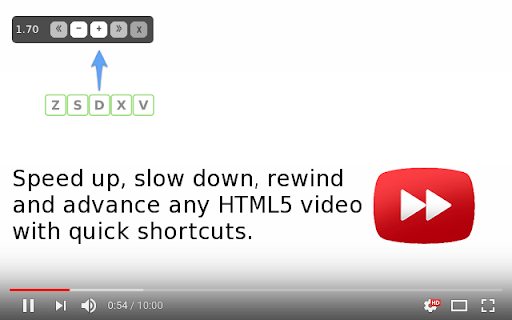
Speed up, slow down, advance & rewind HTML5 audio/video with shortcuts This is a fork of the popular chromium extension. You can change the speed of any HTML5 video (ie. youtube, netflix, reddit, twitter, etc), with much more control than websites typically offer. This fork has mouse-scrolling to change speed - hold shift and use the scroll wheel. This fork also includes unmerged patches to the settings UI which gives it a modern dark theme as well as breaking changes to the settings menu which allow for more fine-grained handling of keyboard input, and some fixes for specific websites such as netflix and reddit. Because I have seen how backwards compatability left crusty code in the original versions for multiple years while I rewrote large sections of it, I will make no promises about this extension working between versions. A complete reinstall of the extension may be (but probably will not be) required on every update, so I can iterate more quickly and correctly.

Video Speed Control
A simple video speed control extension A video speed controller - chromium extension | A simple and easy to operate chromium extension. | Extension is designed to let you change speed to any desired speed of a video (within browser capabilities). | Features: changing playback speed, shortcuts, option to choose affected tabs, customizable speed options | Github page: https://github.com/pajavilc/Video_Speed_Control shortcut list: - Ctrl + Shift + Q - Add/remove current tab to/from list of tabs affected by speed control. - Ctrl + End (Ctrl + Shift + 1 on numpad) - Set speed to a predefined value no. 1 - Ctrl + Left Arrow (Ctrl + Shift + 4 on numpad) - Set speed to a predefined value no. 2 - Ctrl + Down Arrow (Ctrl + Shift + 2 on numpad) - Set speed to the default value (1x)

Video Speed Controller
Control the playback speed of HTML5 videos. Video Speed Controller is a lightweight and powerful Chrome extension that allows you to quickly and easily control the playback speed of any HTML5 video player. Whether you're watching videos on YouTube, Netflix, or any other platform, you can now speed up or slow down playback to suit your preferences. 1. Customizable keyboard shortcuts: Set your desired keys to increase or decrease playback speed, reset speed, rewind or advance the video, and show or hide the speed controller. 2. Save settings per tab, domain, or across all tabs: Choose how you want to save your playback settings. Keep them for a single tab, apply them to a single domain (e.g., YouTube), or make them the default for all tabs. 3. Speed indicator: See the current playback speed in the top left corner of the video player. Hover over the indicator to reveal the controls or use your custom shortcuts. 4. Works on any website with an HTML5 video player: YouTube, Netflix, Vimeo, Facebook, and many more! 5. Easy to use: Install the extension and start using it right away – no need to refresh the page or restart your browser. Instructions for use: 1. Install the Smart Video Speed Controller extension. 2. Navigate to any page with an HTML5 video player. 3. Use the custom keyboard shortcuts or hover over the speed indicator in the top left corner to control playback speed. 4. Click the extension icon in your browser toolbar to access settings and customize your shortcuts or choose how to save your playback settings. Get the most out of your video-watching experience with Smart Video Speed Controller. Enjoy faster or slower playback, depending on your preferences, and easily switch between different speeds with just a few keystrokes. Say goodbye to slow-loading videos and tedious buffering – download Smart Video Speed Controller today!

Video Speed Control
Video Speed Control extension lets you easily control the playback speed for all HTML5 video elements. To work with this add-on, please open a webpage that contains HTML5 video elements. Then, play the desired video element and open the toolbar popup UI. Within the UI, adjust the playback speed and then click on the - Play - button (footer section). The playback speed will be changed according to the value shown in the popup. Please note that this add-on does NOT change the speed automatically. You need to open the toolbar popup UI and press the - Play - button each time (needs user-action). Moreover, every time a page is reloaded, the add-on needs a user action again. The minimum playback speed is 0.07x and the maximum speed is 16x. The min and max values are according to the HTML5 standards. Note: The extension interface supports dark mode. To switch the interface theme to dark, please press the moon icon in the top-right toolbar. If you have a feature request or found a bug to report, please fill the bug report form on the add-on's homepage (https://mybrowseraddon.com/video-speed-control.html).

Hold H Video Speed Controller
Hold H to change video speed. Release to restore speed! Hold H Video Speed Controller lets you adjust the playback speed of any… Hold H to change video speed. Release to restore speed! Hold H Video Speed Controller lets you adjust the playback speed of any HTML5 video on popular platforms like YouTube, Twitch, Netflix, and Bilibili... Not only does this extension allow you to set the speed to whatever you desire (possibly greater than 2), you can also temporarily change the speed to a desired value (3 by default) by holding down the H key! If you want to fast forward some parts of a video but still would like to quickly slow down (or vice versa), this extension is made just for you! Changing the speed no longer requires interacting with the UI so you're able to easily switch between two preset speeds with only the H key!
