
dompogicnedcmbepdaoodjeijbiohbei
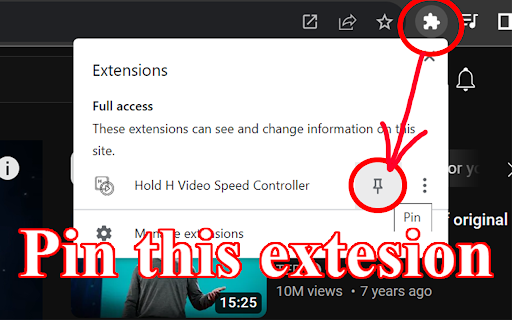
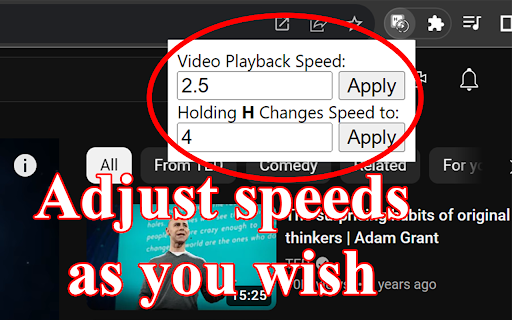
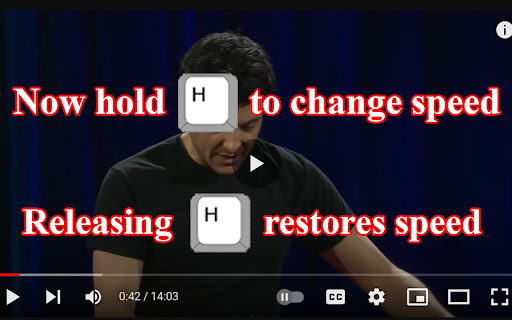
Hold H to change video speed. Release to restore speed! Hold H Video Speed Controller lets you adjust the playback speed of any… Hold H to change video speed. Release to restore speed! Hold H Video Speed Controller lets you adjust the playback speed of any HTML5 video on popular platforms like YouTube, Twitch, Netflix, and Bilibili... Not only does this extension allow you to set the speed to whatever you desire (possibly greater than 2), you can also temporarily change the speed to a desired value (3 by default) by holding down the H key! If you want to fast forward some parts of a video but still would like to quickly slow down (or vice versa), this extension is made just for you! Changing the speed no longer requires interacting with the UI so you're able to easily switch between two preset speeds with only the H key!

Video Speed Controller
Speed up, slow down, advance and rewind HTML5 audio/video with shortcuts HTML5 video provides native APIs to accelerate playback of any video, but most implemented players either hide or limit this functionality. This extension fixes that, plus more... It will help you optimize your video viewing by allowing you to make quick playback speed adjustments, as well as rewind the video to hear the last few second one more time. Once the extension is installed simply navigate to any page that offers HTML5 video, and you'll see a speed indicator in top left corner of the video player. - Works on any site with HTML5 media: YouTube, Netflix, local files, etc, including audio. - Fine-grained speed controls and defaults - 0.07x to 16x in configurable increments. - Fully customizable shortcuts: remap every key, add modifier combos, custom speed toggles. - Configurable per-site speed rules - set a default playback speed for specific domains. - Option to persist your last speed across sessions and tabs. - Reposition the on-video speed indicator anywhere you like. Hover over the speed indicator to reveal the controls to accelerate, slowdown, or rewind the video (10 seconds + lowers playback speed). Or, even better, use your keyboard: If you prefer other shortcuts, want to change the increment value, or want the player to remember your playback speed in the future, head into the settings page and customize it to your heart's content.

Video Speed Controller - video manager
Video speed control for all HTML5 video players. Speed up, slow down video or audio with keyboard shortcuts. Video speed controller for online videos. Speed up, slow down playback on any website. Speed up or slow down video playback on websites such as Youtube and all other websites with video in. Do you struggle with adjusting the speed of video playback on various websites, including popular streaming platforms like Netflix, Amazon Prime Video, and YouTube? Introducing the video speed controller, a Google Chrome extension that enables you to finely adjust the playback settings on your favorite streaming websites. With options ranging from 0.25x to 4x, the extension supports a wide range of playback speeds. How to use Video Speed Controller Extension: - Install the extension and pin to your browser (one-time process). - Open any video on your desired streaming website. - Click on the extension’s icon. - Use the extension’s pop-up to specify the video playback settings. - The chosen settings are applied to the video. The HTML5 video speed controller is an application that allows you to either increase or decrease the playback speed of video content. Easily manage the playback speed while watching videos. Video Speed Controller enables you to speed up or slow down any video during playback, without any set standards or limitations. You have the freedom to increase or decrease the playback speed, as well as fast forward and rewind the video as many times as needed. The main features: - The HTML5 video speed controller is compatible with almost all video sites that you use every day; - Unique accuracy of up to 1% in setting the playback speed that is suitable for you; - Very intuitive interface, so the application will definitely not cause difficulties in using; - Keyboard shortcuts that allow you to instantly change the playback speed. Thankfully, Video Speed Control lets you speed up or slow down videos quickly and easily. Save time today when you are watching videos by slowing them down or speeding the videos up. We hope you find our Playback Video Speed tool useful! We are waiting for your feedback and ratings! If you’re experiencing problems or speed controller isn't working on, please contact us.

Super Video Speed Controller
Adjust playback speed for any video. Video speed controller for your videos Super Video Speed Controller allows to increase or decrease playback sped on any web site. Features: 🎥 Work almost anywhere 🎥 You can adjust with presets or set a custom speed in percents 🎥 Use shortcuts Quick start: find "Super Video Speed Controller" icon by opened a menu under the "puzzle" icon in the toolbar.

Video Speed Controller
Video Speed Controller is a super lightweight extension that lets you control video playback speed on any website. Easily slow down… Video Speed Controller is a super lightweight extension that lets you control video playback speed on any website. Easily slow down or speed up videos up to 5x for a customized viewing experience! - Adjust video speed from 0.01x to 5.00x - Quick-access buttons for 0.5x, 1x, 1.5x, and 2x speeds - Works seamlessly on all websites with embedded videos - 1.0.2 - Added x2.5 and x3 quick buttons - 1.0.1 - Bugfixes and improvements - 1.0.0 - Added settings with enhanced precision, color themes, and an option to force HTML controls on videos - Updated extension icon - 0.2.2 - Improved performance and user experience - Adjustment video speed via icon click - Reduced package size for better efficiency
