
chnccghejnflbccphgkncbmllhfljdfa
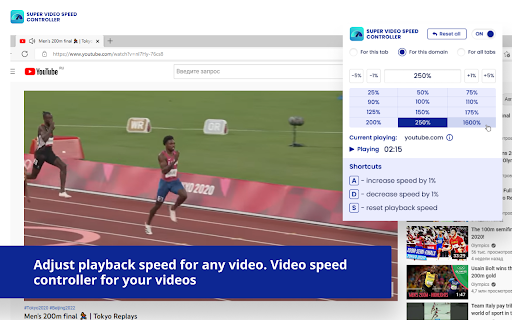
Adjust playback speed for any video. Video speed controller for your videos Super Video Speed Controller allows to increase or decrease playback sped on any web site. Features: 🎥 Work almost anywhere 🎥 You can adjust with presets or set a custom speed in percents 🎥 Use shortcuts Quick start: find "Super Video Speed Controller" icon by opened a menu under the "puzzle" icon in the toolbar.

Coursera Video Speedup
Speed up Coursera videos with this simple Chrome extension. Coursera Video Speedup is a lightweight and easy-to-use browser extension that allows you to control the playback speed of videos on Coursera. With multiple speed options available, you can quickly adjust the playback speed of your video lectures or tutorials, making it easier to learn at your own pace. This extension offers a clean and intuitive interface with speed buttons displayed below the video in window mode, hiding them in fullscreen mode for an immersive viewing experience. The selected speed button is highlighted, giving you clear visual feedback about the current playback speed. Whether you want to slow down a complex topic or breeze through familiar content, Coursera Video Speedup Extension gives you the flexibility to customize your video-watching experience. 🚀 Multiple speed options: 0.25x, 0.5x, 0.75x, 1x, 1.25x, 1.5x, 2x, 3x, and 5x 🎛️ Easy-to-use interface with speed buttons 📺 Fullscreen compatibility

Video Playback Speed (2x-4x-16x)
Control video playback speed from 0.25x to 16x on any website. Modern dark UI with slider and manual input controls. Take full control of your video playback speed! This simple yet powerful extension lets you adjust playback speeds beyond the usual limits — 2x, 4x, 8x, or even 16x. Perfect for fast learners, video reviewers, or anyone who wants to save time. Change video speed instantly with one click Lightweight and easy to use

CU Internet Auto Login
Automatically logs you into Chandigarh University Internet Authentication portal, CUIMS & LMS. CU Internet Auto Login is a lightweight Chrome extension that automatically logs you into University’s internet authentication portal, CUIMS & LMS. Once saved, your UID and password are securely stored in Chrome’s local storage, so you won’t need to re-enter them every time, even after restarting your browser or computer. Key Features: • Automatically log in to CU Internet Portal • Automatically log in to CUIMS and LMS • One-click logout option for Internet Portal • Toggle button to enable or disable CUIMS auto login from the popup • Direct buttons to open CUIMS and LMS • Securely saves your UID and password using Chrome local storage • Simple and user-friendly popup interface • Keyboard shortcut to open popup (Ctrl + Shift + Y)

VidRate Video Speed Controller
Enhance Your Video Playback with VidRate: Speed Control, Keyboard Shortcuts, and Universal Compatibility! Upgrade your video viewing experience with VidRate, the ultimate browser extension. Enjoy enhanced control over your videos with its powerful features. VidRate works seamlessly on various platforms, including YouTube, and supports generic HTML5 videos. Easily adjust the playback speed in percentage to match your preferences. Plus, take advantage of convenient keyboard shortcuts for effortless control. Enhance your video playback today with VidRate!" - Universal Compatibility: Works on almost any video platform, including YouTube, Vimeo, and generic HTML5 videos. - Precise Speed Control: Set the playback speed of your videos in percentage, allowing you to fine-tune your viewing experience. - Convenient Keyboard Shortcuts: - Increase speed by 1%: Press 'A' - Decrease speed by 1%: Press 'D' - Reset speed to normal: Press 'S' Upgrade your video playback and enjoy a customized experience with VidRate! Try it now and take control of your video viewing like never before.
