
nclgfilnbckejgmdinfokodoipboenjp

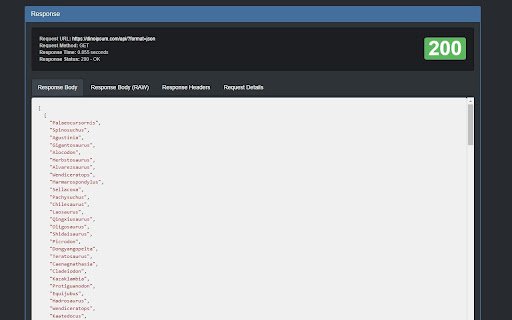


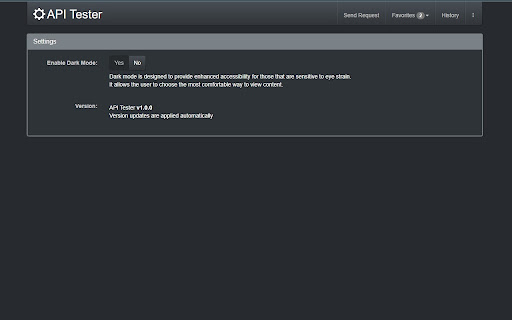
Develop, test and debug REST APIs. Welcome to API Tester - REST API Tester Client FREE a tool for developing, testing and debugging REST APIs. #1 The API Tester includes the following main functionality: 1. Send requests and display responses API Tester - REST API Tester Client FREE can handle GET, PUT, PATCH, DELETE, HEAD, OPTIONS and Custom requests. In addition custom headers and basic authentication can be added to the requests. 2. Manage favorites To make debugging life easier, the API Tester allows to store and manage favorite requests. These favorites can also be imported and exported. 3. Request history By default all requests are stored within the request history. Please rest assured that the API Tester will not store any requests made from an incognito window. 1. Which permissions are needed to use our API Tester - REST API Tester Client FREE extension? Only storage permissions are needed, these permissions are then used to store favorite and historic requests. 2. Where do I get help? The API Tester extension has a dedicated Help section which describes the most important functionality.

REST API Tester
Test REST APIs with ease using this Chrome extension. A simple Chrome extension to test REST APIs on web browser only. No need to use different software and tools for that, now you can test your REST APIs in the browser only while testing the other things.

Pretty Rest API Documentacion
Extension to render a OPEN API 3 REST Documentation uploading the JSON File You can attach a JSON that satisfies the specification Open API 3 and the documentation will be rendered. This extension is focused in front-end and back-end developers who need read a lot of times REST API documentations in order to use it while your are coding. So with this extension you don't need to open another tab to read the API documentation website. - The doc will show you the last section you was reading automatically - Search easy the sections with a modal like box - You can upload new docs This extension do not make any kind of server requests. The extension is Open Source: https://github.com/CharlyJazz/prettyrestdoc You can see the web mode of the extension here: https://charlyjazz.github.io/prettyrestdoc/

API Tester - REST Client Testing Tool
Free REST API Tool, Use it to develop, test, debug RESTful APIs and HTTP request & REST services in Google Chrome Web Store. This is simple REST Client. Use it to develop, test, debug RESTful APIs, HTTP APIs and and easy-to-use UI. This has a number of powerful features than postman... Favorites: - Save favorite requests (including headers, payload etc.) and re-use them with the click of a button. - Import/Export favorites. - Your favorites are automatically synced with your Google account and are not tied to a single machine. History: - View all your previous requests and responses. - Easily run them again. - Easily filter out the requests you're not interested in. Custom Headers: - Choose from a large range of existing request headers. - Create and save your own custom request headers. More... - View the request response in beautiful syntax highlighting (including JSON, XML, HTML and CSS). - See how long each request took to complete. - Supports GET, POST, PUT and DELETE request methods. Custom request methods can also be added by the user. - HTTP Basic Authentication. - Responsive Design. - Dark Mode. - 100% Free. No strings attached. Note on Extension Permissions: The badly named "Read and change all your data" permission is required to send a request to any domain. This does not access or use your data in any way.

Test API
Discover Test API online – a powerful versatile rest client to test api endpoint seamlessly. Your go-to Chrome Api testing tools. 🚀 Enhance your development workflow with Test API - a powerful Chrome extension built for effortless Api testing tools integration. 😊 Experience the simple and comfortable rest Api testing online environment where every developer can execute post request online in seconds. Use this tool to manage your entire development suite right from your browser. 🖱️ Start testing in one click and execute your first QA checkout without leaving your tab. Launch your own development workflow faster than ever, backed by robust apitest scripting and dynamic variable support. Main advantages of test Api: * Easy installation with zero dependencies * Instant Api tester online ready on demand * Built-in api tools for rapid diagnostics and check Rest API * Keep full history of each call, and instantly restore any previous request with a single click Unlock advanced Rest client functionality with no setup required: 🌐 Toggle between GET, POST, PUT, DELETE, PATCH methods for every testing scenario 🛠️ Validate response schemas, Check rest api performance, and simulate real users behaviour 📈 Monitor error rates and check Rest Api Client endpoints effectively Get started in one click and begin your first request. Execute calls, inspect headers, view responses, and debug in real time. No more context switching between multiple apps – Online test api provides you everything you need right in your browser. ➢ Leverage complete tool capabilities without bulky installations ➢ Comprehensive rest client tools library for every stage of development ➢ Lightweight footprint of our test Api ensuring minimal memory usage and smooth performance ➢ Intuitive interface inspired by Postman web and Online postman for Rest api client ease This powerful HTTP client extension transforms your browser into a versatile testing studio 🎯. Users craft GET, POST, PUT, DELETE, and PATCH requests with clicks, add headers, set query parameters, and inspect raw responses 🔍. History of request suites can be saved and restored 🤝. A response viewer ensure efficient debugging and monitoring ⚡. Users choose test API for: 1️⃣ Draft and save your post request online experiments even without an internet connection – full offline support included 2️⃣ Real-time fetch data from api online with instant previews and live response viewers 3️⃣ Conditional workflows to chain multiple requests and complex Test rest client sequences 4️⃣ Customizable headers, query parameters, and body payloads for any types of request 5️⃣ Dark design created for late-night debugging sessions with Http tester integration. ➤ Empower your quality assurance process with comprehensive Tools for api testing built right into your browser. ➤ Benefit from built-in apitest scripting support and rest client in one unified interface. ➤ Leverage our Http tester to run raw HTTP requests, validate authentication workflows and error codes. ➤ Run your checks across multiple environments and manage development lifecycle ➤ Access Online api for testing anytime from your browser — no accounts, no team setup required ❓ Can Test Api perform with various HTTP methods? 🎯 You can check your rest client using GET, POST, PUT, DELETE, and PATCH methods in just a few clicks. Select your desired method, enter the endpoint, configure parameters or body payload, and run the extension instantly. ❓ How do I manage authentication and headers? 🔐 Our tool lets you manage authentication workflows, and custom header presets. Simply choose or create a credentials before sending your request. ❓ Can I measure performance and latency with Test api online ? ⏱️ Yes. You can view response time, status codes, and errors for each request to help with debugging and monitoring. However, this tool doesn’t support load testing or full performance tracking. ❓ Is it possible to automate complex testing scenarios? 🤖 Automation of test scenarios is not available in our extension — and that’s a feature, not a flaw! Test API focuses on simplicity, giving you a lightweight, easy-to-use tool that lets anyone test endpoints quickly without complex setup or scripting. ❓ How do I debug test api online flows in real time? 🐞 Just send your requests and carefully examine the responses. Test Api shows status codes, headers, body content, and error messages — everything you need to troubleshoot and understand how your endpoint behaves. 🏆 Download now and transform your browser into the most versatile test api online available 🎉
