
gjpgfhjgdajmdhialdclpkjmfkhbdchl
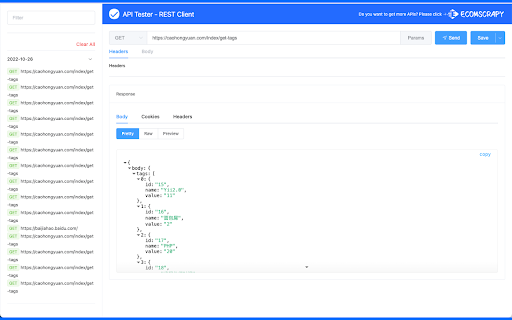
Free REST API Tool, Use it to develop, test, debug RESTful APIs and HTTP request & REST services in Google Chrome Web Store. This is simple REST Client. Use it to develop, test, debug RESTful APIs, HTTP APIs and and easy-to-use UI. This has a number of powerful features than postman... Favorites: - Save favorite requests (including headers, payload etc.) and re-use them with the click of a button. - Import/Export favorites. - Your favorites are automatically synced with your Google account and are not tied to a single machine. History: - View all your previous requests and responses. - Easily run them again. - Easily filter out the requests you're not interested in. Custom Headers: - Choose from a large range of existing request headers. - Create and save your own custom request headers. More... - View the request response in beautiful syntax highlighting (including JSON, XML, HTML and CSS). - See how long each request took to complete. - Supports GET, POST, PUT and DELETE request methods. Custom request methods can also be added by the user. - HTTP Basic Authentication. - Responsive Design. - Dark Mode. - 100% Free. No strings attached. Note on Extension Permissions: The badly named "Read and change all your data" permission is required to send a request to any domain. This does not access or use your data in any way.

SellerSprite - Amazon Research Tool
Join over a million sellers using SellerSprite to research, analyze, and optimize smarter — directly from your browser. Built on powerful data and AI, SellerSprite's Chrome Extension mirrors 80% of the full web app’s functionality. From product research to keyword analysis and competitor tracking, streamline your Amazon FBA business with real-time insights —all without leaving the Amazon page. In a single view, you can instantly spot high-potential products, analyze top competitors, uncover hidden keywords, and filter by sales, ratings, BSR, and more — without ever switching tabs. Key Features 📊 Deep Market Insights - Analyze subcategories with 16+ data points: demand, competition, supply/demand ratio to instantly spot high-potential niches and blue-ocean markets - Access granular BSR analytics with Top 400 rankings—track performance by parent and child ASINs, analyze variant-level sales distribution, and identify underexploited long-tail demand with precision - Customize your own product lists to batch-research trends, volume, and seasonality 🔑 Smart Keyword Tools - Discover high-converting long-tail keywords and build optimized listings - Track organic & sponsored keyword rankings in realtime - Reverse-search competitor ASINs to uncover hidden keyword strategies 🎯 Competitor Intelligence - Track BSR and sales across global sites - Detect brand infringement risks and benchmark strategies - Analyze reviews with AI and generate optimization suggestions ⚙️ Bulk Efficiency Tools - Download images, reviews, and selling points in one click - Collect ASINs and invite reviews in batches - Save hours with automation and smart scraping 💡 Why Sellers Choose SellerSprite - Feature-rich extension with 80% of full functionality — built into your browser - Real-time insights directly on Amazon pages - Trusted by over 1,400,000 Amazon sellers worldwide - Works with all major Amazon marketplaces ✅ Free to install — start exploring today! 1. Install the Extension • Download the SellerSprite Chrome Extension from the Chrome Web Store. 2. Create a Free Account • Sign up or log in. • New users get a 3 day-free trial of premium services. 3. Start Researching • Visit any Amazon product page to activate the extension. • Uncover competitor strategies, analyze product performance, and explore market trends. • Access in-depth historical data on pricing, sales, and keyword rankings to make informed decisions.

REST Client
Use Rest Client – your powerful REST API client tool for testing and debugging HTTP requests both online and locally in Chrome This is an effective tool to simplify your API development. It integrates directly into your browser, eliminating the need for external downloads or installations. This extension offers all the essential tools developers need to efficiently interact with restful services. 🔍 Our chrome extension offers significant advantages over standalone options. Unlike traditional rest api clients, which require separate installation and maintenance, our solution is always available right in your browser. No more switching between applications—just click our icon, and chrome transforms into a fully-featured api testing software in seconds! 🔹 Intuitive request builder for all HTTP methods 🔹 Powerful header management and authentication support 🔹 Response visualization These capabilities make our extension comparable to dedicated api software, eliminating the need for additional api testing tools. 🚀 Perfect for Quick API Testing Need to test api endpoints quickly? Our chrome extension provides the perfect balance of power and simplicity. It's instantly available whenever inspiration strikes, making it a reliable choice for day-to-day testing needs. Our app integrates seamlessly with your development workflow, offering distinct advantages: 🌈 Always available in your browser environment 🌈 Minimal resource usage compared to standalone applications 🌈 Consistent experience across operating systems 🌈 Quick access to testing api during development This integration is particularly valuable for developers who work across multiple machines or need to test handlers quickly. 👨💻 Suitable for All Experience Levels Whether you're new to API development or an experienced engineer, our solution offers functionality for everyone: 🚩 Beginners will appreciate the intuitive interface and helpful documentation 🚩 Intermediate and advanced users will benefit from the streamlined workflow Our Rest Client for chrome browser maintains accessibility while growing with your expertise. 🔒 Focus on Security and Privacy Built with security in mind, our Rest Client is perfect for professional environments where data protection is paramount: 🔐 Local storage of sensitive data with encryption options 🔐 No server-side processing of your data 📈 Continuous Improvements Our rest api client for chrome browser benefits from regular enhancements, ensuring it remains competitive: 🌟 Performance optimizations for speed and reliability 🌟 Bug fixes and stability improvements 🌟 UI refinements for better usability 🚀 Get Started Today Getting started with our browser-based online REST tool is easy.. Install our chrome extension from the Chrome Web Store and begin exploring its capabilities: 🌠 Create your first request in seconds 🌠 Configure environments for different testing scenarios 🌠 Save and organize your requests Join many developers who have discovered that a powerful rest client application can exist right within your browser! 🧠 The Smart Alternative Our Rest Client represents the evolution of api tools, bringing the power of dedicated applications directly into your browser. Build better endpoints more efficiently than ever before, without sacrificing functionality. - 🚀 Postman: The Postman download process can be lengthy, and it requires separate installation, consuming more resources. In contrast, our chrome rest api client is instantly accessible, right within your browser. While there is the postman online service that offers an online version, it doesn't provide the full functionality of the desktop app. - 🌙 Insomnia: As a standalone application, insomnia rest client has a steeper learning curve compared to our integrated rest client in chrome, which is designed for ease of use. - 🆕 Bruno and 🔧 Advanced rest client (ARC): These options offers more complex features, like scripting capabilities, but they also requires installation. Many developers use a range of API testing solutions, such as our Chrome extension, Postman, Insomnia, and Bruno rest clients. However, for quick and efficient development our extension is increasingly becoming the preferred choice among developers.

API Tester
Rest API Tester is an easy api testing tool. Streamline your software development and test api online with this Chrome extension. API testing is essential in software development, ensuring interfaces work correctly and provide accurate data. With the rising complexity of modern applications, a reliable tool for validating endpoints is crucial. This api tester streamlines the process, enabling developers and qa engineers to efficiently identify and resolve issues, facilitating seamless integration among systems. Our instrument serves as a comprehensive solution for your needs, whether you are validating or debugging endpoints. The importance of api in software testing cannot be overstated; it enhances workflow efficiency and simplifies the entire process, making it an essential asset for ensuring quality assurance across your projects. 🚀 With this extension, you can test api online without the need for complex setups or additional software. It’s built to help you conduct api tests quickly and accurately, ensuring your applications run smoothly and deliver exceptional performance. Additionally, you can test api endpoint configurations to ensure they function as intended. Why Should You Consider This Option? 1️⃣ Ease of Use: Designed with a user-friendly interface, it’s easy for both beginners and experts to work with endpoints effortlessly. 2️⃣ No Installation Required: As a chrome extension, it’s lightweight and accessible directly from your browser. 3️⃣ Versatility: From verifying web services to making request validations, this tool supports a wide range of methods, including GET, POST, PUT, DELETE, and more. 4️⃣ Real-Time Results: Get instant feedback on your tests with detailed responses, status codes, and headers. 5️⃣ Cost-Effective: Unlike many tools for api testing, this api tester online is free to use, saving you time and money. Who Can Benefit? This instrument is ideal for: 🔺 Developers who need to test rest api during the development process. 🔺 QA engineers looking for reliable api testing tools to ensure software quality. 🔺 Students and learners exploring concepts of endpoint verification. 🔺 Freelancers and professionals who require a quick and efficient test tool for their projects. Advantages of Using This Rest Client ➤ Efficiency: Save time with a solution that simplifies qa procedures and delivers instant results. ➤ Accuracy: Ensure your endpoints are error-free with detailed response analysis. ➤ Accessibility: As an online api tester, it’s always within reach. ➤ Scalability: Whether you’re verifying a single endpoint or multiple services, it scales with your needs. How to Get Started 1. Install the chrome extension from the web store. 2. Open the tool and enter the url you want to verify. 3. Choose the request method (GET, POST, PUT, DELETE, etc.). 4. Add headers, parameters, or body content as needed. 5. Click Send and analyze the response in real-time. What Makes This Application a Preferred Choice This api tester is more than just a solution - it’s a comprehensive resource for all your needs in software development. Unlike other solutions, it combines simplicity, power, and accessibility into one seamless experience. Whether you’re a seasoned developer or a beginner, it helps you be confident in the quality of your product. Use Cases 🔸 Debugging and validating web service workflows. 🔸 Performing http test requests to ensure the reliability of web services. 🔸 Checking endpoints during software development. 🔸 Learning and experimenting with qa concepts related to web services. 💬 Frequently Asked Questions (FAQ) ❓ What is an api tester, and why do I need it? 💡 An api tester is a solution that helps developers and qa engineers evaluate endpoints to ensure they function correctly. This instrument simplifies the process by allowing you to check rest api without complex setups. ❓ Can I use it for rest api testing? 💡 Yes! It’s designed to handle it, allowing you to send requests (GET, POST, PUT, DELETE) and validate responses effortlessly. ❓ Is it free to use? 💡 Absolutely! Unlike many others, this api tester is free to use, saving you time and money. ❓ How do I verify endpoints using this application? 💡 Simply install the Chrome extension, enter the url, choose the request method, add parameters if needed, and click Send. You’ll receive real-time results instantly. ❓ Is it suitable for beginners? 💡 Definitely! With its user-friendly interface, this application is perfect for both beginners and experts looking to test software efficiently. Conclusion Our api tester is the ultimate solution for anyone looking to streamline their api testing online process. With its intuitive design, powerful features, and accessibility as an online api checker, it’s the perfect companion for developers, qa engineers, and tech enthusiasts focused on testing api functionality. Try it today and experience the future of software solutions! 🌟

Mockiato — Free API Testing & Mocking Tool
Chrome extension to intercept requests, create real-time mocks, and auto-insert headers for web development & testing API. Mockiato is an extension for Google Chrome, designed to optimize web application development and testing. It allows you to intercept outgoing requests in real-time and create mocks for them, ensuring quick emulation of server responses. In addition, Mockiato enables the addition or modification of headers in requests. This feature significantly simplifies request configuration and saves developers' time. Combined, these tools provide flexibility and convenience, making the development and testing process more efficient and reliable. You can submit issues, bugs or feature request at https://github.com/avivasyuta/mockiato/issues
