
nijihkechbhbnjgeifogcldjodcnhdgb
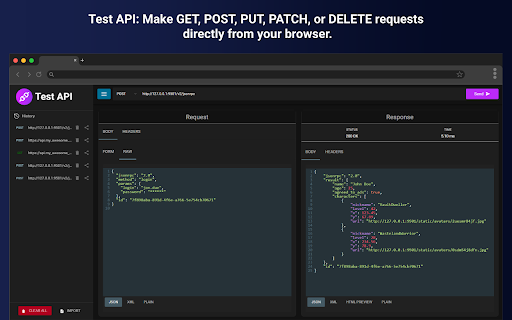
Discover Test API online – a powerful versatile rest client to test api endpoint seamlessly. Your go-to Chrome Api testing tools. 🚀 Enhance your development workflow with Test API - a powerful Chrome extension built for effortless Api testing tools integration. 😊 Experience the simple and comfortable rest Api testing online environment where every developer can execute post request online in seconds. Use this tool to manage your entire development suite right from your browser. 🖱️ Start testing in one click and execute your first QA checkout without leaving your tab. Launch your own development workflow faster than ever, backed by robust apitest scripting and dynamic variable support. Main advantages of test Api: * Easy installation with zero dependencies * Instant Api tester online ready on demand * Built-in api tools for rapid diagnostics and check Rest API * Keep full history of each call, and instantly restore any previous request with a single click Unlock advanced Rest client functionality with no setup required: 🌐 Toggle between GET, POST, PUT, DELETE, PATCH methods for every testing scenario 🛠️ Validate response schemas, Check rest api performance, and simulate real users behaviour 📈 Monitor error rates and check Rest Api Client endpoints effectively Get started in one click and begin your first request. Execute calls, inspect headers, view responses, and debug in real time. No more context switching between multiple apps – Online test api provides you everything you need right in your browser. ➢ Leverage complete tool capabilities without bulky installations ➢ Comprehensive rest client tools library for every stage of development ➢ Lightweight footprint of our test Api ensuring minimal memory usage and smooth performance ➢ Intuitive interface inspired by Postman web and Online postman for Rest api client ease This powerful HTTP client extension transforms your browser into a versatile testing studio 🎯. Users craft GET, POST, PUT, DELETE, and PATCH requests with clicks, add headers, set query parameters, and inspect raw responses 🔍. History of request suites can be saved and restored 🤝. A response viewer ensure efficient debugging and monitoring ⚡. Users choose test API for: 1️⃣ Draft and save your post request online experiments even without an internet connection – full offline support included 2️⃣ Real-time fetch data from api online with instant previews and live response viewers 3️⃣ Conditional workflows to chain multiple requests and complex Test rest client sequences 4️⃣ Customizable headers, query parameters, and body payloads for any types of request 5️⃣ Dark design created for late-night debugging sessions with Http tester integration. ➤ Empower your quality assurance process with comprehensive Tools for api testing built right into your browser. ➤ Benefit from built-in apitest scripting support and rest client in one unified interface. ➤ Leverage our Http tester to run raw HTTP requests, validate authentication workflows and error codes. ➤ Run your checks across multiple environments and manage development lifecycle ➤ Access Online api for testing anytime from your browser — no accounts, no team setup required ❓ Can Test Api perform with various HTTP methods? 🎯 You can check your rest client using GET, POST, PUT, DELETE, and PATCH methods in just a few clicks. Select your desired method, enter the endpoint, configure parameters or body payload, and run the extension instantly. ❓ How do I manage authentication and headers? 🔐 Our tool lets you manage authentication workflows, and custom header presets. Simply choose or create a credentials before sending your request. ❓ Can I measure performance and latency with Test api online ? ⏱️ Yes. You can view response time, status codes, and errors for each request to help with debugging and monitoring. However, this tool doesn’t support load testing or full performance tracking. ❓ Is it possible to automate complex testing scenarios? 🤖 Automation of test scenarios is not available in our extension — and that’s a feature, not a flaw! Test API focuses on simplicity, giving you a lightweight, easy-to-use tool that lets anyone test endpoints quickly without complex setup or scripting. ❓ How do I debug test api online flows in real time? 🐞 Just send your requests and carefully examine the responses. Test Api shows status codes, headers, body content, and error messages — everything you need to troubleshoot and understand how your endpoint behaves. 🏆 Download now and transform your browser into the most versatile test api online available 🎉

Quick API Test
Quick API Test is a fast, lightweight, and local-first API testing tool built for developers who want immediate feedback without the overhead of heavyweight clients. Designed to run entirely inside your browser, it allows you to send HTTP requests, inspect responses, and validate endpoints in seconds — no accounts, no cloud sync, no distractions. Whether you're debugging a single endpoint or iterating rapidly during development, Quick API Test keeps your workflow focused and efficient. Instant API testing directly inside your browser Local-first & privacy-friendly — all requests stay in your environment No setup required — open and test immediately Clean, developer-focused interface optimized for speed This tool is ideal for developers who value simplicity, clarity, and control. Support for all major HTTP methods: GET, POST, PUT, PATCH, DELETE, OPTIONS Custom headers, query parameters, and path variables Environment variables for flexible endpoint configuration JSON, form data, and raw request body support Clear, formatted response viewer with: Collection-based organization for managing multiple endpoints Tabbed requests for parallel testing workflows 🎯 Designed for Real Development Work Quick API Test is suitable for: Verifying authentication headers and tokens Learning and teaching HTTP request fundamentals Prototyping services and validating responses quickly The interface is intentionally minimal, so even complex API workflows remain easy to understand and manage. All API requests are executed locally in your browser. Quick API Test does not collect, transmit, or store your data on external servers, making it safe for sensitive endpoints and internal services. How do I get started? Install the extension, open it, and create your first request. No configuration required. Does it support authentication? Yes. You can use custom headers for API keys, Bearer tokens, and other authentication schemes. Is there a request limit? No artificial limits. You can test as many endpoints as you need. Is this a Postman replacement? Quick API Test is an independent tool focused on speed and simplicity. It is not affiliated with Postman or any other third-party service. Quick API Test is an independent API testing tool and is not affiliated with Postman, FastAPI, or any other third-party platform or framework. Built for developers who prefer less setup, fewer clicks, and faster feedback.

RePostman
A Postman-like Chrome extension for API testing and debugging RePostman is a comprehensive API testing tool built for developers and testers, enabling you to efficiently test APIs directly in your browser. 🔧 Key Features: • Supports multiple HTTP request methods (GET, POST, PUT, DELETE, etc.) • Supports multiple request body formats (JSON, Form Data, x-www-form-urlencoded) • Request history with one-click parameter recovery • Request collection management with drag-and-drop sorting and organization • Environment variable system with priority-based merging • Response preview with JSON/XML formatting and HTML/Markdown rendering • Chrome extension architecture with seamless browser integration 🚀 Use Cases: • API development and testing • Backend service testing • Web service debugging • RESTful API exploration • Development workflow integration 💡 Why Choose RePostman? • Lightweight and fast • No account registration needed • Works offline • Modern and intuitive interface 🙏 Feedback and Suggestions Welcome We welcome all feedback, feature suggestions, and PR contributions to help us build a better API testing tool together! 🙏 Thanks to Postman: Inspired by Postman, we thank it for establishing the industry standard for API testing tools in the developer community.

API Tester Pro - REST Client, HTTP Request Builder, Debug & Collections
REST API client and HTTP tester. Send GET, POST, PUT, DELETE. JSON viewer, auth, headers. Postman alternative. API Tester Pro is a fast, full-featured REST client and API testing tool that runs entirely inside your browser. Send HTTP requests, inspect responses, debug APIs, and manage saved collections — without installing a heavy desktop app. KEY FEATURES: • Send GET, POST, PUT, PATCH, DELETE, HEAD, and OPTIONS requests • View formatted response body, headers, status codes, and timing • Syntax-highlighted JSON, XML, and HTML response viewer • Authentication support — Basic Auth, Bearer Token, API Key, OAuth headers • Request body support — JSON, form data, raw text, and binary • Save and organize requests into collections for reuse • Request history — quickly re-send previous API calls • Import and export collections for team sharing • Environment variables for switching between dev, staging, and production A lightweight REST client alternative that's fast and private. No signup. No cloud dependency. Install and start testing.

Test API
Discover Test API - powerful rest client among api testing tools. Fast and lightweight online api tester in browser. This versatile tool simplifies how online api testing is performed, offering a seamless and lightning-fast experience for every tech person. Say goodbye to complex setups and hello to effortless, lightning-fast workflows. Start with a single click and dive into rest api testing. Skip the hassle of installing heavy tools. With Test API, you can manage everything online - from creating calls to debugging responses. 🚀 Unique features of our Rest Client: ➤ No setups, no dependencies - instant access at your fingertips. ➤ Lightweight endpoint tool designed to optimize your performance. ➤ Track every request automatically with detailed logs for future reference. ➤ Easily configure headers, payloads, and parameters for personalized use. 🛠 Simplified Validation for Every Use Case: 1. Switch between HTTP methods like GET, POST, PUT, DELETE, and PATCH for every step of your requests handling. 2. Analyze responses and monitor status codes in real-time. 3. Debugging becomes straightforward as you check errors, inspect headers, and preview detailed responses using our browser extension. ✅ Benefits of using our rest client: - Comprehensive tool for effective rest app diagnostics. - A smooth experience to test rest api without leaving your browser. - No need for bulky installations – Test API works instantly. - Inspect endpoints dynamically with our user-friendly interface. Move beyond basic tools with Test API: the perfect companion for development. Whether you’re choosing instruments for endpoint validation or performing advanced api testing online, this utility fits the bill. 💻 Here’s why Test API stands out: 1️⃣ Execute multiple requests across various environments. 2️⃣ Enable secure authentication workflows with custom headers. 3️⃣ Save api test templates and reuse them. 4️⃣ Use dark mode and enjoy late-hour debugging. This rest client is designed for functionality and speed. Test API turns your browser into a versatile tool for debugging and inspecting endpoints. Craft, send, and validate endpoints without ever leaving your tab. 🧠 Here's what our rest client offers: 🔹 Toggle between complex methods like GET, POST, or DELETE with organized features. 🔹 Response inspection for clearer debugging. 🔹 Efficient solution to check rest endpoints on-the-go. 🔹 This chrome extension made for reliability and performance optimization. 💪 Advanced Endpoints Validation Made Easy with this web app: This online utility is all about empowering users. From saving request histories to enabling effortless execution, it removes all the guesswork. Test API simplifies the process to validate endpoints, whether you're a pro or an amateur looking to test api online. ⚡ Highlights: ▸ Interactive interface inspired by leading tools like Postman for enhanced usability. ▸ Full support for endpoint assessment in software evaluation, providing efficient results in live environments. ▸ Lightweight yet packed with advanced features for rest api client efficiency. ▸ Saves logs systematically, allowing seamless retrieval of earlier verifications. 🏆 Why developers choose Test API for their projects: ➡️ Access a full library of features for evaluating endpoints, right in your browser. ➡️ Simplify workflows with features like error tracking and dynamic validation. ➡️ Debug in real-time while maintaining performance across environments. ➡️ Effortlessly configure payloads, headers, and parameters for all your scenarios. 💡 Frequently Asked Questions 💡 ❓ How do I test api using HTTP methods? 🎯 This tool supports GET, POST, DELETE, PATCH, PUT, OPTIONS and HEAD. Simply enter your endpoint, configure your request, and check it instantly without leaving your browser. ❓ What about user authentication? 🔐 Securely set up authentication credentials using built-in modules. Send requests with headers pre-configured for your app. ❓ Can this rest client help analyze errors? 🐞 Yes! With features like live debugging, response monitoring, and error tracking, Test API simplifies analyzing your endpoints. ❓ Is it suitable for performance evaluation? ⏱️ While not a replacement for dedicated load simulation tools, Test API efficiently measures latency and response times to ensure smooth performance. ❓ Do I need an account to run this api tester online? 🚫 No. Our extension is accessible directly online. No registration, no setup - just start building requests! Start using Test API today and experience the smoothest way to validate your services, backed by robust functionality and lightweight design. Transform your browser into the ultimate development suite 🎯.
