
ncjkkfbddfkkemiejpfdgjcifjmbcloc
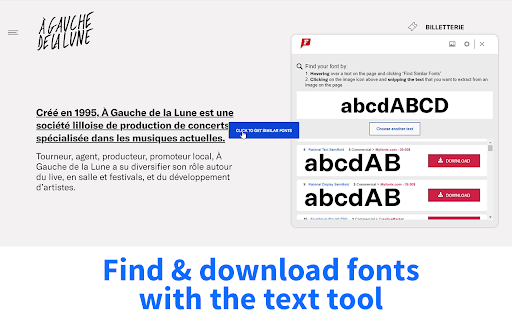
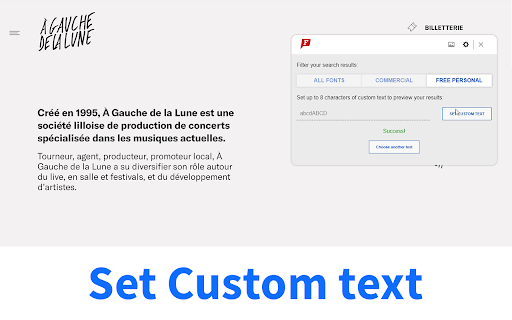


Font Identifier by WhatFontIs helps you quickly detect fonts used on web pages and images. Use the extension to: - hover over text on any website and identify the font in use - capture a visible area of the page and analyze text from an image - send webpage images directly to WhatFontIs for font detection - view similar font matches, including free and commercial alternatives - keep a small history of recently identified fonts The add-on is designed for designers, developers, marketers, and anyone who needs to recognize fonts faster without leaving the page.

Site Palette
Now available for Microsoft Edge, Brave, and Opera via Chrome Web Store! Introducing our new browser extension for generating color palettes! As a designer or frontend developer, you know how important it is to have a tool that helps you quickly and easily generate beautiful color schemes for your projects. With our extension, you can do just that - simply visit any website and start building your palette. We've made it incredibly easy to use, and our seamless user experience means you can focus on creating without any distractions. Whether you're designing a website, creating graphics, or working on a new branding project, our extension is the perfect tool to help you get the job done. Give it a try today – we can't wait to see what you create with it! 💸 PRICING - 24-hour free trial. - $2.50 per month or $30 per year. - Limited-time offer: lifetime subscription for $99. 🆕 FEATURES - Register and log in via MagicLink for enhanced authentication and account management. - Manage subscriptions directly from the “My Profile” page. - Login pop-up when clicking the extension icon for a seamless experience. - New tools and features for organizing palettes on the “My Palettes” page. - Integration with Google Art Palette for fine-tuning color schemes. - Work with palettes using coolors.co (not affiliated with coolors.co). - Extract visible CSS colors directly from the current viewport and rank them by on-screen area. - Share palettes using unique shareable links. - Quick download of auto-generated Sketch templates based on selected palettes. - Support for Adobe Swatch to enhance flexibility. - Support for SVG format on shared pages. - Palette history for accessing, managing, and sharing previous palettes. - Subscription-based product with monthly/yearly plans for ongoing feature development and support. - Lifetime purchase option for unlimited access to all current and future features. 🔧 IMPROVEMENTS - Redesigned interface with a cleaner, more streamlined look. - Enhanced Stripe payment system with better security, faster processing, and improved error handling. - Improved user experience after extension installation. - Increased performance and stability for faster load times. - Added hover states for buttons in modal windows. - Updated footer design. 🐞 BUG FIXES - Fixed palette generation issues on long pages. - Resolved link copying problems in Safari. - Aligned button labels for consistency. - Optimized scrolling on long pages. - Various minor fixes and performance enhancements.

Fontanello
A browser extension that lets you display the basic typographic styles of a text by right-clicking it. Fontanello makes it super easy to inspect typography on a webpage. It will show you information about typeface, weight, size, color and some other less used CSS-properties. It also show information about contrast for selected text.

What Font - find font
Lets you know what font is used on any website Lets you know what font is used on any website Using the WhatFont extension, you can find out the following details: font family, style, weight, size, line height, color which is used on any site. Just find the text you need, activate the WhatFont extension and all the necessary information will appear on your monitor. The WhatFont extension for Google Chrome is a powerful tool that allows users to quickly and easily identify the fonts used on any website and enables users to identify the font style, size, color, and italics used on a website by simply hovering over the text. How To Use: 1. Activate extension WhatFont by clicking on its icon in the right-top 2. For information click on the font 3. To disable the functionality - click "Exit What Font" on the right-top of the browser. WhatFont is especially useful for designers, developers, and anyone who works with typography. It provides an easy and efficient way to identify the fonts used on a website, which can be a valuable resource for creating your own designs. Additionally, this extension can help you improve your understanding of typography, allowing you to make informed decisions about font choices. In summary, WhatFont is an essential tool for anyone who wants to identify the font details used on a website. Its simple and intuitive interface makes it easy to use, and its comprehensive font information is sure to be helpful for designers and developers alike.

WhatFont
The easiest way to identify fonts on web pages. Say goodbye to the complexity of developer tools for identifying fonts. With WhatFont, discovering the fonts used on websites becomes as effortless as hovering over text. Want more details? A simple click on any element reveals the styles applied, making it easier than ever to uncover the secrets behind beautiful typography. Recommended by Wired WebMonkey, Lifehacker, and SwissMiss. History: • 3.2.0 - Improved toolbar icon compatibility • 3.1.1 - Removed unnecessary developer logging • 3.1.0 - Added multiple color format support • 3.0.1 - Restored escape key to exit • 3.0.0 - Completely Rewritten: The entire extension has been rebuilt for better performance and usability. - Updated Permission Model: We've revised permissions to better respect user privacy while maintaining functionalities. - Refreshed Appearance: The look has been updated for a more modern feel. - Isolation from Host Website Styling: Ensures WhatFont's appearance is unaffected by the website it's used on. - Adaptive Toolbar Icon: The toolbar icon now changes based on the system's appearance settings. - Support for New CSS Color Values: Enhanced support for the latest CSS color values. • 2.1.0 - A new design thanks to Siddharth Mate • 2.0.3 - Retina toolbar icon • 2.0.2 - Fix option page for button styles • 2.0.1 - Use native screen capturer • 2.0 - Improved sharing • 1.7 - Added font services detection for FontDeck (Thanks to Mark Perkins) - Improved font detecting algorithm - Improved overall performance • 1.6.1 - Added color detection for text • 1.6 - Added a tweet button for instant sharing through Twitter - Improved style reseting • 1.5 - Overall restyling • 1.4.4 - Supported light icon for dark themes • 1.4.3 - Fixed a bug related to Typekit service detection • 1.4.2 - Reduced loading time - Supported HTTPS protocol • 1.4.1 - Fixed stylesheet bug • 1.4 - Restructured source code - Supported font services detection for Typekit and Google Font API - Fixed toolbar button bug. Second click is now "Exit WhatFont"
