
banojpgedjnmhklbggjekijlfckjodlh
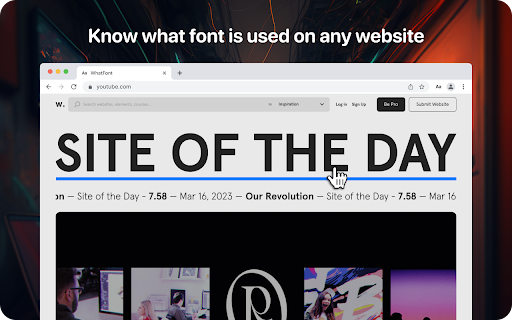
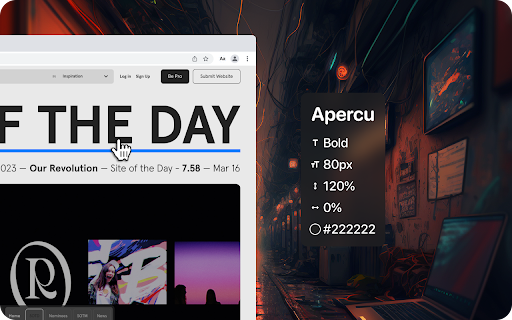
Lets you know what font is used on any website Lets you know what font is used on any website Using the WhatFont extension, you can find out the following details: font family, style, weight, size, line height, color which is used on any site. Just find the text you need, activate the WhatFont extension and all the necessary information will appear on your monitor. The WhatFont extension for Google Chrome is a powerful tool that allows users to quickly and easily identify the fonts used on any website and enables users to identify the font style, size, color, and italics used on a website by simply hovering over the text. How To Use: 1. Activate extension WhatFont by clicking on its icon in the right-top 2. For information click on the font 3. To disable the functionality - click "Exit What Font" on the right-top of the browser. WhatFont is especially useful for designers, developers, and anyone who works with typography. It provides an easy and efficient way to identify the fonts used on a website, which can be a valuable resource for creating your own designs. Additionally, this extension can help you improve your understanding of typography, allowing you to make informed decisions about font choices. In summary, WhatFont is an essential tool for anyone who wants to identify the font details used on a website. Its simple and intuitive interface makes it easy to use, and its comprehensive font information is sure to be helpful for designers and developers alike.

TypeScan What Font Finder
Identify What Font Instantly. Copy with Ease, Free Always WhatFont Font Finder. What HTML Font? Instantly identify web fonts and effortlessly copy font family data with just one click. This browser extension is 100% free, offering a seamless font-finding experience without any premium features. Features: - Find what font is on a web page - Copy a font family data to the clipboard in one click - 100% free to use, no premium features

Font Identifier by WhatFontIs
Font Identifier by WhatFontIs helps you quickly detect fonts used on web pages and images. Use the extension to: - hover over text on any website and identify the font in use - capture a visible area of the page and analyze text from an image - send webpage images directly to WhatFontIs for font detection - view similar font matches, including free and commercial alternatives - keep a small history of recently identified fonts The add-on is designed for designers, developers, marketers, and anyone who needs to recognize fonts faster without leaving the page.

Font Finder for Google Chrome™
Easy to check, find the font name used on any website Want to find out the font a particular website is using? Simply Install our software Font Finder for Google Chrome™ which can help you analyze the exact font family and font class which is being used. All you need to do is the following Install the software Font Finder for Google Chrome™ highlight the text, right click and choose Our software will analyze the font within minutes and give you back the results This software is 100% free and has a user-friendly interface. Try the software today to find out the exact font a website uses. Disclaimer: Please note this extension is NOT made by Google and is made by an independent development team. All copyrights belong to their respective owners. Google doesn’t endorse or sponsor this Chrome extension. Font Finder for Google Chrome™ is not owned by, is not licensed by and is not a subsidiary of Google Inc.

Font Finder
Easy to check, find the font name used on any website This extension lets you know what font is used on any website Font Finder allows you to know the font name, its family, color, style, size, position. Use font identifier to find out what font a website is using. Use our font finder software today. This is a great way to do a font search when you use our font identification software. - Activate the extension by clicking on its icon in the right-top; - Move the mouse cursor to the desired font; - For more information click on the font - Quick and Simple to use Disclaimer: Please note this extension is NOT made by Google and is made by an independent development team. All copyrights belong to their respective owners owners. Google doesn’t endorse or sponsor this Chrome extension. Font Finder is not owned by, it is not licensed by and is not a subsidiary of Google Inc.
