
pekhihjiehdafocefoimckjpbkegknoh
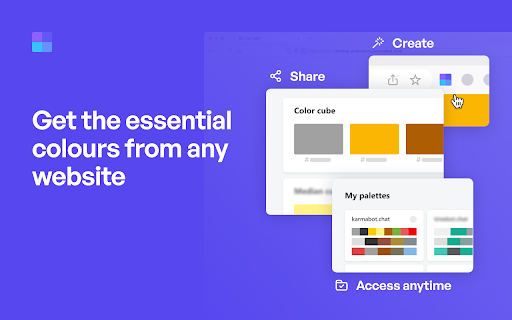


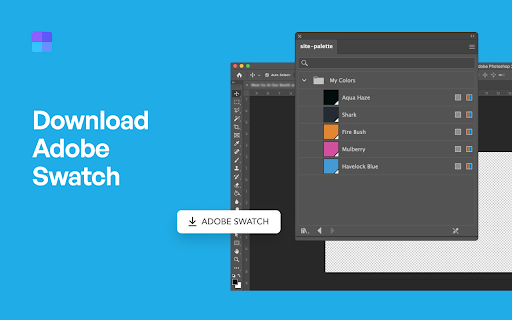
Site Palette now has an official Figma plugin. Import your saved palettes directly into Figma as local variables, no copy-paste of hex codes: https://www.figma.com/community/plugin/1631159048065020915/site-palette Now available for Microsoft Edge, Brave, and Opera via Chrome Web Store. Site Palette is a color palette extractor for designers and front-end developers. Install the extension, visit any website, click the icon in your toolbar, and instantly get an accurate palette of the colors that page actually uses. Save it to your account, share it via a unique link, or export to Figma, Sketch, Adobe Swatch, or SVG. Unlike eyedropper tools that pick one color at a time, Site Palette analyses the full page and returns a coherent palette using multiple algorithms: Color Cube, Median Cut, Material Design mode, and live viewport extraction ranked by on-screen area. Every palette you generate is saved to your personal history and synced across devices. - Multiple extraction algorithms: Color Cube, Median Cut, Material Design, live viewport - Figma plugin with palettes synced as local variables, ready for tokens and themes - Sketch template, Adobe Swatch (.ase), and SVG export - Google Art Palette and Coolors.co integration for fine-tuning - MagicLink sign-in, no passwords - Personal Palette History with unique shareable links - Manage subscription from My Profile - Competitor color audits: compare 10 sites side by side in minutes - Brand discovery: capture a client's existing palette before a rebrand - Design system seeding: bootstrap new files with real-world references - Mood boards: pull colors from any visual reference

Savee
Savee is where over a million designers and creatives find and save inspiration. Our Chrome extension is the fastest way to bring anything you love on the web into your feed. Four ways to save: -Open Savee on any site. We scan the page so you can save any image or video in one click. -Hover over any image or video. A Savee button appears. Click it and it lands in your feed. -Right-click any image or video and choose "Add to Savee" from the menu. -Use the screenshot tool to capture any part of a page straight to your profile. Every save can go to the board you choose: client work, moodboards, private collections, whatever you're building. Prefer a quieter browse? Every save method can be toggled on or off in settings, so the extension works the way you want.

Blue Button | the webpage X-ray
Creative or creator, designer or developer, chances are you don’t look at websites the same way most people do. Blue Button gives you a run-down of all essential web design, graphic and SEO elements in one click. Instantly see beneath the surface, and get all the info you need on any web page, whilst on the go. FOR SEO MANAGERS Easily access SEO related information such as title tag content, meta description, header information such as canonical url, image alt tags, authorship tags (publisher tag, author tag) etc FOR CONTENT MANAGERS AND COPYWRITERS Easily copy & paste meta description and title tag to new websites FOR DEVELOPERS Access a list of all scripts and stylesheets used on the site. View meta generator, wordpress scripts and theme references FOR WEB DESIGNERS View site favicon, touch icons and other images. Find out what google fonts are loaded

Muzli - Design inspiration hub
Your daily dose of design with industry news, tools, and inspiration - all in one place. Muzli takes the center stage as it replaces your default tab and becomes your simple and beautiful design oriented home page. Loved by hundreds of thousands designers worldwide, Muzli is the leading go-to browser extension for creative professionals. Once installed, Muzli becomes your visual hub for the latest and most cutting-edge Design, UI, UX, and interactive content. It serves daily content from all major design and inspiration sources that ensures you will never miss the next big thing. Plus, our hand-picked, professionally curated "Muzli Picks" journal ensures you're treated to the crème de la crème of design inspiration. You can always make Muzli personalised, by choosing from over 160+ creative design sources that cater to your unique interests, so you can always find the content that resonates with you the most. We always try to deliver a design-centric browsing experience that ensures you will always keep up with the creative realm and make your exportations feel seamless.

WhatFont
The easiest way to identify fonts on web pages. Say goodbye to the complexity of developer tools for identifying fonts. With WhatFont, discovering the fonts used on websites becomes as effortless as hovering over text. Want more details? A simple click on any element reveals the styles applied, making it easier than ever to uncover the secrets behind beautiful typography. Recommended by Wired WebMonkey, Lifehacker, and SwissMiss. History: • 3.2.0 - Improved toolbar icon compatibility • 3.1.1 - Removed unnecessary developer logging • 3.1.0 - Added multiple color format support • 3.0.1 - Restored escape key to exit • 3.0.0 - Completely Rewritten: The entire extension has been rebuilt for better performance and usability. - Updated Permission Model: We've revised permissions to better respect user privacy while maintaining functionalities. - Refreshed Appearance: The look has been updated for a more modern feel. - Isolation from Host Website Styling: Ensures WhatFont's appearance is unaffected by the website it's used on. - Adaptive Toolbar Icon: The toolbar icon now changes based on the system's appearance settings. - Support for New CSS Color Values: Enhanced support for the latest CSS color values. • 2.1.0 - A new design thanks to Siddharth Mate • 2.0.3 - Retina toolbar icon • 2.0.2 - Fix option page for button styles • 2.0.1 - Use native screen capturer • 2.0 - Improved sharing • 1.7 - Added font services detection for FontDeck (Thanks to Mark Perkins) - Improved font detecting algorithm - Improved overall performance • 1.6.1 - Added color detection for text • 1.6 - Added a tweet button for instant sharing through Twitter - Improved style reseting • 1.5 - Overall restyling • 1.4.4 - Supported light icon for dark themes • 1.4.3 - Fixed a bug related to Typekit service detection • 1.4.2 - Reduced loading time - Supported HTTPS protocol • 1.4.1 - Fixed stylesheet bug • 1.4 - Restructured source code - Supported font services detection for Typekit and Google Font API - Fixed toolbar button bug. Second click is now "Exit WhatFont"
