
ahbcoeleapdfhmlnjglbiaddohfncace

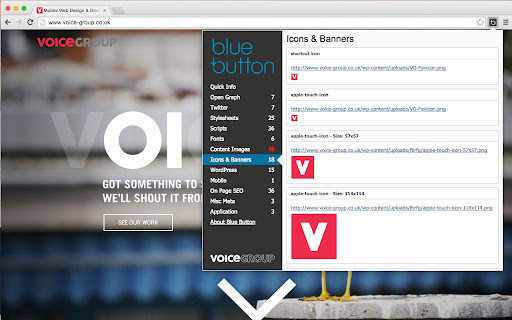
Creative or creator, designer or developer, chances are you don’t look at websites the same way most people do. Blue Button gives you a run-down of all essential web design, graphic and SEO elements in one click. Instantly see beneath the surface, and get all the info you need on any web page, whilst on the go. FOR SEO MANAGERS Easily access SEO related information such as title tag content, meta description, header information such as canonical url, image alt tags, authorship tags (publisher tag, author tag) etc FOR CONTENT MANAGERS AND COPYWRITERS Easily copy & paste meta description and title tag to new websites FOR DEVELOPERS Access a list of all scripts and stylesheets used on the site. View meta generator, wordpress scripts and theme references FOR WEB DESIGNERS View site favicon, touch icons and other images. Find out what google fonts are loaded

Web Maker
Blazing fast & offline playground for your web experiments Free Offline & Super-fast Code Editor for HTML, CSS & JavaScript This extension provides you with a very easy accessible and offline frontend playground for your experiments with HTML, CSS & JS! Perfect for developers who want to experiment or practice in HTML/CSS/JS quickly, even without Internet connectivity. Latest version comes with PRO plans that gets your advanced super-powers: 🪟 Asset hosting to host your images, CSS and JS 🌏 Share your creations publicly (available in FREE plan too) 📁 Unlimited File mode creations ⚙️ Also, lots of improvements and bug fixes * Works offline * User accounts * Supports preprocessors: HTML (jade, markdown), CSS (SCSS, LESS, Atomic CSS, Stylus) & JavaScript (ES6, CoffeeScript, TypeScript) * Inbuilt Console * Asset Hosting * Multi-player collab mode * Share publicly * Save and load your creations with Auto-save * Fork any creation * Various templates for popular libraries - React, Vue, Tailwind and more * Multi-monitor support with detached preview * Import & Export all creations anytime, anywhere * Multiple editor themes & other configurable settings * Font options + use any system font * Code autocompletion * Very easily accessible. Simply open a new tab in Chrome! (configurable setting). * Multiple layouts with saved collapsed states * Save as HTML file * Edit in CodePen * Preview screenshot capture * Open source on Github Permissions Required --------------------- * Read URL of the opened page - This is required to give optional new tab replacement feature because Web Maker shows itself only when chrome://newtab is opened Disclaimer ---------- Web Maker does not track any user specific data. It uses Google Analytics to track aggregated events to improve user experience based on what features are used more. If still you want to opt-out of Google Analytics tracking, please visit http://tools.google.com/dlpage/gaoptout or you can set up a filter in Adblock Plus or similar ad blocker tools like AdBlock, uBlock or Adblock Pro. Changelog ------------- v6.9.0 - New layout - Tabbed code panes - Keyboard shortcuts to focus code and preview panes - New language support: Chinese, French, Dutch, German - Minimize individual code panes v6.5.1 - [New] Light Theme - Keyboard shortcuts for manual preview refresh and console toggle - Bugfix: Console is working again! - [New] Feedback board to add and upvote suggestions. v6.4.1 - Make CSS changes super fast and don't refresh the page anymore v6.3.0 - JavaScript is working again! - Extension is on latest MV3 and more secure than ever. v6.0.0 - PRO plans with asset hosting, public sharing and unlimited file mode creations - UX improvements - bugfixes v5.0.0 - Local language support! First up, Spanish & Hindi! 🔥 - Lots of bug fixes - Dev changes to make changes a lot faster. Stay tuned for some amazing features! v.3.4.0 Templates, Js13kGames mode and more! v.2.9.7 Tailwind CSS added, Popular libraries updated, and code refactor. v.2.9.5 Improvements in external library ux, pane collapsing and bugfixes v.2.8.0 Auto-save, custom system font, configurable auto-completion, matching tag highlighting, bugfixes and improvements v.2.7.1 Lots of bug fixes and minor improvements v.2.7.0 Fork feature, fonts, bugfixes and improvements v2.5.0 search saved items, Atomic CSS support, more configurable settings and bugfixes. v2.3.2 Onboarding improvements, does not replace new tabs by default and babel update. v2.3.0 Preview screenshot capture (new downloads permission required for this), keyboard navigation, auto code alignment & bugfixes. v2.2.0 Code autocompletion, full screen preview, SASS support and bugfixes.

Baseliner
Baseliner adds horizontal & vertical lines to help you align your grid to any website. Adds a horizontal and/or vertical lines on top of any website. The Baseliner extension adds a fully customisable CSS layer on top of any website to help you align your design and ensure the grid is in place. -------------------- The best place for support is not in the reviews section below, but on the Baseliner GitHub repo: Check out full set of features and how to contribute on our GitHub page:

Link Research SEO Toolbar
Enjoy looking at the most advanced SEO metrics while you search the Web. You can use the Link Research SEO Toolbar to customize your searches in Google, Bing and Yandex. You can also enable it as a page toolbar, so you look at advanced SEO metrics for every page. Here’s what you can do with the Link Research SEO Toolbar: • See the Power and Trust of a domain or page • Discover great places to get links from • See how successful a page is on social media • Understand user engagement • See the strongest pages by Keyword Ranking • Spot drastic changes in the number of links • See how many backlinks a page has. All this is possible by looking at a set of powerful SEO metrics: • LRT Power*Trust for domains • LRT Power*Trust for pages • Buzz - social media signals • Impact - long-term user engagement metrics • Keyword Ranking • Link Velocity Trends • Number of Backlinks Why LRT Power*Trust? Because LRT Power*Trust is a precise, reliable and stable metric built by LinkResearchTools shortly after the first Google Penguin update in 2012, as a result of many years of research and calculations. Forget about Google’s Toolbar PageRank. Google stopped updating it many years ago and completely removed it from their toolbar in April 2016. You can think of LRT Power*Trust as a replacement for Google’s toolbar PageRank, but it’s so much more. LRT Power*Trust is the metric to look at when you want to assess the quality and trustworthiness of a page, domain or top domain. Why Keyword Ranking? The Link Research SEO Toolbar’s “Keyword Ranking” metric allows you to take a quick look at your competitors’ keyword rankings. By evaluating the keywords your competitors rank for, you will easily come up with new ideas for your content optimization. Why Buzz? Buzz is Impactana’s aggregate of social media signals, divided into shares and likes. By using the Link Research SEO toolbar to sort the search results by Buzz, you can quickly find out what sort of content is “HOT” on social media. You can use Google’s time filter to see only the pages indexed in the past year, month or week. Why Impact? The Impact metric helps you discover strong content that people linked to a lot and engaged with by commenting or downloading it. This metric measures user engagement for any content, not only for the one that goes viral on social media. A good article about construction will not get shared on social media, but it may get many links or comments if it’s great. Why link velocity trends? A website needs to have a steady link growth. Search engines can interpret unnatural link growth as a negative signal, which can lead to a loss in the rankings. Google uses link growth trends to detect any algorithm manipulation attempts. If your backlink profile grows too fast, you’re out. If you’re too slow, you won’t ever get on the first page. Why backlinks? Google confirmed links to be a top ranking factor. That's a very strong reason to look at links whenever you analyse the strength of a page or domain. Update 0.0.3 - Now with option to follow REL-Canonicals for Metrics of pages (requires fetch) - Loading animation Update 0.0.4 NEW: SEO Toolbar for every page with all the important metrics - three different toolbar styles mini, bulky and skyscraper - drag&drop the toolbar around where you need it - open backlink checker right from the toolbar (requires LRT account) NEW: Fetch results from SERP to resolve redirects and show real SEO metrics SERP overlay - Backlink count shown for every SERP result - Sorting by backlink count in the SERPs Update 0.0.5 - Domain exclusion feature: you can now choose to disable the Link Research SEO Toolbar for certain domains. Update 0.0.9 - Minor layout fixes and improvements. - Added knowledge graph hint. Update 0.1.2 - Fixed issues with Google reCAPTCHA Update 0.1.3 - Fixed issues with Google SERP overlay

PixelParallel by htmlBurger
PixelParallel by htmlBurger - Pixel perfect HTML vs Design tool for developers PixelParallel is a completely free, super handy and light HTML vs Design comparison tool for front-end developers that will help you code pixel perfect websites with ease. Built from developers to developers, PixelParallel is a tool working in favor of the ultimate precision in front-end coding. How it works: 1. Simply upload your image and compare the semi-transparent overlay with the web page below. 2. Customize the opacity, scale and position of the image as you wish. You can also hide it or lock it. 3. Perform color difference for a strong pixel perfect precision. 4. Use the vertical and horizontal grids to achieve a pixel perfect web design. - Bootstrap grid with customizable width, number of columns, gutter and opacity - Horizontal lines with customizable space between - Draggable rulers (Photoshop-like) + Reset option - Inversion (Color difference) - Separate overlays for each web page - Overlay scaling - Customizable overlay opacity - Saving overlays between sessions - All image sizes supported - Draggable overlay - Quick hide / show image - Shortcuts + customizable keyboard hotkeys - Works with local files - Intuitive UI: clean and simple; draggable; minimizable PixelParallel does not collect any personal data. Uploaded images are saved locally in the browser storage.
