
iffnoibnepbcloaaagchjonfplimpkob


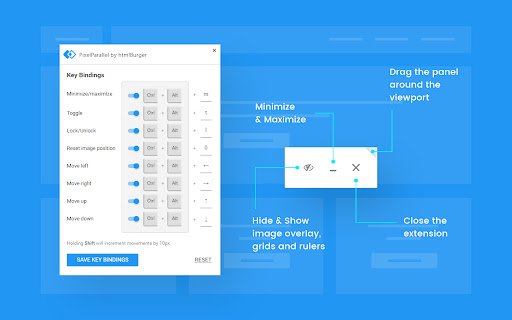
PixelParallel by htmlBurger - Pixel perfect HTML vs Design tool for developers PixelParallel is a completely free, super handy and light HTML vs Design comparison tool for front-end developers that will help you code pixel perfect websites with ease. Built from developers to developers, PixelParallel is a tool working in favor of the ultimate precision in front-end coding. How it works: 1. Simply upload your image and compare the semi-transparent overlay with the web page below. 2. Customize the opacity, scale and position of the image as you wish. You can also hide it or lock it. 3. Perform color difference for a strong pixel perfect precision. 4. Use the vertical and horizontal grids to achieve a pixel perfect web design. - Bootstrap grid with customizable width, number of columns, gutter and opacity - Horizontal lines with customizable space between - Draggable rulers (Photoshop-like) + Reset option - Inversion (Color difference) - Separate overlays for each web page - Overlay scaling - Customizable overlay opacity - Saving overlays between sessions - All image sizes supported - Draggable overlay - Quick hide / show image - Shortcuts + customizable keyboard hotkeys - Works with local files - Intuitive UI: clean and simple; draggable; minimizable PixelParallel does not collect any personal data. Uploaded images are saved locally in the browser storage.

CSS Peeper
Inspect website styles in seconds. Supercharge your workflow, and save hours of work. CSS Peeper is the ultimate Chrome extension for designers and developers who want a seamless way to inspect and extract design properties from any website. Say goodbye to digging through complex code. CSS Peeper provides an intuitive, organized interface to access key design details. Professionals deserve tools that save time. Let CSS Peeper streamline your workflow and help you work smarter, not harder. Join 500,000+ professionals who are already making the most of their time. Supercharge your workflow with advanced design inspection features and save hours of work. No more digging in a code. 👉 Get CSS Peeper for Free! Install now and start inspecting websites in seconds. Visit https://csspeeper.com for more details. ✦ Inspect design properties effortlessly. Stop digging through the code. Save hours by quickly inspecting element properties with a simple point-and-click. ✦ Explore colors used on your favorite sites. Browse a variety of colors, find inspiration, and easily check contrast. Love a palette? Export it to your favorite design tool. ✦ Identify typography. Explore the typography across any site, uncover unique font pairings, and check the most relevant text properties. ✦ Explore assets. Browse and download all images, icons, and graphics used across a website. ✦ Instantly preview and copy the CSS of any element, turning great design into reusable code. ✦ Browse and explore the typography in use on any website. Preview the typography hierarchy to understand font choices, sizes, and styles, helping you design confidently and efficiently. ✦ Effortlessly identify typography instances and gain deeper insights into font style applications. Navigate to a dedicated screen to inspect each type of style with precision. ✦ Browse colors by semantic grouping including typography, background, border, and more. Identify colors in context to get more insights. ✦ Inspect individual color instances and explore their use cases, including value, category, class, and design token. ✦ Explore gradients color by color and preview every shade to recreate stunning visual effects with precision. ✦ Contrast scanner helps you stay aligned with the best accessibility practices. Instantly assess contrast issues, ensuring your websites are beautiful and accessible. ✦ Smart Inspector offers an advanced way to inspect design details at a glance. It provides deeper insights into design properties, including color contrast, shadows, and elevation effects. ✦ Switch to Sidebar Mode to gain full access to the website’s viewport. You can see the full list of available features at https://csspeeper.com/pricing By using the CSS Peeper extension, you agree to our Terms & Conditions (https://csspeeper.com/terms-and-conditions) and Privacy Policy (https://csspeeper.com/privacy-policy). CSS Peeper is proud to support Learn to Code, a nonprofit that supports our mission to help everyone become better coders. By using affiliate links, we invite you to help our mission when you are shopping at partner stores, at no cost to you. Support is always optional, and can be permanently disabled at any time.

Baseliner
Baseliner adds horizontal & vertical lines to help you align your grid to any website. Adds a horizontal and/or vertical lines on top of any website. The Baseliner extension adds a fully customisable CSS layer on top of any website to help you align your design and ensure the grid is in place. -------------------- The best place for support is not in the reviews section below, but on the Baseliner GitHub repo: Check out full set of features and how to contribute on our GitHub page:

Pixelay for Figma
Compare your Figma designs with real websites. NOTE: This extension is designed to be used in collaboration with the Pixelay Figma Plugin, and it won't do anything on its own without the Figma plugin installed to upload your designs first - https://www.figma.com/community/plugin/816424186244407164/ Never hear excuses for your designs being messed up again. Pixelay allows you to effortlessly visually compare your Figma designs and your real website URLs with a single click.

Amino: Live CSS Editor
Customize any website with your own CSS and see your changes instantly with Amino! Amino is a free CSS editor that lets you write and apply persistent CSS to any website. Use Amino to experiment with CSS in realtime, style your favorite websites, fix rendering issues—the applications are endless. Your CSS is stored in the cloud and is served every time you visit the page, making it effectively permanent as long as the extension is enabled. NEW FEATURE Guest mode: after many requests from users to be able to use amino without creating an account we've finally launched our Guest mode! It will work entirely locally with no need to create an account. If you want cloud storage you can simple create an account at anytime and enjoy the same great Amino experience sync'd across all your devices. Amino has previously been featured in: Chrome's ‘Top Picks’ in developer tool extensions, Smashing Magazine, Product Hunt, Designer News, Codrops, Sidebar, and more. FEATURES - Syntax highlighting - Automatic indenting and outdenting - Inspect tool - DevTools integration (*new*) - SCSS/Sass support - Autocomplete - Autosave - Data export - Multiple color schemes - Guest Mode USAGE TIERS - Guest & Free Cloud Tier - Free tiers are supported by ad displays in the sidebar/editor and cloud dashboard - Pro Cloud Tier - Remove ads - Access to collections - Unlimited Cloud Storage - Access to beta features BETA FEATURES (Pro Only) - AI Assistant to help write and understand your CSS rules For new feature announcements or just to say hello, please follow Amino on X: https://x.com/aminoeditor For more info or to sign up visit: https://amino.dev For frequently asked questions visit: https://amino.dev/faqs For documentation and guides on how to get the most out of Amino: https://docs.amino.dev For Amino's open source projects: https://github.com/aminoeditor By installing the extension or accessing the amino.dev website, you agree to Amino’s Privacy Policy (https://amino.dev/privacy) and Terms of Use (https://amino.dev/terms). TLDR: We care about user privacy, and we will never sell your data. To learn about the permissions this extension requests: https://amino.dev/permissions Thanks for giving Amino a try. If you like our product, please consider leaving us a review.
