
lkfkkhfhhdkiemehlpkgjeojomhpccnh


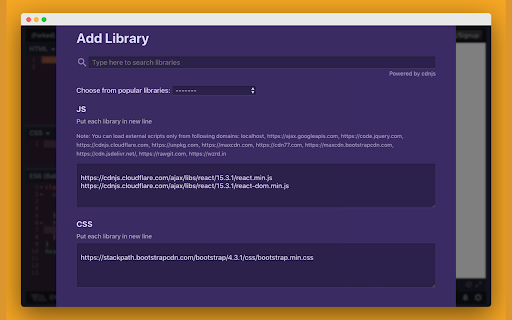
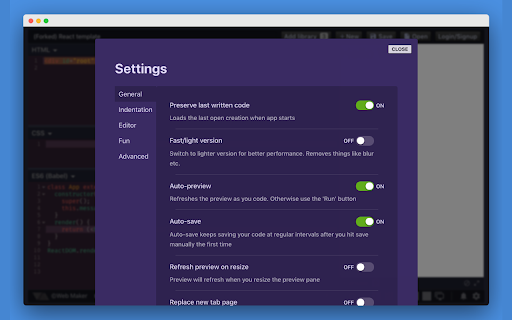

Blazing fast & offline playground for your web experiments Free Offline & Super-fast Code Editor for HTML, CSS & JavaScript This extension provides you with a very easy accessible and offline frontend playground for your experiments with HTML, CSS & JS! Perfect for developers who want to experiment or practice in HTML/CSS/JS quickly, even without Internet connectivity. Latest version comes with PRO plans that gets your advanced super-powers: 🪟 Asset hosting to host your images, CSS and JS 🌏 Share your creations publicly (available in FREE plan too) 📁 Unlimited File mode creations ⚙️ Also, lots of improvements and bug fixes * Works offline * User accounts * Supports preprocessors: HTML (jade, markdown), CSS (SCSS, LESS, Atomic CSS, Stylus) & JavaScript (ES6, CoffeeScript, TypeScript) * Inbuilt Console * Asset Hosting * Multi-player collab mode * Share publicly * Save and load your creations with Auto-save * Fork any creation * Various templates for popular libraries - React, Vue, Tailwind and more * Multi-monitor support with detached preview * Import & Export all creations anytime, anywhere * Multiple editor themes & other configurable settings * Font options + use any system font * Code autocompletion * Very easily accessible. Simply open a new tab in Chrome! (configurable setting). * Multiple layouts with saved collapsed states * Save as HTML file * Edit in CodePen * Preview screenshot capture * Open source on Github Permissions Required --------------------- * Read URL of the opened page - This is required to give optional new tab replacement feature because Web Maker shows itself only when chrome://newtab is opened Disclaimer ---------- Web Maker does not track any user specific data. It uses Google Analytics to track aggregated events to improve user experience based on what features are used more. If still you want to opt-out of Google Analytics tracking, please visit http://tools.google.com/dlpage/gaoptout or you can set up a filter in Adblock Plus or similar ad blocker tools like AdBlock, uBlock or Adblock Pro. Changelog ------------- v6.9.0 - New layout - Tabbed code panes - Keyboard shortcuts to focus code and preview panes - New language support: Chinese, French, Dutch, German - Minimize individual code panes v6.5.1 - [New] Light Theme - Keyboard shortcuts for manual preview refresh and console toggle - Bugfix: Console is working again! - [New] Feedback board to add and upvote suggestions. v6.4.1 - Make CSS changes super fast and don't refresh the page anymore v6.3.0 - JavaScript is working again! - Extension is on latest MV3 and more secure than ever. v6.0.0 - PRO plans with asset hosting, public sharing and unlimited file mode creations - UX improvements - bugfixes v5.0.0 - Local language support! First up, Spanish & Hindi! 🔥 - Lots of bug fixes - Dev changes to make changes a lot faster. Stay tuned for some amazing features! v.3.4.0 Templates, Js13kGames mode and more! v.2.9.7 Tailwind CSS added, Popular libraries updated, and code refactor. v.2.9.5 Improvements in external library ux, pane collapsing and bugfixes v.2.8.0 Auto-save, custom system font, configurable auto-completion, matching tag highlighting, bugfixes and improvements v.2.7.1 Lots of bug fixes and minor improvements v.2.7.0 Fork feature, fonts, bugfixes and improvements v2.5.0 search saved items, Atomic CSS support, more configurable settings and bugfixes. v2.3.2 Onboarding improvements, does not replace new tabs by default and babel update. v2.3.0 Preview screenshot capture (new downloads permission required for this), keyboard navigation, auto code alignment & bugfixes. v2.2.0 Code autocompletion, full screen preview, SASS support and bugfixes.

HTML editor WebStudio for Webpages
WebStudio, a HTML editor online to create and edit any webpage using a web browser. WebStudio is a HTML Editor online for webpages that has been designed to perform editing operations over HTML files using your web browser. It is an enhanced version of the CKEditor web app to create and modify HTML files. Moreover, it scans and collects the webpages you browse in the Internet. These webpages are uploaded to our servers in order to know if they contain HTML links that can be edited using our extension integrated with our online app. Basic HTML editor operations - Change fonts color - Change font size - Underline texts - Copy/paste text passages, undo/redo your actions - Create a new document or open an existing one Format the HTML paragraphs - Align your text in a paragraph - Select background color for a paragraph - Change paragraph indents - Set paragraph line spacing Format the HTML texts - Set font type, size, and color - Apply font decoration styles - Copy/clear text formatting - Add hyperlinks Tools and settings Download/print your HTML file. Search and replace function

Web Editor
Forget about all the Code chaos and Customize your website in a handy way Customize your website, Create your designs. Forget about all the chaos and design your website with your imaginations, in a handy way. The web editor is the tool that provides you with an enhanced way to inspect any website elements, alter their properties, insert contents, design, and visualize the way you want to see them. You don’t need to hold a bunch of technical knowledge. Instead, this tool will do the job for you..

Edit with Sublime Text™
Live editing text and HTML content of the page with the Sublime Text from the page context or DevTools. This extension facilitates editing of HTML node element's content within the popular Sublime Text editor, providing real-time updates upon saving the generated temporary file. Additionally, it enables external editing of "TEXTAREA," "INPUT[type=search]," and "INPUT[type=text]" elements. There are three methods for sending content to the Sublime Editor: 1. Activate the simple inspector using the action button, click on the HTML node, and press the ESC key to cancel the operation if needed. 2. Use the DevTools "Elements" panel, where a new sub-pane is added. Select "Edit as HTML," choose an HTML node, and press the button to open the content in the Sublime Text editor. 3. Right-click on a "TEXTAREA" or "INPUT[type=text]" element and use the context menu item. This extension supports simultaneous editing of multiple nodes. Each editor has its unique temporary text file, and saving updates the content of the respective node. These files are stored in the operating system's temporary directory with random filenames. Additionally, the extension allows the DevTools panel to convert an external script or CSS resource to an internal equivalent. This functionality enables sending the content of remote resources to the external editor. File extensions used for temporary resource creation: 1. HTML -> when innerHTML or outerHTML content is sent to the external editor. 2. JS -> when editing an inline script. 3. TXT -> when editing an editable area. --- Legal "Sublime Text" is a trademark of Sublime HQ Pty Ltd, registered in the U.S. and other countries. This extension is an independent project with no affiliation to the mentioned product.

PixelParallel by htmlBurger
PixelParallel by htmlBurger - Pixel perfect HTML vs Design tool for developers PixelParallel is a completely free, super handy and light HTML vs Design comparison tool for front-end developers that will help you code pixel perfect websites with ease. Built from developers to developers, PixelParallel is a tool working in favor of the ultimate precision in front-end coding. How it works: 1. Simply upload your image and compare the semi-transparent overlay with the web page below. 2. Customize the opacity, scale and position of the image as you wish. You can also hide it or lock it. 3. Perform color difference for a strong pixel perfect precision. 4. Use the vertical and horizontal grids to achieve a pixel perfect web design. - Bootstrap grid with customizable width, number of columns, gutter and opacity - Horizontal lines with customizable space between - Draggable rulers (Photoshop-like) + Reset option - Inversion (Color difference) - Separate overlays for each web page - Overlay scaling - Customizable overlay opacity - Saving overlays between sessions - All image sizes supported - Draggable overlay - Quick hide / show image - Shortcuts + customizable keyboard hotkeys - Works with local files - Intuitive UI: clean and simple; draggable; minimizable PixelParallel does not collect any personal data. Uploaded images are saved locally in the browser storage.
