
nbnfihffeffdhcbblmekelobgmdccfnl
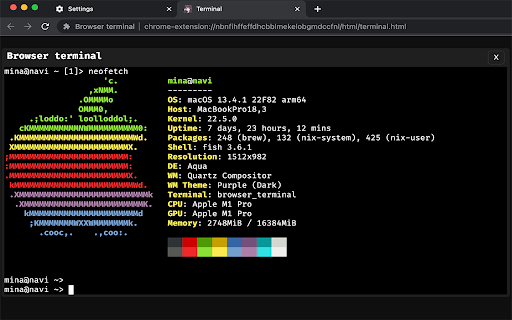
Extension that allows you to open a native shell in the browser The extension wont work on its own, complete the installation at https://github.com/ayes-web/browser_terminal/blob/main/installation.md

Tabs Unloader
An extension recapture your own memory from browser. An extension recapture your own memory from browser. Features: ‧ No tab disappearing. Just unload it from memory. You can reload it anytime if you want. ‧ Simple to use. Just click your mouse. Unload tabs in 5 mode. ‧ No more memory waste. Unload tabs. Recapture your own memory.

Extensions shortcut
Lets you create a keyboard shortcut to the extensions page An extremely lightweight extension (only runs when used) which lets you specify a custom keyboard shortcut which opens the extensions page. If turned on in the options, this extension will check if you already have an extension page open and switch to that one instead of opening a new. Because it is an option you don't have to trust this extension with a dangerous permission if you don't want to. Extension icon by Ganeshk (derived from "Wiki puzzle.svg") and Mysid (derived from "Insertpad.svg") both licensed under GFDL (http://www.gnu.org/copyleft/fdl.html) or CC-BY-SA-3.0 (http://creativecommons.org/licenses/by-sa/3.0/), via Wikimedia Commons.

prune
A browser extension to help you trim your garden of tabs. prune can help you manage your tab growth by: - Preventing you from opening duplicate tabs (focusing ones you already have open instead!) - Hiding or removing old tabs (you decide how old is too old!) - Setting a limit on the number of tabs you have open (pick what works best for you!) - ...and more! This project is free, open-source, and can be found at https://github.com/tbrockman/prune

Hivelighter
Hivelighter extension allows you to post to the hive from your browser The Hivelighter save button (and right-click command) lets you highlight, save and collect the best parts of articles (and PDFs) and keep them all in one place. All your highlights get saved in real time to your free Hivelighter Web App or iOS App account. Using the Hivelighter save button, you can also save highlights directly into the Collections you've created in the App, so you can organize them immediately and find them faster later. Never lose your important articles and quotes ever again, because Hivelights are permanently archived and never go "404 not found". Get the Web App free at www.hivelighter.com, and the iOS App free from the App Store and enjoy the full Hivelighter experience: --> Collect your favourite parts of articles and pdfs all in one place --> Share them instantly with friends, or on any platform and get people to the point faster --> Create as many highlights as you need from a single article or pdf and they all get "stacked" as a single Hivelight --> Discover new articles faster and see what everyone is highlighting from across the web --> Follow your favourite Hivelighters and browse their Collections --> Gather all the best quotes around a subject into Collections and share your research and insight instantly, all at once --> Invite others to your Collection so that everyone can collaborate by sharing their best reads on a subject of mutual interest
