
jageegmimlcfoomhknbhbmbjacmglnlb


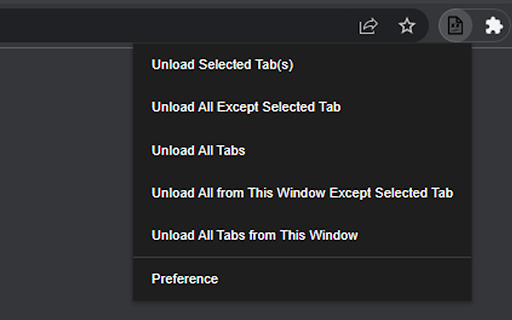
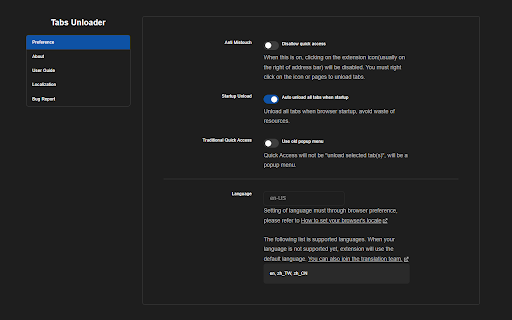
An extension recapture your own memory from browser. An extension recapture your own memory from browser. Features: ‧ No tab disappearing. Just unload it from memory. You can reload it anytime if you want. ‧ Simple to use. Just click your mouse. Unload tabs in 5 mode. ‧ No more memory waste. Unload tabs. Recapture your own memory.

Tab Suspender
Optimize browser performance with Tab Suspender. Tab Suspender - Save Memory and Speed Up Your Browser Stop tabs from slowing down your browser with Tab Suspender Chrome extension. This lightweight extension helps you save memory, improve performance, and increase your productivity by suspending tabs that you aren't actively using. >>Automatically suspends tabs: The Tab Suspender extension automatically suspends tabs after a specified time period, freeing up memory and improving performance. >>Quick suspend option: With just one click, you can quickly suspend any tab >>Whitelist important URLs and domains: The extension provides an option to whitelist important URLs and domains, ensuring that they never get suspended. >>Minimalistic design: Tab Suspender has a minimalistic design, with no distracting features, making it easy to use and efficient. >>Increasing productivity: By suspending tabs that you're not actively using, you can reduce distractions and increase your productivity. >>Saving battery life: Suspending tabs reduces the amount of memory and processing power used by your browser, which can help extend your laptop's battery life. >>Managing tab overload: If you frequently have many tabs open, the extension can help you manage the overload and reduce the amount of memory used by your browser. >>Improving browser performance: The extension can help improve the performance of your browser by freeing up memory and reducing the number of active tabs. Say goodbye to slow and unresponsive tabs, and experience a faster, smoother browsing experience with Tab Suspender.

Tab Suspender – Free Up RAM & Boost Browser Speed
Keep your browser fast with Tab Suspender! Suspend inactive tabs,free up memory,reduce lag,rename tabs, and manage data efficiently. 🚀 Boost Your Browser Speed with Tab Suspender Chrome Extension Keep your browser fast and efficient with 𝗧𝗮𝗯 𝗦𝘂𝘀𝗽𝗲𝗻𝗱𝗲𝗿 Chrome – the ultimate solution for managing multiple tabs without slowing down your system. This Chrome tab suspender automatically puts inactive tabs to sleep, freeing up memory, reducing CPU load, and improving overall performance. Perfect for multitaskers who need speed, focus, and organization! 💡 𝗪𝗵𝘆 𝗖𝗵𝗼𝗼𝘀𝗲 𝘁𝗵𝗲 𝗕𝗲𝘀𝘁 𝗧𝗮𝗯 𝗦𝘂𝘀𝗽𝗲𝗻𝗱𝗲𝗿 𝗳𝗼𝗿 𝗖𝗵𝗿𝗼𝗺𝗲? ✅ 𝗔𝘂𝘁𝗼-𝗦𝘂𝘀𝗽𝗲𝗻𝗱𝘀 𝗜𝗻𝗮𝗰𝘁𝗶𝘃𝗲 𝗧𝗮𝗯𝘀 – Automatically applies Chrome suspend tabs to save memory and improve browsing speed. ✅ 𝗦𝗺𝗮𝗿𝘁 𝗥𝗲𝘀𝗼𝘂𝗿𝗰𝗲 𝗠𝗮𝗻𝗮𝗴𝗲𝗺𝗲𝗻𝘁 – Reduces CPU load and extends battery life by handling Chrome sleep tabs intelligently. ✅ 𝗜𝗻𝘀𝘁𝗮𝗻𝘁 𝗧𝗮𝗯 𝗥𝗲𝘀𝘁𝗼𝗿𝗮𝘁𝗶𝗼𝗻 – Suspended tabs reload quickly when revisited, ensuring a smooth workflow. ✅ 𝗖𝘂𝘀𝘁𝗼𝗺𝗶𝘇𝗮𝗯𝗹𝗲 𝗧𝗮𝗯 𝗦𝘂𝘀𝗽𝗲𝗻𝘀𝗶𝗼𝗻 – Adjust suspension timing, whitelist sites, and control how your tab suspension works. ✅ 𝗢𝗿𝗴𝗮𝗻𝗶𝘇𝗲 𝘄𝗶𝘁𝗵 𝗥𝗲𝗻𝗮𝗺𝗲𝗱 𝗧𝗮𝗯𝘀 – Easily rename tabs for better productivity and organization. ✅ 𝗗𝗮𝘁𝗮 𝗧𝗿𝗮𝗰𝗸𝗶𝗻𝗴 𝗠𝗮𝗱𝗲 𝗘𝗮𝘀𝘆 – Export and update tab data into spreadsheets for smarter tracking. ✅ 𝗟𝗶𝗴𝗵𝘁𝘄𝗲𝗶𝗴𝗵𝘁 & 𝗘𝗳𝗳𝗶𝗰𝗶𝗲𝗻𝘁 – Works silently in the background without slowing your browser. ✅ 𝗦𝘁𝗮𝘆 𝗙𝗼𝗰𝘂𝘀𝗲𝗱 – Minimize distractions, reduce clutter, and keep your browsing experience seamless. 🌐 Whether you’re a heavy multitasker or just want a smoother experience, Tab Suspender is the best tab suspender Chrome users can rely on for speed, memory optimization, and productivity.

Tab Discard (Suspender)
Easily suspend inactive tabs and save up memory for your browser. Tab Discard (Suspender) is an extension that lets you easily suspend either all inactive tabs or just the active tab by clicking on the toolbar button. In principle, suspending tabs can reduce the browser memory and enhances your browsing experience. When you click on a suspended tab (make it active) it will be loaded with the previous content automatically. This addon is useful when you have several open tabs, you can suspend them all (free up the memory) with just one click and then visit them one-by-one to unsuspend. This way, your browser will use the least amount of memory and have a better performance. Please right-click on the toolbar button and then select the desired option for suspending tabs (i.e. active or inactive tabs). To report bugs, please visit the addon's homepage (https://mybrowseraddon.com/tab-discard.html) and fill the bug report form.

Open tabs in order
This is an extension that updates tabs in order when multiple tabs are opened. “Open tabs in order” is an extension that reduces browser load by loading tabs sequentially when multiple tabs are opened simultaneously. This extension is designed to solve the problem where opening many tabs at once causes all tabs to load simultaneously, slowing down your PC. Normally, in Chrome, opening multiple tabs at once causes each to start loading simultaneously, placing a heavy load on memory and CPU. Using “Open tabs in order” allows tabs to load sequentially, reducing consumption of system resources. This extension adjusts loading timing by pausing tabs, providing a comfortable browsing experience. It is especially useful for users who frequently open large numbers of pages at once, such as from bookmark folders.
