
nacebcpaiaaglpddkjeeibkbbcpgmdfm

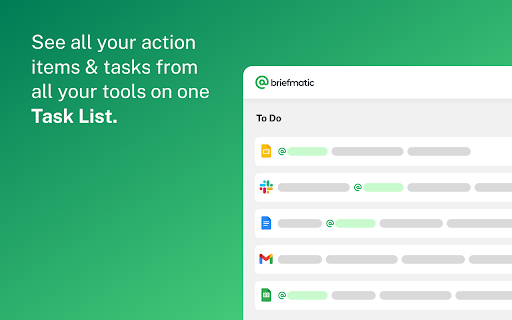


Briefmatic is a task manager that connects you with tasks from all of your work files and collaboration tools. All your tasks from all your tools, all in one place. Briefmatic is a task manager that connects you with tasks from your Google Drive™, Google Docs™, Gmail™, Slack™ and more. So you can stop wasting time manually creating to-do lists, and get back to being awesome! Sign In & Connect To Your Tools Briefmatic monitors connected tools and notifies you of any new action items created. Manage Your Work Your Way Briefmatic gives you control over how you manage your tasks, with List, Kanban and Calendar views. Embrace the power of @ Any time anyone @-mention's you in a connected tool, you'll get a task in Briefmatic.

Quick GTasks
Quickly access and edit your Google Tasks™ conveniently from within Google Chrome I use Google Tasks™ many, many times every day. After several of the Google Tasks™ Chrome extensions I used stopped working back in 2019, I began working on my own extension as a hobby project. Most of the functionality is currently included. Please let me know if you run into any bugs, and thanks for trying my extension!

Tab for Google Tasks
Opens Google Tasks in a new tab. Light and Fast! This Chrome extension makes it easy to get to your Google Tasks without having to open Gmail. Just click the extension icon in your toolbar and your Tasks will open in a new tab. With this extension, you can: - Stay organized and productive by keeping your Tasks separate from your Gmail. - Never miss a Task by having your Tasks open in a new tab that you can easily access. - Be more productive by being able to focus on your Tasks without being distracted by your Gmail.

Meeting Dolphin Google Calendar Tags
The best Google Calendar companion. Enables you to add tags to events, drive insights, search & filter and much more. Meeting Dolphin helps you maximise your Google Calendar experience and optimize it for work purposes. Use it to tag calendar events, organise your week, set Active Hours, and Remove timestamps, ... all in one extension. Learn more @ https://meetingdolphin.com/extension Our blog @ https://meetingdolphin.com/blog FEATURES 🏷️ Tagging for Google Calendar Drag and drop tags to categorize an event. This makes it easy to visualize your week. 📊 Time Analytics See your weekly or monthly time allocation by tag as you shift views. Export your tag data to CSV on the web app. 🔍 Search & Filter Search and filter either by Tags or by Text using the search bar. The matches are highlighted directly in your current calendar view. Set Work/Active Hours You never need to scroll up and down because Meeting Dolphin fixes your view to only your work/active hours. Hide timestamps: Clean up your events by removing the time stamps. At Meeting Dolphin, we believe that great software shouldn't come at a cost to privacy. Our extension securely stores your tags in the cloud so you can keep them backed up and accessible from anywhere you need them. Your data belongs to you, and we store it to provide value to you. Our extension uses read-only permissions for your calendar events. We do not store this data; its purpose is to programmatically link your tags to events. If you ever have questions about Meeting Dolphin's security practices or your data, reach out to us at security@meetingdolphin.com. Feel free to contact support at support@meetingdolphin.com and we'll reply as soon as possible.

Tasks - To do & task list by Workona
The best task list for work in the browser. Workona Tasks are the best way to manage tasks in Chrome. Now it’s simple to jot down a task, check in with your most important todos, or create a task list for a project. Creating todo lists is easier than ever — just click the button in your browser bar. This extension lets you create and update tasks from any Chrome tab, and even attach tabs to your tasks so you have the full context. Learn more about Workona: https://workona.com ______________________________________________ FEATURES Create a task instantly Turn any tab or email into a task as soon as you think of it. Just click the extension button in your browser bar or use the keyboard shortcut Opt + Z (or Alt + Z). This lets you quickly add tasks while you work and attach a tab or resource. With your to-do list accessible from every page, it’s easier to stay on top of tasks. Top tasks at your fingertips Your task list is now just a click away in Chrome. Without leaving your current tab or interrupting your workflow, you can access your most important tasks and log any other to-dos that come to mind. Convenient task popup Workona’s task manager includes a popup that’s just a click away. This helps you capture to-dos without opening a separate app. It’s designed to cut down on context switching so you can maintain focus. Without breaking your workflow, you can create as many todo lists as you need. To-do lists for every project Want to separate your to-dos by project? Add them to workspaces, which can provide instant context for each task. To give even more context, attach relevant tabs and docs to the task. Fully featured task list Your task list includes a rich text editor for polished formatting, keyboard shortcuts to move faster, and intuitive drag-and-drop attachments. Plus, a due date email digest to let you know when deadlines are here (optional). Feel free to contact support at support@workona.com and we'll reply as soon as possible. By installing the extension, you agree to Workona’s Terms of Service (workona.com/policies/terms) and Privacy Policy (workona.com/policies/privacy).
