
mpeepmfabickbdbckcejbflkpfamgcon
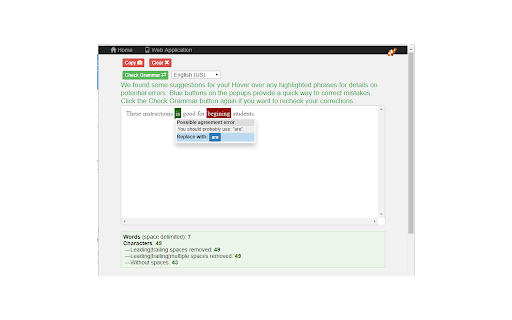
Grammar, spelling and style checker. Get suggestions on writing improvements Grammar check your writing. Find mistakes in your grammar, spelling and style. Get suggestions on improvements you can make to your writing. Finds grammar and style issues that a simple spell checker cannot detect. Makes suggestions, and allows you to apply those suggestions with a simple button click. Shows word and character counts. Also, lets you select text on a web page, and check the grammar by right-clicking and selecting check grammar. Features: - The Grammar Checker finds errors that other spell checkers cannot detect. For example, Incorrect use of "there" and "their", "a" and "an", or repeated words. - Supports more than 25 languages. - Your text is remembered between visits. You can close the page at any time and reopen it without losing your work. Clear the text area if you don't want your text to be saved. - Word and character counts are shown below your source text. Word counts use a space as a delimiter. - A menu with more tools from https://linangdata.com - This tool is powered by the API provided by: https://languagetool.org.

Wordeep Proofreading
Wordeep will automatically correct your grammar and spelling mistakes. Use our grammar checker to improve your writing, find all the grammatical and spelling errors, and more. Wordeep is an artificial intelligence extension that helps you improve your writing, as you type on the computer. Simply install the extension and surf any website to see the magic happen. This is more than a spelling or punctuation correction: * You are welcome to compare it to tools like Grammarly, ProWritingAid, Ginger, Whitesmoke, and others. * It catches three times more errors than other tools. * All data is secured without human intervention. For any feedback or support, please write to us on our website. We love to get feedback. See our Google Docs extension as well: https://chrome.google.com/webstore/detail/nhedncoeppgaelddhokmikcaecmppgmh For all browsers support see here: https://wordeep.com/browsers By installing this extension, you agree to our Terms and Conditions and Privacy Policy: https://wordeep.com/privacy-and-terms.

Sapling Grammar Checker and Writing Assistant
AI-powered grammar checking, paraphrase, and autocomplete for email, docs, chat, and more. Sapling is an AI writing assistant that helps fix grammar and spelling mistakes, rewrites sentences for clarity and tone, and speeds up everyday writing with autocomplete and reusable snippets. It works everywhere you type in the browser. Getting started: 1. Install the extension and pin the Sapling icon. 2. Write in any text field on the web — suggestions appear inline as you type. 3. Visit https://sapling.ai to customize your settings. Writing quality: • AI-powered spell check and grammar checker — flags broad variety of errors in real time. • Maintain a consistent professional tone across messages, emails, and documents. Snippets: • Save canned messages, macros, and templates and insert them with a shortcut. • Share snippet library with your team for consistent, centrally-managed responses. Rephrase (premium): • Rewrite any sentence with AI-powered paraphrasing. • Adjust formality or tone and split or simplify long sentences. Autocomplete Everywhere (premium): • Predictive sentence completions across CRM, support, and messaging tools. • Press Tab or backtick (or your own custom key) to accept. Works where you write, including Gmail, LinkedIn, Salesforce, and most other rich text fields on the web. Companion apps for Google Docs, Slides, Word, and Outlook desktop are also available — see https://sapling.ai/integrations for the full list. Languages: English by default. Chinese, Spanish, French, German, Italian, Japanese, Portuguese, and other languages can be set in the settings dashboard. Security and privacy: • Enterprise-grade security policies and procedures. • Independent external testing and audits (SOC 2 Type II). • API and self-hosted deployment options available. Feedback and support: team@sapling.ai

Outwrite — Grammar checker & rewrite tool
Write perfect content with Outwrite. Check spelling & grammar, improve writing style, find synonyms and paraphrase sentences. Become a better writer with Outwrite for Chrome. Our AI writing assistant is more than just a grammar checker—it helps turn your ideas into powerful sentences. It works wherever you write online, including Gmail, Outlook, LinkedIn, Medium, and WordPress. You can use Outwrite to paraphrase entire sentences, strengthen your vocabulary, fix passive voice, and help increase or decrease your word count. Free features of the Outwrite Editor include: ★ Spell Checker ★ Grammar and Punctuation Checker ★ Thesaurus suggestions ★ Writing statistics (including readability, grade level and word count) ★ French, Spanish, and English support Upgrade to our Pro plan to access: ★ Paraphrasing Tool (to rewrite and restructure entire sentences) ★ Style suggestions ★ Structure suggestions (like changing passive voice to active voice) ★ Plagiarism Checker It's not just Chrome—you can also use Outwrite to improve your writing using Google Docs, Word, Edge, iOS, and with our web app. Get started with your free Outwrite account today! Over 1 million people use Outwrite for tasks like: ➤ Editing homework or an English essay for school ➤ Enhancing assignments for college using appropriate synonyms from our thesaurus ➤ Checking punctuation, like commas and apostrophes ➤ Writing clear and impactful copy for websites, ads, and social media ➤ Refining business documents & reports ➤ Grading an academic thesis ➤ Rewriting text to improve SEO and readability ➤ Teaching students how to write more effectively You don't have to be Shakespeare or Hemingway—just use Outwrite to proofread and write like a pro.

Grammar.com
Check your text and writing for style, spelling and grammar problems everywhere on the web All the grammar you need to succeed in life! Enhance your writing everywhere on the web! Grammar.com will make sure your messages, documents, and blog media posts are clear, error-free, and professional. Adding the Grammar.com extension to your browser means that your spelling and grammar will be corrected and verified on your web-based email, Facebook & Twitter, and anywhere else you communicate on the internet. To use this extension simply select the text you'd like to verify and click on the extension icon. A pop-up window will open with all possible grammar corrections and suggestions for the selected text. Note: The extension will not work in tabs that were open prior to installation. After installing this extension, either reload your open tabs or restart Chrome.
