
jldbdlmljpigglecmeclifcdhgbjbakk

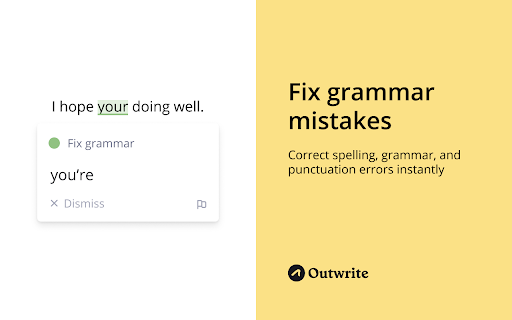


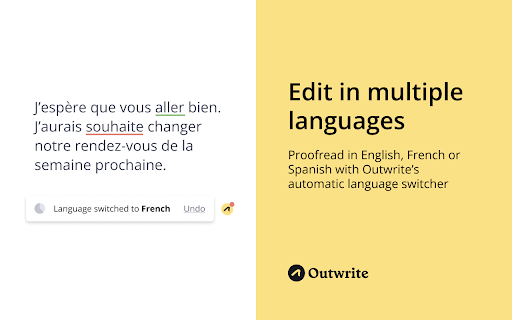
Write perfect content with Outwrite. Check spelling & grammar, improve writing style, find synonyms and paraphrase sentences. Become a better writer with Outwrite for Chrome. Our AI writing assistant is more than just a grammar checker—it helps turn your ideas into powerful sentences. It works wherever you write online, including Gmail, Outlook, LinkedIn, Medium, and WordPress. You can use Outwrite to paraphrase entire sentences, strengthen your vocabulary, fix passive voice, and help increase or decrease your word count. Free features of the Outwrite Editor include: ★ Spell Checker ★ Grammar and Punctuation Checker ★ Thesaurus suggestions ★ Writing statistics (including readability, grade level and word count) ★ French, Spanish, and English support Upgrade to our Pro plan to access: ★ Paraphrasing Tool (to rewrite and restructure entire sentences) ★ Style suggestions ★ Structure suggestions (like changing passive voice to active voice) ★ Plagiarism Checker It's not just Chrome—you can also use Outwrite to improve your writing using Google Docs, Word, Edge, iOS, and with our web app. Get started with your free Outwrite account today! Over 1 million people use Outwrite for tasks like: ➤ Editing homework or an English essay for school ➤ Enhancing assignments for college using appropriate synonyms from our thesaurus ➤ Checking punctuation, like commas and apostrophes ➤ Writing clear and impactful copy for websites, ads, and social media ➤ Refining business documents & reports ➤ Grading an academic thesis ➤ Rewriting text to improve SEO and readability ➤ Teaching students how to write more effectively You don't have to be Shakespeare or Hemingway—just use Outwrite to proofread and write like a pro.

Crammer: Save time using AI
Provides text analytics to the webpage using artificial intelligence to quickly find what you are looking for and save time We read on average 15 articles a day but how much do we take from each of them. We often lose interest quickly and don't read the part of the article that matters. Crammer is a Chrome extension tool that uses Artificial Intelligence to analyse and find the key phrases of an article you are reading online. It then shows you the locations of key phrases you select so you can quickly find what you are looking for. ⚡ Think of it as a way of having a contents or glossary for a web page. 🔎 A popup appears over the web page once the text analytics has completed. The great part is that this popup is fully re-sizable and can be dragged anywhere when clicking on the 'Key Phrases' title. If it is getting in the way at all, there is a toggle switch button to hide and show the popup window. BONUS #1 🎁: Able to perform analysis in 7 languages 🌍 and many more languages are on the way! BONUS #2 🎁: Now shows a badge for each phrase displaying how many times it is mentioned on the web page!

WProofreader: AI grammar check & rewrite tool
Correct texts and rephrase content with WProofreader secure writing assistant. WProofreader is a reliable multi-language grammar and spell checker extension. You can choose to host it on-site, in a private cloud under Business plan or in the shared cloud under Free plan. 📌 Want to try it before signing up? Test the spelling and grammar checker instantly with our free online demo — no registration required: https://wproofreader.com/ What do you get in a bundle with WProofreader? SENTENCE CHECKER AND REWORDING TOOL 🪄 WProofreader detects and corrects spelling, grammar and style issues in 20+ languages. AI support for English, German and Spanish that perform with better accuracy. Language autodetect for checking multilingual content. Being stuck with writer’s block or tired of tedious text paraphrasing? Try WProofreader AI writing assistant, a text rewording and content generator tool for English, German, French, Spanish, Dutch, Portuguese, Swedish, Italian, Polish and Ukrainian. Transform your texts to find a perfect match: shorten, expand, rewrite, improve style, make them sound more formal or informal, summarize key ideas and proofread. WProofreader AI assistant comes with a daily word count limit. STYLE. Free users can try embedded style check suggestions to make their writing more respectful and native as well as omit slang and profane language in English, German, French, Spanish, Portuguese and Ukrainian. STYLE GUIDE BUILDER. Within WProofreader Business for self-hosted deployment, you can create an organizational style guide with custom rules to standardize communication across your team. SPELLING AUTOCORRECT & AUTOCOMPLETE. Autocorrect instantly suggests corrections for common misspellings while users are typing. Autocomplete, aka text prediction, speeds up writing and enhances business communication. Autocomplete is available for English dialects for now. SECURE SOLUTION. Client security is critical for us. We adjust to all industry security standards and best practices. We offer self-hosted deployment for organizations. You can host and run the text checker on your servers in house or in a private cloud. It eliminates any chance of data leakage and provides top-notch security for your personal and corporate info. WProofreader can also be installed in a shared cloud on Amazon EC2 servers within the Free plan. COMPATIBILITY WITH SOFTWARE. Supports Google Workspace, project management apps, document management software, CRM and CMS systems, social media, email service agents, service desks systems, publishing platforms, AI assistants, etc. CUSTOMIZATION OPTIONS. Select the main language, tweak proofreading settings, extend user spelling dictionaries, block or allow websites. CUSTOM DICTIONARIES AND SPECIALIZED LEXICONS. Under WProofreader Business, create a unified custom dictionary for all your users. By default, all extension users can build their own vocabularies. For the legal and medical industries, we have an extra option: prebuilt dictionaries with a professional lexicon. WProofreader security hub: https://wproofreader.com/security

Power Thesaurus
Use the power of synonyms by button in toolbar, right-click or by word selection on any page. Enhance your writing with the Power Thesaurus extension from PowerThesaurus.org — a comprehensive, fast, and user-friendly thesaurus trusted by millions. Discover accurate synonyms, antonyms, and definitions instantly while writing, editing, browsing, or studying online. • Instant Toolbar Search: Quickly find synonyms, antonyms, and definitions with one-click copy. • On-page Results: Select any word on a page to instantly see synonyms and definitions. Ideal for editing directly in emails, documents, and text fields. • Context Menu Shortcut: Access the full resources of PowerThesaurus.org by right-clicking any word on any page. • Enjoy infinite scrolling for seamless browsing of extensive language resources. • Customize your search experience with lists that prioritize the terms you use most. • Use exclusive filtering options to refine results by part of speech. • Quick Toggle: Easily enable or disable on-page tools using the toolbar icon for distraction-free writing. • Flexible On-page Tools: Enable, disable, and customize how on-page results appear, including smart popup placement. • Themes: Choose between system, dark, or light themes. • Love Power Thesaurus? Please rate us and leave a review! Your feedback helps us improve Power Thesaurus. This extension processes only your search queries and account login data to provide synonyms, antonyms, definitions, and subscription features. It does not collect or share your personal browsing history. Write with confidence using Power Thesaurus!

Scalenut: AI powered writer
Write, Command, Rephrase, Simplify and multiple other use cases using Content AI from Scalenut Create and write content about anything & everything in a single click. Save time, increase your productivity, and never be stuck for ideas again. Writer’s block? Never again. Scalenut chrome extension provides a powerful AI assistant to enable powerful writing in your browser and help you write excellent, plagiarism-free content at flash speed. Our AI-powered writing assistant generates superior content across applications (Gmail, Facebook, LinkedIn, Quora, Twitter and more). Use it to write social media posts, blogs, emails, ad copy, and so much more. AI Copywriter gives you quality copy, saved time, and peace of mind all in a few clicks! Write emails, social media posts, responses to reviews, google ads copy or even answers to questions in just a couple of clicks with ‘Templates’. AI Copywriter understands your inputs and generates killer copy to match. Don’t like how it sounds? Choose the ‘Rephrase’ option. AI Copywriter rewrites your sentence and offers you multiple, plagiarism-free options to choose from. Never settle for underwhelming copy anymore. Your real-life genie, the ‘Command’ function elaborates on your selected phrase or sentence. Get quick, relevant paragraphs on just about anything in a single click. Your wish is its command. Writing a block of text and unsure how to complete it? As the name suggests, ‘Complete’ does just that for you. It uses AI to comprehend the context and presents you with the perfect words to create a flawless piece of copy. Finding it hard to KISS it? Leave it to AI. ‘Simplify’ analyzes your long, complex sentences and transforms them into easy-to-read ones. One-click to on-point, simplified sentences that create an effortless reading experience. Scalenut’s AI Writer uses a deep learning model to write like humans. The tool knows words and sentences after reading through hundreds of billions of words. It develops exceptional content that reads, communicates, and engages just like a human. Made for and used by Content Writers, Marketing Managers, Content Strategists, and other professionals to produce outstanding content, every time. → Install now and get started in under a minute. Generate up to 2,000 short-form AI words for free. ⇧ Upgrade to the full version on the Scalenut website. Access 40+ use cases, create long-form content, get 24𝗑7 support, and so much more. Want to know more? Find out here: https://www.scalenut.com/chrome-extension
