
mndlpifkemjipbkoejnekcieebmoicmk

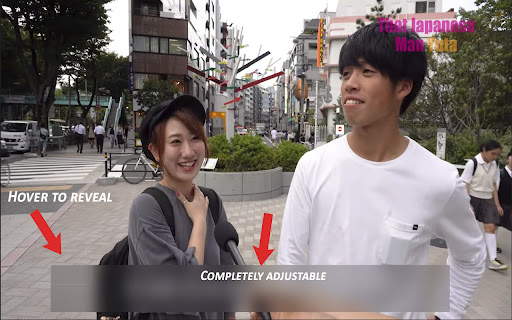
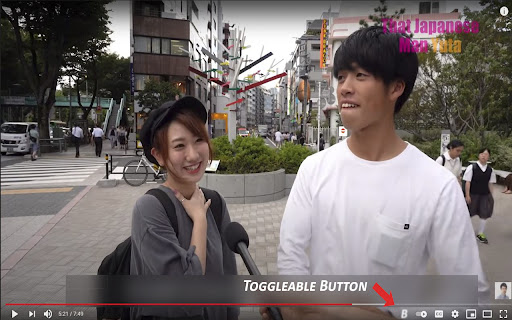
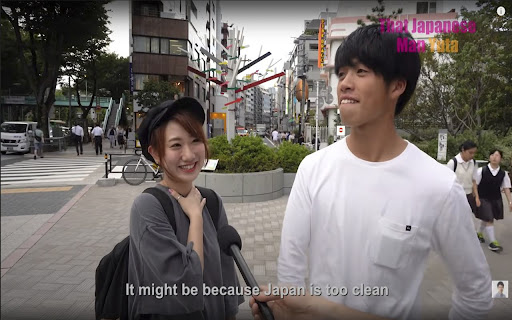
Adds an adjustable blur bar to cover subtitles that are embedded into a YouTube video. Blur bar comes with a hover-able panel that will reveal the subtitles(which also can be accessed with controls). This is a great tool for language learners as often times people put their subtitles within the YouTube video itself and not the CC. You can throw the bar over the subtitles and reveal them to check if you are translating it correctly within your head. I found this extremely useful while studying Japanese and figured I could help some fellow learners. HOW TO USE: Simply load up the YouTube video of your choice and our extension will inject a B button within the YouTube video player controls. Click this button to reveal the Blur Bar then drag and resize as you see fit. The Blur Bar comes equipped with a hover-able square at the top left corner of the bar in which when hovered it will reveal the subtitles. You can also access this feature by clicking the "S" key. OPTIONS: There is a popup located in your extensions at the top right corner of the browser, click it to reveal your options. As of now we have two options available. Pause-on-Hover option allows you to toggle whether or not the video pauses and rewinds upon hovering the reveal square or pressing S. The Height limit allows you to toggle whether or not you can adjust the height past the said limit. I recommended you keep this toggled on as sometimes the bar can get lost under the controls. Confirm your Options by clicking the submit key. DISCLAMIER: I am new to developing and currently am in school, so if you have any questions or if there are any problems just email me at censoredgreen@gmail.com and ill try to get to it as soon as possible. As the extension stands now it is in very early BETA. Thank you.

Content Edit & Blur
This is an OPEN-SOURCE project: https://github.com/HasanAboShally/web-content-edit-and-blur--browser-extension "Content Edit & Blur" is a simple browser extension that allows users to edit or replace texts and images on any webpage directly from the browser, and also blur content when needed. Some use-cases this plugin can be useful in: - Creating quick mockups based on existing pages - Communicating changes in web pages - Bluring (hiding) sensitive data when taking screenshots for example How to use: - Click on the extension’s icon to switch between the 3 modes: Idle, Edit, Blur - In Blur mode: Click any element once to blur it, click twice for extra blur, click again to unblur - In Edit mode: Double-click any image to replace it - In Edit mode: Select a text and press ALT+R to replace all occurrences - Press the ESC key anytime to switch back to Idle mode

Easy Blur
Blur parts of a web page, before taking screenshots or screen recordings Do you often need to mask confidential or sensitive details on a web page? Why spend many hours blurring parts of your videos, when you can blur them before recording? Save time in video editing and post processing! Easy Blur helps you quickly select elements to 👉 Blur one or more elements 👉 Unblur them, if needed 👉 Customise the strength of the blur effect and the keyboard shortcuts Common use cases ✅ Blur sensitive parts when recording product demos and walkthroughs ✅ Blur parts when recording tutorials ✅ Blur parts when recording videos for social media posts This is an open source extension. View source code here: https://github.com/vivek-nexus/easy-blur

Subtitle Masker
An extension designed to facilitate learning foreign languages by masking the subtitle in video players. Extension Name: Subtitle Masker Subtitle Masker is a Chrome extension designed to enhance language learning by concealing secondary subtitles in video players. Whether you're watching educational videos, movies, or any other video content, Subtitle Masker blocks secondary subtitles, enabling you to concentrate more effectively and enhance your foreign language listening comprehension. 1. Install the Extension and enable it. 2. While watching videos, simply click the plugin icon to mask the subtitles, assisting you in learning foreign languages more efficiently. Feedback and Support: If you have any suggestions or encounter issues, please feel free to provide feedback via the plugin page. We are dedicated to offering support to ensure you have the best learning experience possible.

Dreaming Spanish Toolkit
A chrome extension to interact with the Dreaming Languages website, enabling new functionalities. Dreaming Spanish Toolkit enables the following functionality for the Dreaming Spanish website, enriching your user experience: - Monthly statistics card, which reflects site display mode - More to come (eventually) Made as a hobby, if you like the extension please consider leaving a review. 0.2.0 - Removed the site-wide dark mode functionality, as this has now been implemented by Dreaming Spanish. Kept only dark mode functionality for the stats card, as this is injected by the extension and thus needs to be styled by it. 0.1.8 - Updated to work with the new URL, made minor changes to the dark mode to account for new elements and the dark mode formatting of the existing website. 0.1.7 - Dark mode now updated for the website including comments (thanks to kaStinju on github for this) 0.1.6 - Got rid of the dark mode option because I couldn't maintain it anymore and it wasn't working, added a reccomendation to use a different extension to enable dark mode 0.1.5 - Update the dark mode so that it works with changes in the site's UI - For some reason I had trouble applying the CSS to the comments section, so I'll try to come back and fix this later 0.1.4 - Minor change to dark mode to improve the look of the monthly progress calendar 0.1.3: - Updated the dark mode for the new changes to the site HTML 0.1.2: - Updated the dark mode display to apply to the new dreaming spanish video difficulty feature 0.1.1: - Fixed some display errors in dark mode - Moved the monthly stats calculation from the extension to the progress page for ease of use - Changed the monthly average calculation so that in the current month, a more accurate average is provided. (This could still be a day off depending on what time it is, as the extension uses the local time on your device, which may differ from the DS time by a couple of hours)
