
lponnilepefmohnagjabckdeiobldmhk
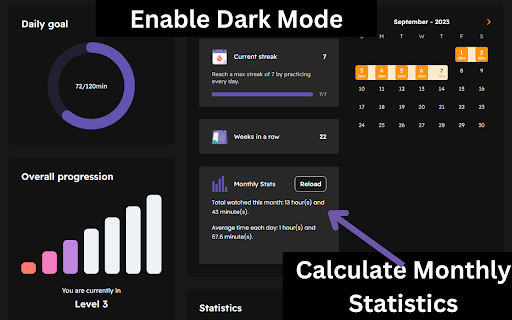
A chrome extension to interact with the Dreaming Languages website, enabling new functionalities. Dreaming Spanish Toolkit enables the following functionality for the Dreaming Spanish website, enriching your user experience: - Monthly statistics card, which reflects site display mode - More to come (eventually) Made as a hobby, if you like the extension please consider leaving a review. 0.2.0 - Removed the site-wide dark mode functionality, as this has now been implemented by Dreaming Spanish. Kept only dark mode functionality for the stats card, as this is injected by the extension and thus needs to be styled by it. 0.1.8 - Updated to work with the new URL, made minor changes to the dark mode to account for new elements and the dark mode formatting of the existing website. 0.1.7 - Dark mode now updated for the website including comments (thanks to kaStinju on github for this) 0.1.6 - Got rid of the dark mode option because I couldn't maintain it anymore and it wasn't working, added a reccomendation to use a different extension to enable dark mode 0.1.5 - Update the dark mode so that it works with changes in the site's UI - For some reason I had trouble applying the CSS to the comments section, so I'll try to come back and fix this later 0.1.4 - Minor change to dark mode to improve the look of the monthly progress calendar 0.1.3: - Updated the dark mode for the new changes to the site HTML 0.1.2: - Updated the dark mode display to apply to the new dreaming spanish video difficulty feature 0.1.1: - Fixed some display errors in dark mode - Moved the monthly stats calculation from the extension to the progress page for ease of use - Changed the monthly average calculation so that in the current month, a more accurate average is provided. (This could still be a day off depending on what time it is, as the extension uses the local time on your device, which may differ from the DS time by a couple of hours)

Dreaming Spanish Importer
This application adds a small icon to the YouTube player UI. When clicked, the application will open dreamingspanish.com/progress and automatically add the YouTube video as tracked input to dreamingspanish.

Chromebook usage monitoring - Sateraito Office
Chromebook usage monitoring function allow write to log user using device Chromebook利用確認機能はChromeブラウザの拡張機能で追加してから、Chromebook端末に本人がログインされているかどうかを管理者は確認出来ようになる機能です。

NIFB Toolkit
NIFB Toolkit is a simple and minimalist extension which features various convenient tools for NIFB users. Current Features: • The Gospel in 56 Languages • Quick & Easy NIFB Link Sharing • KJV Bible Search • NIFB Livestreams

Uzera
Empower users with Uzera. Integrate tours and demos seamlessly. Design interactive tours, record engaging DemoX. Uzera: Elevate User Experience with Product Tours and DemoX 🚀 Welcome to Uzera, the ultimate Chrome extension designed to revolutionize user engagement on your website or application. With two powerful features – Product Tours 🎯 and DemoX 🎬 – Uzera empowers you to provide an immersive and user-friendly experience for your audience. 1. Product Tours 🌐: Easily create interactive product tours that guide users through the essential features of your website or application. The intuitive design interface allows you to define step-by-step instructions, ensuring users grasp the full potential of your product. 2. DemoX - Video Guides 📹: Take user guidance to the next level with DemoX. Record step-by-step actions within your website or application, transforming them into captivating video guides. Share these DemoX videos to enhance user understanding and streamline the onboarding process. - Product Tours: - Design Engaging Steps 🎨: Craft visually appealing and informative steps for your product tour. Customize each step to showcase specific features or actions. - Seamless Integration 🚀: Integrate product tours effortlessly into your website or application, enhancing user onboarding and feature discovery. - DemoX - Video Guides: - Effortless Recording 🎥: Capture user interactions and workflows within your website or application effortlessly. - Shareable Video Guides 🌐: Generate shareable DemoX videos to provide users with a dynamic visual guide for using your product. - Enhanced User Engagement 🤝: Keep users engaged and informed with interactive product tours and video guides that cater to different learning preferences. - Simplified Onboarding 🛤️: Streamline the onboarding process for new users by providing them with comprehensive product tours and step-by-step video guides. - Versatility 💼: Whether you're a developer, marketer, or product manager, Uzera Toolbox is a versatile tool that adapts to your needs, enhancing user engagement across the board. 1. Install the Uzera Chrome extension. 2. Access the intuitive design interface for Product Tours or start recording with DemoX. 3. Elevate your user engagement and provide an unparalleled experience for your audience. Transform user engagement today with Uzera – Your Gateway to Intuitive Product Tours and Dynamic DemoX Video Guides! 🚀
