
mkghfgfppfbkkemjcpcdjpoiedhmoocf
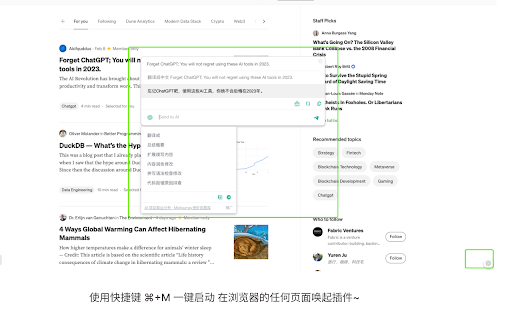


ChatGPT for all sites 是一款强大的 AI 助手插件,能够为您的学习和工作提供各种实用的功能,包括: ChatGPT for all sites 还带有各种预设提示模板,适用于不同的网络活动,无论您在浏览任何网站时,ChatGPT侧边栏都可以为您提供帮助,让您更加高效地完成各种任务。 💻💡 ChatGPT for all sites is a powerful AI assistant plugin that provides a variety of practical functions for your learning and work, including: 1、One-click activation using the shortcut ⌘+M to summon the plugin on any page of your browser~ 2、Reading Assistant 📖: Summarizing articles, finding similar pages, explaining concepts, and interpreting code for programmers. 3、Writing Assistant 📝: Checking grammar, rewriting content, expanding text, generating advertising scripts, and creating video scripts. 4、Translation 🔤: Able to translate both natural language and programming language. In addition, ChatGPT for all sites comes with various preset prompt templates, which are suitable for different online activities. No matter what website you are browsing, ChatGPT's sidebar can provide assistance to help you efficiently complete various tasks. 💻💡

ChatGPT Bulk Delete
A Chrome extension to bulk delete ChatGPT conversations This Chrome extension is designed to help users quickly and efficiently delete conversations in the ChatGPT’s left sidebar. With the extension installed, users can add checkboxes to each conversation in the sidebar, select multiple conversations to delete or archive, and accomplish this with just a few clicks. Hold Shift and click to select multiple conversations for efficient bulk actions. This extension is particularly useful for users who frequently use ChatGPT and need to manage their conversations efficiently. Instead of deleting conversations one by one, users can remove multiple conversations at once, saving both time and effort. Additionally, this extension now offers a “bulk archive” feature for a one-time fee of $0.99 USD. This paid feature allows users to archive multiple conversations simultaneously, further enhancing the tool’s utility and convenience. The extension popup includes a small advertisement labeled “Ad” in the footer, linking to TubeVocab (https://www.tubevocab.com/), a third-party language-learning product. This ad helps support the continued development and free distribution of ChatGPT Bulk Delete. Clicking it is entirely optional and does not affect any of the extension’s core functionality.

ChatExtension - A ChatGPT Extension
A Chrome extension to interact with ChatGPT for All Websites. ChatExtension is an innovative browser add-on that empowers users with AI-powered assistance while they browse the web. By leveraging the advanced capabilities of OpenAI's ChatGPT API, the extension can answer any question with current page contenxt. Key features of this extension include: 1. Instant Summaries: With just one click, users can generate concise summaries of web pages, enabling them to quickly understand the main points without having to read the entire content. 2. Intelligent Assistance: The extension integrates a user-friendly chat interface that allows users to communicate with GPT3.5 AI model and ask questions about the content they are browsing, getting instant answers and insights. 3. Wide Range of Use Cases: From summarizing news articles and research papers to getting quick answers and insights on complex topics, this extension is a versatile tool that can benefit users across various fields and industries. By installing this extension , users can enhance their browsing experience with AI-powered assistance that helps them save time, improve productivity, and gain a deeper understanding of the content they encounter online. The extension's convenient, user-friendly interface and powerful AI capabilities make it an essential tool for modern web users who seek to make the most out of their time on the internet.

ChatGenie for Chatgpt
The ultimate browser extension for accessing Chatgpt Chatgenie brings the power of OpenAI's ChatGPT to your browsing experience, Chatgenie is focused on reliability and keeping up with recent changes. Features: • Easily access ChatGPT by clicking on the icon in the toolbar. The popup will appear and you can start a conversation with ChatGPT. • Quickly access ChatGPT from the navigation bar (aka Omnibox) by typing `gpt` and pressing space. • Run ChatGPT from the context menu. • Maintains a longer ChatGPT session by periodically pinging it. • (Beta) Prevents leaks of personal data to the LLM We strive to keep up with the fast-paced development of ChatGPT to bring you the best possible experience. How to use: • Log in to https://chat.openai.com • If you encounter an error, try opening chat.openai.com again. The service may be under high demand. • If you continue to experience issues, please report a bug in the review section of our extension's page.

ChatGPT Explain
A ChatGPT Chrome Extension that explains concepts in a simple way Looking for a way to understand complex concepts with ease? Look no further than ChatGPT Explain, the Chrome extension that simplifies even the most challenging topics. 📚 Select any text on your screen and get concise, brief, or detailed explanations of the concepts it contains. 💡 Customize the amount of detail you receive, from a quick overview to an in-depth analysis. ⏰ Save time and effort by getting instant access to the information you need. 👩🎓 Perfect for students, professionals, or anyone who loves to learn new things. 🆓 Completely free to use and easy to install with just a few clicks. With ChatGPT Explain, understanding new information has never been easier. Say goodbye to confusion and frustration and start learning with ease today!
