
lgfokdfepidpjodalhpbjindjackhidg
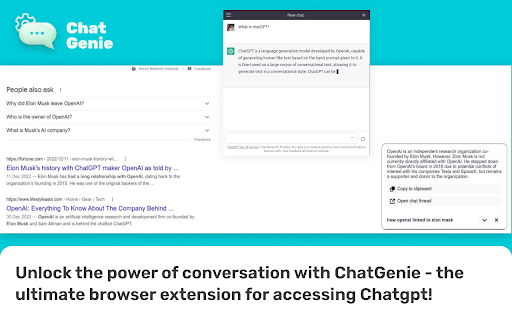
The ultimate browser extension for accessing Chatgpt Chatgenie brings the power of OpenAI's ChatGPT to your browsing experience, Chatgenie is focused on reliability and keeping up with recent changes. Features: • Easily access ChatGPT by clicking on the icon in the toolbar. The popup will appear and you can start a conversation with ChatGPT. • Quickly access ChatGPT from the navigation bar (aka Omnibox) by typing `gpt` and pressing space. • Run ChatGPT from the context menu. • Maintains a longer ChatGPT session by periodically pinging it. • (Beta) Prevents leaks of personal data to the LLM We strive to keep up with the fast-paced development of ChatGPT to bring you the best possible experience. How to use: • Log in to https://chat.openai.com • If you encounter an error, try opening chat.openai.com again. The service may be under high demand. • If you continue to experience issues, please report a bug in the review section of our extension's page.

Voice Control for ChatGPT
Expands ChatGPT with fast voice control in multiple languages, read aloud, and more! Voice Control for ChatGPT gives you a smoother, faster way to interact: use speech input, hands-free replies, keyboard shortcuts, and custom voice commands with a personal dictionary. Ideal for power users who want speed, flexibility, and automation. Key Features: 🎤 Fast speech recognition in multiple languages ⌨️ Push-to-talk: hold spacebar or click mic to speak 👐 Hands-free mode: auto-submit + auto-read (if enabled) 🌍 Pre-select speech input language ⚡️ Custom Dictionary: Define your own voice actions and word replacements — perfect for fixing misheard words or triggering full prompts with short phrases 📣 Automatic read-aloud with shortcut to skip (if enabled) 🤖 Voice input also works on Claude AI (enable via popup) How to use: 1. Install the extension 2. Go to chat.openai.com 3. Log in or create a free ChatGPT account 4. Click the mic or hold spacebar to speak 5. Allow microphone access when prompted To use with Claude AI, open the extension popup and click “Enable Claude.” Accept the permission when asked. 🛟 Need help or found an issue? Contact us via the support section or email us directly at support@voicecontrol.chat. About: This extension is made by the creators of Talkio and TalkaType — tools that help you practice pronunciation, improve fluency, and type with your voice. Explore more: 🔗 Voice Control Pro — AI-powered dictation for your computer 🔗 Talkio — AI-powered speaking practice 🔗 TalkaType — Dictation for productivity

ChatGPT Optimizer - Boost Your AI Workflow
Enhance the Chat GPT interface and bring GPT trough all the web! The ultimate productivity tool for ChatGPT. Enhances the interface and adds new features. Improve your workflow with a simple installation. 💬 Messages - Copy buttons (Plain & HTML) - "Scroll to Latest" Button - "Read Aloud" Button - Stop Reading Button - Play/Pause Read Aloud - 30+ Voices - Persitente Voice Setting - Chars and word counter - Copy the latest message via the shortcut - Windows/Linux/ChromeOS: Ctrl+C - Mac: Command+C - Stop and Regenerate the Answer via the shortcut - Stop: Ctrl+Escape - Regenerate: Ctrl+Backspace - Copy clean text without style of selection - Delete Messages 💪 Prompt Everywhere - Prompt Selection via Context Menu - Prompt Page via Context Menu - Prompt from Search Bar - Type in "gpt" and click tab key to prompt - New chat via command - Windows/Linux/ChromeOS: Ctrl+Shift+O - Mac: Command+Shift+O - Access ChatGPT from extension popup ✍️ Prompting - Prompt input max chars warning - Quick Prompt to rewrite message - Jailbreak with DAN Model button - Prompt URLs 🤝 Usage - Prompt History - Navigate trough prompt history by clicking up and down arrow on prompt text area - Get Insights and Charts - Pass "GPT On Capacity" Page 👀 Interface - Collapsible Navigation Bar - Shortcut: Spacebar - Open chats scrolled to the bottom - Less prominent plan upgrade button - Direct chat deletion with shortcut - All Platforms: Control / Command or Shift + Delete Icon - Direct focus on the text area to directly start typing - Horizontal word break for too long messages in width - Adjustable message width for large screens - Blur chats on sidebar for presentation - Expand/collapse button for prompt field - United Settings Popup ✅ Secure Code - Compatible with ChatGPT Plus - Compatible with ChatGPT Normal - Compatible with AIRMP 🧑💻 Next Features - Improve "Read Aloud" - Read faster - Prompt Generator - Promp on Page Popup 📆 Planned Features - Multi Delete Chats - Search in Chats - GPT in Search Engines - Google - Bing - DuckDuck Go - Brave Search - GPT in GMail - GPT in LinkedIn - Generate Post Content - Improve Post Content - Based on User Pages - GPT in YouTube - Video summarizer based on title and subtitles - Enable / Disable Features - Website about Extension - Version Features - FAQ & Help - Contact - More Information - Quick Feature / Support Requests (For Extension) 💡 Description Introducing the ultimate productivity booster for the official Chat GPT website - the ChatGPT Optimizer! This powerful tool will improve the way you use the website, by adding a host of new features that will boost your productivity and streamline your workflow. The extension also offers a variety of other features that will make it easier for you to use GPT everywhere. This means you can use GPT's capabilities to improve your search results, compose better emails, and even enhance your LinkedIn profile. With its user-friendly interface and powerful features, the GPT Extension is the perfect tool for anyone who wants to get the most out of GPT. So why wait? Download the GPT Extension now and start seeing the benefits for yourself! Important: This extension isn't developed by Open AI or the Chat GPT team.

ChatGPT Voice Master
Supports English voice engine for chatgpt.com, making conversations more natural and interactions smoother. Our goal: to create the best human-computer communication assistant Version Upgrade: 2.4.3 (2024-04-25) makes opening the panel smoother and supports 47 languages. 🔥 Compared to traditional voice plugins, we offer excellent neural network voice services that allow you to converse with our chatbot as if talking to a real person. Even with prolonged use, you won't feel fatigued. Our product is permanently free to use, but for users seeking a superior experience and personalization, we also offer purchasing options. Focused on enhancing input and output: 🧑💻 Compared to similar high-quality voice plugins, our focus is on optimizing input and output efficiency. Our plugin offers high recognition rate speech recognition, allowing you to interact more efficiently with chatbots. Additionally, you can open the voice assistant on any page through the ChatGPT sidebar. Download and use ChatGPT Voice Master now to boost your productivity! 🖥️ Wide-screen display and optimized code area to help programmers view and copy code. ⬇️ Conveniently export conversation content, save it as an image, PDF, MD format, or generate a sharing link for communication with others. 🌟 Smooth communication mode: Interrupt the robot's speech at any time, issue new instructions without interruption. 🧲 Smart Correction: No need to re-record when making corrections. Simply select the part you want to modify and continue speech recognition. 🔑 Easy Wakeup: Wake up the assistant with simple English word "one", similar to "Hey Siri". 📌 Convenient Sidebar: Easily open the sidebar, interact with icons, and easily copy content or perform actions. 🔒 Secure Record: The local sidebar retains conversation history while protecting your privacy. ✂️ Segment Input: Supports segment input to process large amounts of content, facilitating more question and answer interactions. 🔊 Intelligent Reading: Automatically detect reply language and perform appropriate voice reading. 🌐 Multilingual Support: Supports 70 languages and dialects to meet different language communication needs. 🔄 Automatic Translation: Replies will be automatically translated into your native language to enhance understanding and response efficiency. Text selection also offers translation. 🔤 English Shortcut: Provides shortcuts for English queries to ensure faster and more comprehensive responses. 📋 Chat export: Easily export chat records for communication. 🔍 Quick Search: Quickly search through your chat history using keywords. 🔎 Query Retrieval: Retrieve previous questions using the up arrow to refine your query. 🔊 Speed and volume control: Use the slider to adjust the speed and volume of the voice, personalizing your experience. ⌨️ Keyboard shortcuts: Use keyboard shortcuts for simple voice input, and use the space bar and enter key to initiate recognition and questioning. 💼 Compatible with ChatGPT Plus version: providing unique features and experiences for Plus users. 📌 Download the voice plugin now and easily explore the world of interacting with chatbots! 🚀🚀🚀 When you need to purchase more coins, we offer the option to pay using PayPal. With PayPal, you can securely and conveniently complete the purchase process. Simply select PayPal as your payment method and follow the instructions to make the payment. Thank you for your support! 📒 This extension also supports recording, text editing, notes, messaging, navigation, etc., enhancing usability and richness of use. 🔖 Additionally, we have added options for recording, text editing, searching, note-taking, messaging, navigation, game selection, wallpapers, and themes. 🔍 Our extension is easy to download and compatible with popular browsers such as Google, Bing, Qwant, WeChat, etc. 💬 We've also added the functionality to locally save chat logs, allowing you to easily review past conversations and reference them offline. Just click on the extension icon above.

MaxAI: Ask AI anything as you browse (GPT, Gemini, Claude, Grok, etc.)
Save time with your AI assistant that helps you read, write, and search faster wherever you work online. MaxAI for Chrome offers a complete set of powerful AI tools in a clean, minimalist interface designed to boost your productivity online, no matter what task you're working on. ➤ How it works MaxAI adds an AI sidebar and an AI context menu to your browser. With the AI sidebar, you can ask questions about the webpage you're viewing, such as summarizing content, finding information, analyzing data, or getting answers to your questions. The AI context menu lets you select any text online and have the AI improve your writing, translate, explain, or answer the selected text with a single click. ~ Free The free version of MaxAI includes basic AI features designed to help you read, write, and search more quickly and effectively. • Ask AI anything in the AI sidebar • Ask about webpages and your files • AI web search • AI writing assistance • AI reading assistance • AI reply (emails, social media, messages) • AI translate • Create reusable prompts ~ Pro MaxAI Pro includes everything available for free, plus an expanded range of AI features designed to help you get more accurate answers and produce higher-quality results that make an impact. • Choose a smarter AI • 5x more web search sources • In-depth content and data analysis • Advanced reasoning • Customizable responses • Voice input • Ask multiple AI models at once • Image generation ➤ AI models MaxAI is powered by the latest top AI models from OpenAI, Anthropic, Google, and others. ~ Powered by OpenAI • GPT-4.1 / GPT-4o • o4-mini • GPT-Image-1 (the image generation model in ChatGPT) • DALL·E 3 ~ Ask AI anything • Get answers • Search the web • Extract text from images • Create images • Generate and debug code • Generate diagrams and flowcharts • Compare answers from different AI models ~ AI reading assistance • Summarize • Find information • Explain complex concepts • Analyze content and data • Translate sentences • Translate the entire webpage ~ AI writing assistance • Clarity-focused sentence rewrites • Improve writing • Adjust tone • Translate sentences • Improve vocabulary (word choice, formality level) • Check grammar • Check spelling • Check punctuation • Quickly reply to emails, social posts, and messages • Create a draft ➤ Works where you work MaxAI is designed to work seamlessly in your browser—no copying or pasting required. Use it in Google Docs, email clients, social media, and across the web. MaxAI for Chrome works across: • Google Docs • YouTube • Gmail • LinkedIn • And more! ➤ Our mission We're a small, independent team of highly talented individuals based in Silicon Valley, California. Our mission is to make generative AI accessible and useful for everyone. ➤ Important notes • Make sure to reload/refresh the webpage after installing the extension to ensure its proper functionality. • For security reasons, the extension will not work on any Chrome Web Store pages. ➤ Terms and Conditions By installing the extension, you agree to and acknowledge: https://www.maxai.co/terms/ https://www.maxai.co/privacy/
