
mkgegefmmdlpejiifolbbjjfggimnmoe
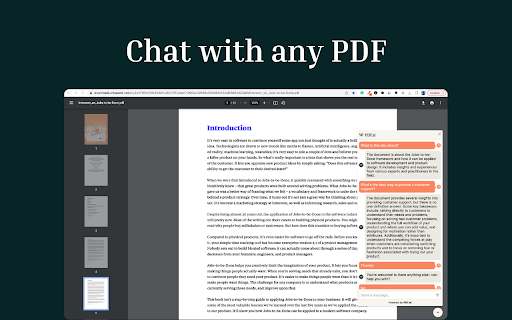
The ultimate ChatPDF extension that allows you to chat with any PDF using AI: ask questions, get summaries, find anything you need! Introducing the ultimate ChatPDF Chrome extension that allows you to chat with any PDF! 🥳 Engage effortlessly with PDFs from external .pdf files or your local .pdf files. We also have native integrations with Google Drive and Dropbox. Experience the future of interactive document interaction. Try it now! 🙌

MaxAI: Ask AI anything as you browse (GPT, Gemini, Claude, Grok, etc.)
Save time with your AI assistant that helps you read, write, and search faster wherever you work online. MaxAI for Chrome offers a complete set of powerful AI tools in a clean, minimalist interface designed to boost your productivity online, no matter what task you're working on. ➤ How it works MaxAI adds an AI sidebar and an AI context menu to your browser. With the AI sidebar, you can ask questions about the webpage you're viewing, such as summarizing content, finding information, analyzing data, or getting answers to your questions. The AI context menu lets you select any text online and have the AI improve your writing, translate, explain, or answer the selected text with a single click. ~ Free The free version of MaxAI includes basic AI features designed to help you read, write, and search more quickly and effectively. • Ask AI anything in the AI sidebar • Ask about webpages and your files • AI web search • AI writing assistance • AI reading assistance • AI reply (emails, social media, messages) • AI translate • Create reusable prompts ~ Pro MaxAI Pro includes everything available for free, plus an expanded range of AI features designed to help you get more accurate answers and produce higher-quality results that make an impact. • Choose a smarter AI • 5x more web search sources • In-depth content and data analysis • Advanced reasoning • Customizable responses • Voice input • Ask multiple AI models at once • Image generation ➤ AI models MaxAI is powered by the latest top AI models from OpenAI, Anthropic, Google, and others. ~ Powered by OpenAI • GPT-4.1 / GPT-4o • o4-mini • GPT-Image-1 (the image generation model in ChatGPT) • DALL·E 3 ~ Ask AI anything • Get answers • Search the web • Extract text from images • Create images • Generate and debug code • Generate diagrams and flowcharts • Compare answers from different AI models ~ AI reading assistance • Summarize • Find information • Explain complex concepts • Analyze content and data • Translate sentences • Translate the entire webpage ~ AI writing assistance • Clarity-focused sentence rewrites • Improve writing • Adjust tone • Translate sentences • Improve vocabulary (word choice, formality level) • Check grammar • Check spelling • Check punctuation • Quickly reply to emails, social posts, and messages • Create a draft ➤ Works where you work MaxAI is designed to work seamlessly in your browser—no copying or pasting required. Use it in Google Docs, email clients, social media, and across the web. MaxAI for Chrome works across: • Google Docs • YouTube • Gmail • LinkedIn • And more! ➤ Our mission We're a small, independent team of highly talented individuals based in Silicon Valley, California. Our mission is to make generative AI accessible and useful for everyone. ➤ Important notes • Make sure to reload/refresh the webpage after installing the extension to ensure its proper functionality. • For security reasons, the extension will not work on any Chrome Web Store pages. ➤ Terms and Conditions By installing the extension, you agree to and acknowledge: https://www.maxai.co/terms/ https://www.maxai.co/privacy/

Chat-GPT PDF
Export your chat with Chat-GPT to PDF The Chat-GPT PDF extension for Google Chrome allows users to easily and quickly download their conversations with ChatGPT as PDF files. With just one click, the extension captures the entire conversation history, formats it appropriately, and generates a PDF document that can be downloaded and shared. This tool is useful for keeping a record of conversations with ChatGPT, reviewing important information, or sharing insights with colleagues and friends.

ChatPDF - AI for Documents
With AI, you can chat with pdf, PowerPoint, Word in natural language, ask questions, get summaries and answers instantly. Say goodbye to endless scrolling and searching, and say hello to a smarter, more intuitive way of working with your documents. Legal agreements, financial reports, e-books—— it can extract key data, gain unprecedented insights, answer any questions. It's your personal documents assistant, delivering information at your fingertips! ➤ It is designed to cater to a wide range of users. Whether you're a researcher, dealing with business contracts, or a student, It can help you extract valuable insights from your documents. 🔹For students 👨💻 Understanding and retaining information from textbooks and research papers is crucial but tedious for students. Chat Documents allows you to interact with your study materials, prepare notes efficiently, and understand the content better. Ask your Documents about complex concepts, definitions, or theories, and get easy-to-understand answers. With Chat Documents, studying becomes a breeze. 🔹For researchers 🔬 As a researcher, you're often dealing with dense, information-packed Documents. Chat Documents lets you quickly uncover more profound insights and turbocharge your research. Ask your Documents exact questions, extract key data, and gain insights swiftly and efficiently. With Chat Documents, you can focus on your research while we take care of the information extraction. 🔹For work 🧑💼 Efficiently analyze your documents. From financial and sales reports to project and business proposals, training manuals, and legal contracts, Chat Documents can quickly provide you with the information you need. 🔹Chat with books Dive into a whole new reading experience! Chat with your favorite books and get ready for interactive conversations that bring the pages to life. 🔹Chat with scientific papers Take your research game to the next level. Collaborate effortlessly and exchange knowledge with a simple chat interface for scientific papers. 🔹Chat with financial reports Say goodbye to boring number crunching! Chat with your financial reports and get quick answers like a pro. 🔹Chat with product user manuals Confused about how to set up that gadget? Chat with your user manual and get instant, friendly assistance that'll have you up and running in no time. 🔹Chat with legal documents No more headaches trying to decipher legal jargon! With Chat Documents, legal documents become a breeze to understand and discuss. 🔹Chat with employee training documents Boring training sessions, be gone! With Chat Documents, training documents become interactive buddies, making learning fun, engaging, and as easy as chatting with a friend. By design, your data stays at all times on your Google account, never saved in our database. Your data aren’t shared with anyone, including the add-on owner. We complies with privacy laws (especially GDPR & California Privacy Act) to protect your data.

Chatgpt PDF | Ask your pdf
Ask your pdf ai. Chapdf best ai summarizer plugin powered by gpt. Summarize text and have a chat with any pdf. Pro summary generator Enhance Your talk to PDF Experience with ChatGPT: The Ultimate Summary Generator and AI Summarizer In today's fast-paced digital world, where information is king, PDF documents play a pivotal role in knowledge sharing. Yet, the sheer volume of PDFs can often be overwhelming. That's where our ChatGPT-powered Chrome extension comes into play. It's your ultimate tool for conquering PDFs, making your interactions smarter and more efficient. 🔥Unlock the Power of PDF Summarize and Chat GPT 🚀 ai PDF Summarizer: Say goodbye to endless scrolling and sifting through lengthy documents. Our extension, equipped with an advanced PDF summarizer, distills the most critical insights for you. Askyourpdf about everything 🚀 ChatGPT Integration: Harness the formidable capabilities of Chatpdf for instant and precise answers. ChatGPT and PDF come together seamlessly, allowing you to query documents in plain language. 🚀 Intelligent Annotation: Dive deeper into your docs with smart annotations. Our extension not only summarizes but also annotates key points, making it easier for you to grasp the core concepts at a glance. With the integration of GPT, you can effortlessly annotate PDF, making your reading experience more insightful and interactive. 🚀 Seamless Document Navigation: Transform the way you navigate through documents with our intuitive interface. Effortlessly jump between sections, search for keywords, or ask Chat gpt to find the information for you. With the combination of AI PDF Summarizer and ChatGPT, navigating through dense documents becomes a smooth, user-friendly experience. Say goodbye to the traditional tedious document browsing, and embrace a new era of intelligent, AI-driven document navigation. 🔥 Maximizing Your talk to PDF Extension: A Step-by-Step Guide 1️⃣ Simple Installation: Getting started is a breeze. Add the extension to your Chrome browser with a single click. 2️⃣ Seamless PDF Access: Open the PDF document you wish to engage with directly from your browser. 3️⃣ Effortless Chat with ai assistant: Initiate a conversation via the user-friendly extension interface. Just click on the icon. 4️⃣ Request a Summary: Ask ChatPDF to summarize the Documet content. You can request a concise overview or specify sections you want to focus on. 5️⃣ Instant Summaries: In a matter of moments, ChatGPT will deliver precise summaries, giving you quick access to the essential information within the PDF gpt. 🔥Advantages of Our AI assistant Extension: Your Path to Efficiency 🕗Time-Saving: Summarizing PDF, webpage, youtube or any other Documents is now a matter of minutes, freeing your schedule for more critical tasks. 👩🎓Accuracy: ChatGPT's natural language understanding ensures precise and relevant summaries, helping you make informed decisions. 🛠Customization: Tailor your summarization requests, whether it's specific sections or the entire document, to cater to your unique needs. ⚙️Versatility: Our extension seamlessly handles a variety of Documents formats, making it a versatile tool for professionals, students, and researchers alike. ⚙️Intelligent Integration: Enjoy a seamless connection between our extension and your preferred PDF reader, enhancing your workflow across different platforms. ⚙️Conclusion: Revolutionize Your PDF, webpage Interaction Say goodbye to the daunting task of dealing with voluminous PDFs. Forget about wondering how to get ChatGPT to summarize a PDF. With our PDF extension powered by ChatGPT, you have the tools to revolutionize your PDF interactions. Enter a new era of intelligent PDF management and summarization. Don't allow your valuable time to get lost in the maze of lengthy documents. Embrace the future of PDF handling, elevate your efficiency, and empower your interactions with our ChatGPT-powered PDF extension. Try it today, and experience the transformation in your PDF interactions. Your PDFs will become more than documents; they'll become gateways to instant insights. ❓Q1: How to feed a document to the AI? A1: Feeding a document to the AI is a straightforward process with our extension. After installation, simply click on the icon, and you'll find an option to upload or open a file. Once the document is uploaded, it becomes ready for interaction with the AI. ❓Q2: How to use 'Ask Your Document' feature? A2: With the 'Ask Your Document' feature, you can easily pose queries to your file. After uploading the document using our extension, click on the icon and type in your question in the provided chat interface. The AI will interact with the document and provide you with the relevant answers or summaries based on your query. ❓Q3: How to upload a document for interaction? A3: Uploading a document for interaction is done through our extension. Once the extension is installed, click on the icon and select the option to upload a document. Browse to the location of the file on your device, select the file, and click 'Open'. Your document will be uploaded and ready for interaction. ❓Q4: How to get the AI to summarize a document? A4: To get the AI to summarize a document, first upload the document using our extension. Then, click on the icon, and in the chat interface, type a request like ""Summarize this document"" or specify the sections you want summarize. The AI will provide a concise summary of the requested content from the document. ❓Q5: Can the AI summarize a document? A5: Yes, the AI can summarize a document effectively. Once the document is uploaded through our extension, you can request a summary by interacting via the chat interface. You can ask for a summary of the entire document or specify particular sections that you want summarized.
