
mkcpablaampjifhidkcelogaijhemoef
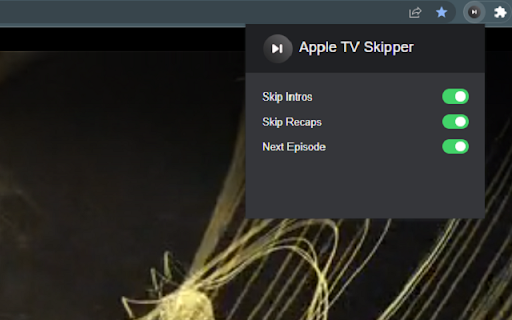
Automatically skip intros, recaps, and click next episode button on AppleTV Extension to skip all intros and recaps when watching AppleTV+. Save your time, muscles and keyboard buttons! One click to play all series episodes in a row without a single move from the couch. Add Apple TV + Skipper to your browser to automatically: ⏭️ Skip intros ⏭️ Skip recaps ⏭️ Go to the next episode One extension to play all episodes of your favorite series in a row smoothly. All you need to do is to add the extension to your browser, switch on skipping options using toggles and log into your AppleTV+ account. Now you are ready to binge series all night. It is as simple as that! How does it work? Skipper automatically clicks ""skip"" buttons which appear while watching. Please note that this extension was developed and tested for the English version only. It may not work for other languages or if the "skip" button is not available by default. Disclaimer : AppleTV+ is a trademark of Apple Inc. This website & extension hold no association or affiliation with AppleTV+ or any third-party companies.

Skipfast intro, recap, next and more
Automatically skip Netflix, Prime Video and Disney plus intros, recaps, and next episode prompts. Automatically skip Intro, Recaps and Next episode for Netflix, AppleTV, Prime Video and Disney plus prompts. IMPORTANT: you need to refresh the Netflix, AppleTV, Prime Video or Disney plus page only once after installing the extension. It's not dependent on language. You can check the code here : https://github.com/mfaurel/skipfast You can open an issue or send a pull request if you find any bug. If you want to buy me a coffee, here's my paypal : https://paypal.me/MichaelFaurel

What to watch on Apple TV TMDb ratings
Not sure what to watch? Here’s our advice: don’t waste your precious time on bad productions. Now you can see if the movie is worth watching directly on Apple TV+. Check what others like and increase your chances of finding real gems among the high-scored titles. Film Scores for AppleTV displays TMDb ratings ⭐ Picking something to watch has never been easier! All you need to do is add Film Scores for AppleTV extension to your browser. It's as simple as that! Known issues: - Missing scores - please note that some ratings may be missing, depending on their availability. - If you experience empty rating circles on AppleTV, please try reloading them first by navigating to the movie detail page and clicking the Refresh Scores button. Disclaimer : AppleTV+ is a trademark of Apple Inc. This website & extension hold no association or affiliation with AppleTV+ or any third-party companies.

Hulu SubStyler : customize subtitles
Extension to customize captions and subtitles on Hulu. Change text size, font, color and add background. Wake up your inner artist and express your creativity by customizing Hulu subtitle style. Even though you usually don’t use movie captions, you may consider starting after checking out all the settings this extension has to offer. Now you’re able to: - Choose custom text color, - Adjust text size, - Add text outline and choose its color, - Add text background, choose its color and adjust the opacity - Choose font family Feeling artistic? Here’s another bonus: all the colors can be chosen either from a built-in color picker or by entering RGB value, creating almost endless style possibilities. Take the subtitle customization to the next level with Hulu SubStyler and let your imagination run wild!! Too many options? Worry not! Check out some basic settings, such as text size and background. All you need to do is add Hulu SubStyler extension to your browser, manage available options in the control panel and adjust subtitles to your own preferences. It’s as simple as that! Disclaimer : Hulu is a trademark of Disney Media and Entertainment Distribution. This website & extension hold no association or affiliation with Hulu or any third-party companies.

Audio Booster for Apple TV
Struggling with quiet audio? 🚀 Try Audio Booster for Apple TV and amplify your experience! 🎧 Have you ever watched a show on Apple TV and felt the sound was too quiet? 😕 Did you have to turn up the volume to the max and still weren't satisfied? 📉 Enter Audio Booster for Apple TV - your solution to the problem of a quiet audio track in online media! 🚀 What is Audio Booster for Apple TV? Audio Booster for Apple TV is an innovative extension for the Chrome browser 🌐, allowing you to increase the maximum volume of audio played on Apple TV. Easily adjust the volume using a slider 🎚️ or predefined buttons in the extension's pop-up menu to achieve the optimal sound level. 🔊 Features 🔹 Volume Increase: Set the volume according to your needs. 🔹 Predefined levels: Choose from ready-made volume settings for quick adjustment. 🔹 Compatibility: Designed specifically for use with Apple TV. Install the extension from the Chrome Web Store. Open your favorite show on Apple TV. 🎬 Click the extension icon in the browser bar. 🖱️ Use the slider or predefined buttons in the extension's pop-up menu to increase the volume. 🎧 ❗**Disclaimer: All product and company names are trademarks or registered trademarks of their respective holders. This extension holds no association or affiliation with them or any third-party companies.**❗
