
fbeghiagboohdcfpcledhbbkfpmlhifi
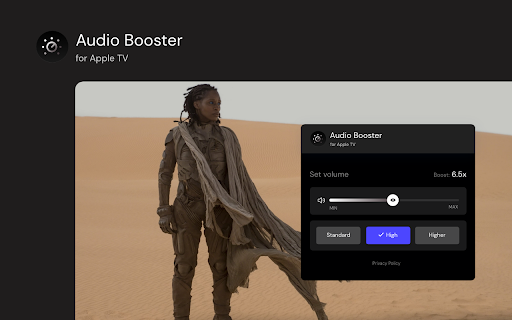
Struggling with quiet audio? 🚀 Try Audio Booster for Apple TV and amplify your experience! 🎧 Have you ever watched a show on Apple TV and felt the sound was too quiet? 😕 Did you have to turn up the volume to the max and still weren't satisfied? 📉 Enter Audio Booster for Apple TV - your solution to the problem of a quiet audio track in online media! 🚀 What is Audio Booster for Apple TV? Audio Booster for Apple TV is an innovative extension for the Chrome browser 🌐, allowing you to increase the maximum volume of audio played on Apple TV. Easily adjust the volume using a slider 🎚️ or predefined buttons in the extension's pop-up menu to achieve the optimal sound level. 🔊 Features 🔹 Volume Increase: Set the volume according to your needs. 🔹 Predefined levels: Choose from ready-made volume settings for quick adjustment. 🔹 Compatibility: Designed specifically for use with Apple TV. Install the extension from the Chrome Web Store. Open your favorite show on Apple TV. 🎬 Click the extension icon in the browser bar. 🖱️ Use the slider or predefined buttons in the extension's pop-up menu to increase the volume. 🎧 ❗**Disclaimer: All product and company names are trademarks or registered trademarks of their respective holders. This extension holds no association or affiliation with them or any third-party companies.**❗

Enhancer for YouTube™
Take control of YouTube and boost your user experience! Enhancer for YouTube™ is the ultimate tool to supercharge your YouTube experience with a host of highly customizable features, making it smoother and more enjoyable. Whether you’re looking to fine-tune playback settings or customize the look and feel, this YouTube enhancer gives you complete control to tailor YouTube to your needs. Video Playback: • Quickly adjust playback speed, quality, volume, and more with the mouse wheel or keyboard shortcuts. • Playback Speed: Set a default playback speed and adjust it anywhere from 0.07x to 16x while watching. • Playback Quality: Set a default playback quality for videos, playlists, and embedded videos. • Volume Booster: Boost volume and bass for louder, clearer sound (up to 10x audio boost). • Enhanced Loop Mode: Repeat specific parts or the entire video effortlessly. • Autoplay Control: Fine-tune or disable YouTube’s autoplay features for better control. • Video Formats: Disable high frame rate formats (60fps). Appearance and Themes: • Video Filters: Adjust brightness, contrast, color, and more without changing your monitor's settings. • Enhanced Dark Mode: Enjoy a sleek, eye-friendly interface with the built-in Dark Theme and its 50+ variants. • Custom Themes: Personalize YouTube's appearance with custom themes to suit your style. • Cinema Mode: Dim everything around the player to keep your focus on the video. Video Player: • Wide Player: Expand the player beyond the default Theater Mode, or fill the entire screen without going full screen. • Mini Player: Keep watching while reading comments so you never miss a moment. • Pop-up Player: Watch videos in a resizable window while multitasking or browsing other content. Distractions and Shorts: • Block Distractions: Hide end screens, info cards, recommendations, related videos, chat, or comments. • YouTube Shorts: Hide Shorts or watch Shorts like regular videos. Other Features: • Screenshot: Capture high-quality screenshots of your favorite video moments. • Keyboard Shortcuts: Set up customizable keyboard shortcuts to control YouTube like a pro. • Reverse Playlists: Watch playlists in reverse order for a fresh viewing experience. And more! Get the most popular YouTube enhancer now and transform the way you watch YouTube forever! Enhancer for YouTube™ is a third-party extension and is not affiliated with YouTube. YouTube is a trademark of Google LLC. Use of this trademark is subject to Google Permissions.

Advanced Audio Equalizer
Enhance your online audio experience with the Advanced Audio Equalizer. Fine-tune your tab audio in real-time Enhance your online audio experience with the Advanced Audio Equalizer, your ultimate sound companion. Join our community of audio enthusiasts and discover a world of personalized sound quality like never before. 🎵 Fine-Tune Your Audio, Effortlessly With the Advanced Audio Equalizer, sculpt your audio to perfection with precision EQ settings and dynamic effects. From crisp highs to deep lows, tailor your sound to suit your preferences with ease. 🌟 Unlock a Universe of Audio Effects Immerse yourself in a world of audio effects with the Advanced Audio Equalizer. Explore reverb, chorus, 3D audio, compressor, and background noise control, each with its own set of presets for instant customization. 🔊 Amplify Your Listening Experience Boost your audio to new heights with volume amplification of up to 800%. Whether you're gaming, streaming, or simply browsing, feel the power of crystal-clear sound with every click. 🔄 Sync Your Settings Across Devices Never lose your perfect audio setup again. With syncable profiles, your personalized settings travel with you across devices effortlessly, ensuring a consistent audio experience wherever you go. Ready to take your audio to the next level? Add the Advanced Audio Equalizer to your browser today and start enjoying a truly personalized sound experience.

Audio Equalizer for Youtube™
Stylish audio equalizer for your Youtube Equalizer for the Chrome Browser. Customize the sound of your songs when you install this software extension. Help smooth out the sounds of songs/videos on Youtube, to begin using this software extension you need to simply install this software. Go to the Youtube video page, the sound equalizer button is next to the Like/dislike button below the Youtube video. Play with the settings and tune the music to your liking. There are over 10+ default settings you can try out for the audio equalizer effect. Spend hours testing out this audio equalizer effect for your favorite songs on Youtube. Youtube™ & the YouTube logo are trademarks of Google Inc. Use of these trademarks is subject to Google Permissions. This extension is not created nor endorsed by Google inc.

Sound Boost Hub
Boost Your Audio With Powerful All-In-One Sound Enhancement Tools 🎧 FREE Booster Key Features (Included for Everyone): 🔊 Boost Volume Up To 900% ✔️ Maximize Sound Without Any Distortion – Even At High Volumes, Experience Clear And Powerful Audio. ✔️ Smooth Transitions – Enjoy A Seamless Fade-In And Fade-Out For A Professional Audio Experience. 🔲 Fullscreen Mode With Boosted Audio ✔️ Keep Enhanced Volume Even In Fullscreen Mode , Perfect For Streaming, Gaming, Or Presentations. 🎵 Bass Boost For Deep, Rich Sound ✔️ Experience Cinema-Quality Sound With Enhanced Bass For Music, Movies, And Gaming. 🔄 Instantly Restore Boosted Settings for Each URL ✔️ One-Click Restore To Your Preferred Volume Level – No Need To Adjust Every Time! ⌨️ Quick Mute Shortcut (Ctrl+M) ✔️ Instantly Mute Any Tab With A Simple Keyboard Shortcut – Fully Customizable In Settings. 🔑 Open Extension With (Ctrl+B) ✔️ Quickly Access The Extension Anytime With A Simple Keyboard Shortcut (Ctrl+B). 🔇 Website-Specific Muting ✔️ Automatically Mute Specific Websites And Save Your Preferences For A Distraction-Free Experience. 🎯 Focus Tab Mode ✔️ Keep the Active Tab Unmuted While Silencing All Others. ⚙️ Manage Muted Websites With Ease ✔️ Easily Add, Remove, Or Organize Muted Sites From The Options Page For Full Control. 🌟 Premium upgrade available anytime from the extension menu. 🚀 Custom Volume Input ✔️ Set your own exact boost level — go far beyond 900%, set any number you want. 🎚️ Advanced Bass Boost Slider ✔️ Fine-tune your bass levels precisely — customize the depth and intensity for any type of content. ⌨️ +10% / -10% Volume Keyboard Shortcuts ✔️ Quickly increase or decrease the volume in 10% steps using your keyboard — no need to open the extension. 🗑️ Clear All Muted URLs ✔️ Remove your entire muted website list in one click — ideal for starting fresh. 💾 Import / Export Muted URLs ✔️ Easily backup or sync your list of muted websites — convenient for users across multiple devices or profiles. 📝 Add Notes to Muted Websites ✔️ Write short notes for each muted site — remember why you muted it or what it’s used for. 💬 Live Chat Support ✔️ Get priority help through live support — fast answers and guidance directly from the developer. 👑 Premium Badge ✔️ Display your Premium status inside the extension — show support and unlock full functionality. ✅ Music & Video Lovers – Elevate Your Listening Experience With Enhanced Bass And Clarity. ✅ Gamers & Streamers – Enjoy Consistent, High-Quality Sound Across All Your Tabs. ✅ Remote Workers & Professionals – Control Background Noise In Shared Spaces Or Meetings. ✅ Anyone Who Wants Superior Audio Control In Chrome 🔒 100% Private – We Do Not Track, Collect, Or Store Your Data. 🚀 No External Servers – Everything Runs Locally In Your Browser For Speed And Security. 🔧 Regular Updates – We Continuously Improve Performance Based On Your Feedback. 🔹 Optimized For Chrome – Lightweight, Fast, And Smooth. 🔹 No Distortion – Even At 900% Volume Boost, Enjoy Clean And Clear Audio. 🔹 Customizable & Smart Features – Personalize Your Sound Settings To Match Your Needs. 🔹 100% Free & No Ads – No Intrusive Ads, Just Pure Audio Control. 🆕 We Are Always Improving Based On Your Feedback! 🚀
