
dcjnokfichnijppmkbgpafmdjghibike
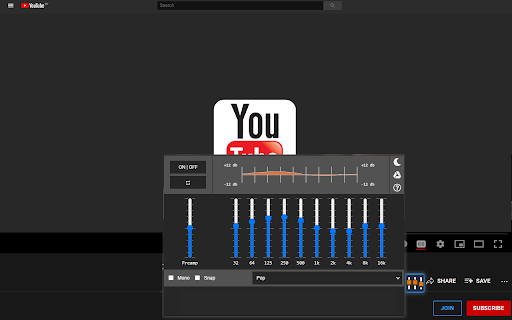
Stylish audio equalizer for your Youtube Equalizer for the Chrome Browser. Customize the sound of your songs when you install this software extension. Help smooth out the sounds of songs/videos on Youtube, to begin using this software extension you need to simply install this software. Go to the Youtube video page, the sound equalizer button is next to the Like/dislike button below the Youtube video. Play with the settings and tune the music to your liking. There are over 10+ default settings you can try out for the audio equalizer effect. Spend hours testing out this audio equalizer effect for your favorite songs on Youtube. Youtube™ & the YouTube logo are trademarks of Google Inc. Use of these trademarks is subject to Google Permissions. This extension is not created nor endorsed by Google inc.

Audio Equalizer - EQ
Audio Equalizer - adjust volume of sound, bass booster, sound booster, dim the highs. EQ Audio Equalizer for all webs! 🎧 Chrome Extension "Audio Equalizer - EQ": Elevate Your Sound to New Heights! Audio Equalizer for Chrome browser is an extension that allows you to precisely adjust the volume, boost bass, increase the overall sound level up to 3 times your speaker's capacity, and control high frequencies, creating the perfect soundscape for any content. EQ Audio Equalizer works on all websites, including YouTube, live streams, TV shows, and online radio. Our product is continuously updated to meet your requirements and provide the best sound quality. - 📈 Volume Adjustment: Fine-tune the sound level to your personal preferences. - 🎵 Bass Booster: Enhance the bass for richer and deeper sound, providing a new level of music enjoyment. - 🔊 Sound Amplification: Increase the overall sound level up to 3 times your speaker's capacity without compromising quality. - 🎧 High-Frequency Control: Optimize high frequencies for clear and comfortable listening. - 🔄 Mode Switching: Easily switch between stereo and mono modes to adapt the sound to different environments and preferences. The 12-band parametric equalizer gives you full control over sound frequencies. Customize each frequency to your liking, highlight vocals or instruments, and easily switch between stereo and mono modes for the best sound experience. Audio Equalizer is designed to enhance the sound quality on all websites. Enjoy clear dialogues in movies, boost bass in your favorite songs, or adjust the sound in live streams - Audio Equalizer can handle all your audio needs. Sound quality is our priority. This extension ensures clean, high-quality sound without noise or interference. Security and Privacy: The extension requires permission to "Read and change all your data on the websites you visit" solely to customize the sound to your personal preferences. Your data remains secure. Audio Equalizer is easy to use and suitable for all users. Install it today and elevate your sound to new heights! Key Benefits: - Sound amplification for all websites. - Audio customization to your personal preferences. - Sound enhancement to achieve the highest quality. - Audio equalizer for precise frequency tuning. - Mode switching between stereo and mono. Install now and discover a new level of sound! 🎶

Equalizer Plus
Unleash the Power of Personalized Audio in Chrome Transform your Chrome audio with Equalizer Plus — a powerful, real‑time sound control tool built for clarity and precision. Customize your listening experience across any tab with flexible presets and advanced controls. 🔥 Key Features 🔥: • High‑quality equalizer with popular presets for quick tuning • Volume dynamics compressor for balanced, punchy sound • Mono/Stereo toggle for a tailored listening experience • Volume booster up to 400% • Custom presets: save and recall your own settings instantly • Themes: light, dark, and random looks • Startup preset: save your current settings and load them automatically when you open the extension • Pan dial for precise stereo balance or true mono • Unlimited instances across tabs • Real‑time audio processing with instant results • Works with all online audio: music, video, calls, and more

Audio Equalizer
Audio equaliser with most popular music genre presets. Make own settings of sound, bass, volume, acoustic Audio equalizers are a great way to customize the sound of your audio files. With an the extension, you can adjust the frequency of your files to make them sound better. If you're looking for an easy way to customize the sound, then an Equaliser for Chrome is the perfect solution. A sound equaliser and volume booster is a device application that allows users to improve the sound levels of their audio devices. It is used to enhance the quality of recordings, music, and other sources.

Audio Equalizer
Classic audio equalizer. Adjust the volume of the sound and increase it if your speakers are not enough. Experience every note with Audio Equalizer! Our extension gives you complete control over the audio on any website. Instantly boost bass, adjust treble, and fine-tune the sound on YouTube, Spotify, Netflix, and other platforms for the perfect listening experience. Whether you're watching a movie, listening to music, or playing a game, our equalizer lets you adjust the sound in real time. Choose from ready-made presets for various genres-from rock and jazz to electronic music-or create and save your own unique settings. Get deep bass and crystal-clear vocals with a single click. Key Benefits: - Universal Compatibility: Works with all major audio and video platforms, including YouTube, Spotify, SoundCloud, and Netflix. - Bass Boost: Instantly add depth and power to your favorite music. - Flexible Adjustments: Easily control the lows, mids, and highs to achieve the perfect sound. - Custom Presets: Create and save an unlimited number of your own settings for different audio profiles. - Intuitive Interface: A simple and clean design that requires no special skills. Audio Equalizer is your personal sound control panel right in your browser. Install the extension now to instantly improve your sound quality!
