
gaehmonpidpljhpcjkipclmbgilhaafb

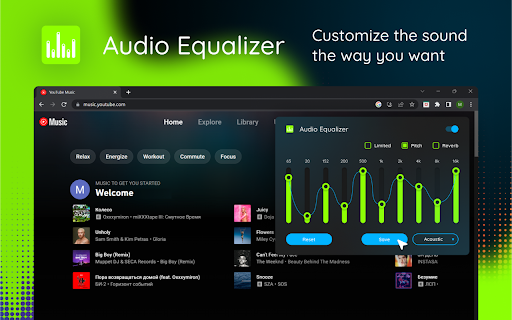
Audio equaliser with most popular music genre presets. Make own settings of sound, bass, volume, acoustic Audio equalizers are a great way to customize the sound of your audio files. With an the extension, you can adjust the frequency of your files to make them sound better. If you're looking for an easy way to customize the sound, then an Equaliser for Chrome is the perfect solution. A sound equaliser and volume booster is a device application that allows users to improve the sound levels of their audio devices. It is used to enhance the quality of recordings, music, and other sources.

Equalizer for Chrome browser
Equalizer for your Browser. Customize your sound by 10 bands, equalizer presets with collection music genres and a bass booster.. The Audio Equalizer allows you to adjust the balance between frequency components with a 10-band audio equalizer, many different sound settings and excellent control for quality sound. Used correctly, it can help you smooth out the sound, making it nicer and cleaner, whether it be adding volume to the low frequencies, removing some of the high frequencies, or adjusting the middle balance between them. This is a handy tool to help you customize the sound for you. Audio equalizer with 21 preset profiles for different music genres and for your taste. You can always edit them to your liking and save your profiles. Audio Equalizer (Eq) can create a surround sound effect, boost bass and increase the maximum volume on your device. You can use it to adjust the level of various frequencies in the audio stream, or to boost both low frequencies (bass) and high frequencies. You can use it as an equalizer for YouTube and other streaming audio, video sites. In addition, we have many other features that may surprise you. Some of our handy Equalizer features: - Preamplifier volume controls; - 10 ranges for sound adjustment; - 21 ready-to-use presets; - Low CPU usage while running; - Boost / Cut frequency in each band is +/- 12 dB; - Absolutely free equalizer extension. Functionality: Promo page usage within the extension. Opening a site page after updating the extension.

Sound Equalizer - Equalizer
Easy-to-use audio equalizer with volume control and presets for various music genres. 🎧 Using Chrome for everything from streaming music to videos? Did you know the sound can be enhanced? Try the Sound Equalizer! 🚀 This extension will transform your Chrome browser into a real sound system. Are you ready to experience music in a new way? Here’s what you get with Sound Equalizer: - 🔊 10-band Equalizer: Adjust the frequency range to suit your taste. Whether you prefer bass or high notes, everything is possible! -🎵 20 Genre Adjustments: From rock to jazz, there’s something for everyone, including reggae, classical, electronic music, and other popular genres. Match your mood and tune into the vibe! - Rock: Empower energetic guitars and tight drums for a powerful driving sound. - Jazz: Enhance the lower tones of saxophones and pianos for a deep and sophisticated sound. - Reggae: Add bass and rhythm to capture the right Jamaican vibe. - Classical: Make the sound purer and more expressive, ensuring each note is flawless. - Electronic Music: Highlight synthetic sounds and bass for maximum impact. - Pop: Clarify vocals and boost the rhythm for an energetic and bright sound. - Hip-Hop: Boost the bass and beats for a deep, punchy sound. - Blues: Add depth and emotion to guitar riffs and vocals. - Metal: Strengthen guitars and drums for an aggressive and powerful sound. - Latin: Emphasize rhythms and percussion for a lively and dynamic sound. - Country: Add warmth and clarity to vocals and acoustic guitars. - Funk: Enhance the bass and rhythms for the perfect funk feel. - Soul: Create a warm and emotional sound for a deep, penetrating experience. - R&B: Add depth and smoothness to vocals and bass. - Disco: Boost the rhythms and bass for the perfect dance vibe. - Techno: Enhance synthetic sounds and beats for an electronic sound. - House: Add bass and rhythm for a punchy club sound. - Lo-Fi: Boost the midrange to create an atmospheric and relaxing sound. - Acoustic: Maintain a clear and warm sound for a natural acoustic experience. - Folk: Empower instruments and vocals for a warm and soulful sound. 🎚️ Volume Control: Easily adjust the volume to achieve the perfect sound. You control how loud it gets! 🔊 Power Boost: Enjoy the sound at 400% strength! Feel every note, every drumbeat, every whisper. 🎸 Bass Boost: Make the sound even deeper and richer. Add some drive to your favorite tracks! 🔊 Tuning for Small Speakers: Forget about muted sounds—enjoy clear audio even from your laptop’s small speakers. 🎤 Vocal Boost: Enhance high frequencies for clear vocals. Let the voice of your favorite artist be closer than ever! 🎨 Custom Presets: Create your own presets for a personalized sound. You are the DJ of your own sound world! ⭐ Rating: Sound Equalizer is highly rated by users for its simplicity and effectiveness. Check the reviews and see for yourself! 📞 Support: We are always ready to help! Our support team is on hand to answer all your questions and assist with adjustments. Sound Equalizer is not just an extension, but a new level of sound satisfaction. Forget about average sound and try the Sound Equalizer today. Your ears will thank you! 🎶

Audio Equalizer
Classic audio equalizer. Adjust the volume of the sound and increase it if your speakers are not enough. Experience every note with Audio Equalizer! Our extension gives you complete control over the audio on any website. Instantly boost bass, adjust treble, and fine-tune the sound on YouTube, Spotify, Netflix, and other platforms for the perfect listening experience. Whether you're watching a movie, listening to music, or playing a game, our equalizer lets you adjust the sound in real time. Choose from ready-made presets for various genres-from rock and jazz to electronic music-or create and save your own unique settings. Get deep bass and crystal-clear vocals with a single click. Key Benefits: - Universal Compatibility: Works with all major audio and video platforms, including YouTube, Spotify, SoundCloud, and Netflix. - Bass Boost: Instantly add depth and power to your favorite music. - Flexible Adjustments: Easily control the lows, mids, and highs to achieve the perfect sound. - Custom Presets: Create and save an unlimited number of your own settings for different audio profiles. - Intuitive Interface: A simple and clean design that requires no special skills. Audio Equalizer is your personal sound control panel right in your browser. Install the extension now to instantly improve your sound quality!

Audio Equalizer and Amplifier
Globally control audio equalization, genres presets, volume and bass boosting of all video and audio elements on all web pages A tool for boosting or reducing (attenuating) the levels of different frequencies of media elements in web pages. The most basic type of equalization is the bass control on the old home audio equipment to control low frequencies and the treble control to adjust high frequencies. Since there are only two controls, the adjustment is for a fairly wide range of frequencies. In this extension, however, you can adjust a wide set of frequency ranges (60, 170, 310, 600, 1K, 3K, 6K, 12K, 14K, 16K) similar to the well-known VLC player. The extension adds a toolbar button to your browser to control audio equalization simply from its popup window. There are about 12 presets to select from or you can adjust your frequency levels. The extension offers profiling to keep user selections in different profiles. This extension supports pre-amplification for each profile as well. You have a global volume control to adjust the level of each profile too. For more info please read the FAQs page. You can submit bug reports on the GitHub page.
